<?xml version="1.0" encoding="utf-8"?><?xml-stylesheet type="text/xsl" href="https://codexguide.offerya.cc/atom.xsl"?>
<feed xmlns="http://www.w3.org/2005/Atom" xml:lang="zh-CN">
  <id>https://codexguide.offerya.cc/</id>
  <title>CodexGuide</title>
  <subtitle>CodexGuide 是面向中文用户的 OpenAI Codex 教程，系统整理 Codex 桌面 App、CLI、IDE、Cloud、配置、Skills、AGENTS.md 和实战案例。</subtitle>
  <icon>https://codexguide.offerya.cc/logo.svg</icon>
  <updated>2026-06-21T15:59:30.027Z</updated>
  <generator>@vuepress/plugin-feed</generator>
  <link rel="self" href="https://codexguide.offerya.cc/atom.xml"/>
  <link rel="alternate" href="https://codexguide.offerya.cc/"/>
  <entry>
    <title type="text">共建路线图</title>
    <id>https://codexguide.offerya.cc/community/roadmap.html</id>
    <link href="https://codexguide.offerya.cc/community/roadmap.html"/>
    <updated>2026-06-21T15:59:30.029Z</updated>
    <summary type="html"><![CDATA[
<p>目标：把这个仓库做成面向全球初学者、创作者、开发者与团队的 Codex 实践知识库。</p>
<h2>第一阶段：骨架完整</h2>
<ul class="task-list-container">
<li class="task-list-item"><input type="checkbox" class="task-list-item-checkbox" id="task-item-0" checked="checked" disabled="disabled"><label class="task-list-item-label" for="task-item-0"> 建立 VuePress + Theme Hope 文档站。</label></li>
<li class="task-list-item"><input type="checkbox" class="task-list-item-checkbox" id="task-item-1" checked="checked" disabled="disabled"><label class="task-list-item-label" for="task-item-1"> 建立 README、贡献指南、行为准则和安全政策。</label></li>
<li class="task-list-item"><input type="checkbox" class="task-list-item-checkbox" id="task-item-2" checked="checked" disabled="disabled"><label class="task-list-item-label" for="task-item-2"> 搭建入门、进阶、团队和案例目录。</label></li>
<li class="task-list-item"><input type="checkbox" class="task-list-item-checkbox" id="task-item-3" checked="checked" disabled="disabled"><label class="task-list-item-label" for="task-item-3"> 添加官方资料索引。</label></li>
<li class="task-list-item"><input type="checkbox" class="task-list-item-checkbox" id="task-item-4" disabled="disabled"><label class="task-list-item-label" for="task-item-4"> 补充第一批截图和命令输出。</label></li>
<li class="task-list-item"><input type="checkbox" class="task-list-item-checkbox" id="task-item-5" disabled="disabled"><label class="task-list-item-label" for="task-item-5"> 给每篇教程增加“适用版本”和“最后核对日期”。</label></li>
</ul>]]></summary>
    <content type="html"><![CDATA[
<p>目标：把这个仓库做成面向全球初学者、创作者、开发者与团队的 Codex 实践知识库。</p>
<h2>第一阶段：骨架完整</h2>
<ul class="task-list-container">
<li class="task-list-item"><input type="checkbox" class="task-list-item-checkbox" id="task-item-0" checked="checked" disabled="disabled"><label class="task-list-item-label" for="task-item-0"> 建立 VuePress + Theme Hope 文档站。</label></li>
<li class="task-list-item"><input type="checkbox" class="task-list-item-checkbox" id="task-item-1" checked="checked" disabled="disabled"><label class="task-list-item-label" for="task-item-1"> 建立 README、贡献指南、行为准则和安全政策。</label></li>
<li class="task-list-item"><input type="checkbox" class="task-list-item-checkbox" id="task-item-2" checked="checked" disabled="disabled"><label class="task-list-item-label" for="task-item-2"> 搭建入门、进阶、团队和案例目录。</label></li>
<li class="task-list-item"><input type="checkbox" class="task-list-item-checkbox" id="task-item-3" checked="checked" disabled="disabled"><label class="task-list-item-label" for="task-item-3"> 添加官方资料索引。</label></li>
<li class="task-list-item"><input type="checkbox" class="task-list-item-checkbox" id="task-item-4" disabled="disabled"><label class="task-list-item-label" for="task-item-4"> 补充第一批截图和命令输出。</label></li>
<li class="task-list-item"><input type="checkbox" class="task-list-item-checkbox" id="task-item-5" disabled="disabled"><label class="task-list-item-label" for="task-item-5"> 给每篇教程增加“适用版本”和“最后核对日期”。</label></li>
</ul>
<h2>第二阶段：指南成型</h2>
<ul class="task-list-container">
<li class="task-list-item"><input type="checkbox" class="task-list-item-checkbox" id="task-item-6" disabled="disabled"><label class="task-list-item-label" for="task-item-6"> 完成 CLI 从安装到日常使用的完整教程。</label></li>
<li class="task-list-item"><input type="checkbox" class="task-list-item-checkbox" id="task-item-7" disabled="disabled"><label class="task-list-item-label" for="task-item-7"> 完成 <code>AGENTS.md</code> 专题。</label></li>
<li class="task-list-item"><input type="checkbox" class="task-list-item-checkbox" id="task-item-8" disabled="disabled"><label class="task-list-item-label" for="task-item-8"> 完成提示词模板库。</label></li>
<li class="task-list-item"><input type="checkbox" class="task-list-item-checkbox" id="task-item-9" disabled="disabled"><label class="task-list-item-label" for="task-item-9"> 完成排障手册第一版。</label></li>
<li class="task-list-item"><input type="checkbox" class="task-list-item-checkbox" id="task-item-10" disabled="disabled"><label class="task-list-item-label" for="task-item-10"> 补齐 Cloud、IDE、桌面 App 的使用差异。</label></li>
</ul>
<h2>第三阶段：案例驱动</h2>
<ul class="task-list-container">
<li class="task-list-item"><input type="checkbox" class="task-list-item-checkbox" id="task-item-11" disabled="disabled"><label class="task-list-item-label" for="task-item-11"> 收集 20 个真实工程案例。</label></li>
<li class="task-list-item"><input type="checkbox" class="task-list-item-checkbox" id="task-item-12" disabled="disabled"><label class="task-list-item-label" for="task-item-12"> 每个案例包含任务说明、关键过程、验证方式和复盘。</label></li>
<li class="task-list-item"><input type="checkbox" class="task-list-item-checkbox" id="task-item-13" disabled="disabled"><label class="task-list-item-label" for="task-item-13"> 建立案例标签：前端、后端、测试、重构、文档、CI、安全。</label></li>
<li class="task-list-item"><input type="checkbox" class="task-list-item-checkbox" id="task-item-14" disabled="disabled"><label class="task-list-item-label" for="task-item-14"> 补充失败案例，说明 Codex 不适合直接处理的场景。</label></li>
</ul>
<h2>第四阶段：社区传播</h2>
<ul class="task-list-container">
<li class="task-list-item"><input type="checkbox" class="task-list-item-checkbox" id="task-item-15" disabled="disabled"><label class="task-list-item-label" for="task-item-15"> 设计更完整的首页和 Open Graph 图。</label></li>
<li class="task-list-item"><input type="checkbox" class="task-list-item-checkbox" id="task-item-16" disabled="disabled"><label class="task-list-item-label" for="task-item-16"> 建立中英文关键词索引。</label></li>
<li class="task-list-item"><input type="checkbox" class="task-list-item-checkbox" id="task-item-17" disabled="disabled"><label class="task-list-item-label" for="task-item-17"> 发布 GitHub Pages。</label></li>
<li class="task-list-item"><input type="checkbox" class="task-list-item-checkbox" id="task-item-18" disabled="disabled"><label class="task-list-item-label" for="task-item-18"> 整理适合社媒传播的短链接和学习路线图。</label></li>
<li class="task-list-item"><input type="checkbox" class="task-list-item-checkbox" id="task-item-19" disabled="disabled"><label class="task-list-item-label" for="task-item-19"> 邀请早期贡献者认领章节。</label></li>
</ul>
<h2>贡献入口</h2>
<p>你可以从这些任务开始：</p>
<ul>
<li>修正文档里的不准确表述。</li>
<li>新增一个你亲自跑过的 Codex 案例。</li>
<li>给排障手册补一个常见错误。</li>
<li>把官方文档的新变化同步到资料索引。</li>
</ul>
]]></content>
  </entry>
  <entry>
    <title type="text">CLI 选项与命令</title>
    <id>https://codexguide.offerya.cc/configuration/cli-options.html</id>
    <link href="https://codexguide.offerya.cc/configuration/cli-options.html"/>
    <updated>2026-06-21T15:59:30.035Z</updated>
    <summary type="html"><![CDATA[
<p>CLI 是 Codex 最适合练基本功的入口。本页按官方教程的逻辑，把交互模式、非交互模式、会话恢复、Slash Commands 和常用启动参数整理成中文实操版。</p>
<div class="hint-container tip">
<p class="hint-container-title">最后核对</p>
<p>官方资料最后核对日期：2026-05-27。本文参考 <a href="https://developers.openai.com/codex/cli/features" target="_blank" rel="noopener noreferrer">Codex CLI features</a>、<a href="https://github.com/openai/codex" target="_blank" rel="noopener noreferrer">Codex CLI 官方仓库</a>、<a href="https://github.com/openai/codex/blob/main/docs/getting-started.md" target="_blank" rel="noopener noreferrer">CLI getting started</a>、<a href="https://github.com/openai/codex/blob/main/docs/exec.md" target="_blank" rel="noopener noreferrer">exec 文档</a> 与 <a href="https://github.com/openai/codex/blob/main/docs/slash_commands.md" target="_blank" rel="noopener noreferrer">slash commands 文档</a>。</p>
</div>]]></summary>
    <content type="html"><![CDATA[
<p>CLI 是 Codex 最适合练基本功的入口。本页按官方教程的逻辑，把交互模式、非交互模式、会话恢复、Slash Commands 和常用启动参数整理成中文实操版。</p>
<div class="hint-container tip">
<p class="hint-container-title">最后核对</p>
<p>官方资料最后核对日期：2026-05-27。本文参考 <a href="https://developers.openai.com/codex/cli/features" target="_blank" rel="noopener noreferrer">Codex CLI features</a>、<a href="https://github.com/openai/codex" target="_blank" rel="noopener noreferrer">Codex CLI 官方仓库</a>、<a href="https://github.com/openai/codex/blob/main/docs/getting-started.md" target="_blank" rel="noopener noreferrer">CLI getting started</a>、<a href="https://github.com/openai/codex/blob/main/docs/exec.md" target="_blank" rel="noopener noreferrer">exec 文档</a> 与 <a href="https://github.com/openai/codex/blob/main/docs/slash_commands.md" target="_blank" rel="noopener noreferrer">slash commands 文档</a>。</p>
</div>
<h2>三种使用姿势</h2>
<p>| 模式 | 适合任务 | 典型命令 |<br>
|</p>
]]></content>
  </entry>
  <entry>
    <title type="text">配置文件 config.toml</title>
    <id>https://codexguide.offerya.cc/configuration/config-file.html</id>
    <link href="https://codexguide.offerya.cc/configuration/config-file.html"/>
    <updated>2026-06-21T15:59:30.041Z</updated>
    <summary type="html"><![CDATA[
<p><code>config.toml</code> 用来保存 Codex CLI 的本地默认行为。你可以把它理解为“个人驾驶舱”：模型、审批、沙盒、profiles、MCP 服务等偏好都可以在这里集中管理。</p>
<div class="hint-container tip">
<p class="hint-container-title">最后核对</p>
<p>官方资料最后核对日期：2026-05-27。本文参考 <a href="https://developers.openai.com/codex/config-basic" target="_blank" rel="noopener noreferrer">Codex config basic</a>、<a href="https://developers.openai.com/codex/config-advanced" target="_blank" rel="noopener noreferrer">Codex config advanced</a>、<a href="https://developers.openai.com/codex/config-reference" target="_blank" rel="noopener noreferrer">Codex config reference</a> 与 <a href="https://github.com/openai/codex/blob/main/docs/config.md" target="_blank" rel="noopener noreferrer">openai/codex config docs</a>。</p>
</div>]]></summary>
    <content type="html"><![CDATA[
<p><code>config.toml</code> 用来保存 Codex CLI 的本地默认行为。你可以把它理解为“个人驾驶舱”：模型、审批、沙盒、profiles、MCP 服务等偏好都可以在这里集中管理。</p>
<div class="hint-container tip">
<p class="hint-container-title">最后核对</p>
<p>官方资料最后核对日期：2026-05-27。本文参考 <a href="https://developers.openai.com/codex/config-basic" target="_blank" rel="noopener noreferrer">Codex config basic</a>、<a href="https://developers.openai.com/codex/config-advanced" target="_blank" rel="noopener noreferrer">Codex config advanced</a>、<a href="https://developers.openai.com/codex/config-reference" target="_blank" rel="noopener noreferrer">Codex config reference</a> 与 <a href="https://github.com/openai/codex/blob/main/docs/config.md" target="_blank" rel="noopener noreferrer">openai/codex config docs</a>。</p>
</div>
<h2>配置文件放在哪里</h2>
<p>通常位于：</p>
<div class="language-text line-numbers-mode" data-highlighter="shiki" data-ext="text" style="--shiki-light:#383A42;--shiki-dark:#abb2bf;--shiki-light-bg:#FAFAFA;--shiki-dark-bg:#282c34"><pre class="shiki shiki-themes one-light one-dark-pro vp-code"><code class="language-text"><span class="line"><span>~/.codex/config.toml</span></span></code></pre>
<div class="line-numbers" aria-hidden="true" style="counter-reset:line-number 0"><div class="line-number"></div></div></div><p>项目长期规则建议写到仓库内的 <code>AGENTS.md</code>，个人偏好放到本机 <code>config.toml</code>。这样团队成员能共享项目规则，又能保留自己的 CLI 使用习惯。</p>
<div class="hint-container info">
<p class="hint-container-title">截图占位</p>
<p>请补充本机 <code>~/.codex/config.toml</code> 文件位置截图，注意遮挡敏感路径和 token。建议文件：<code>docs/.vuepress/public/screenshots/config/02-config-location.png</code>。</p>
</div>
<h2>最小配置示例</h2>
<p>下面是一个学习用示例，实际字段请以官方 config reference 和当前 CLI 版本为准：</p>
<div class="language-toml line-numbers-mode" data-highlighter="shiki" data-ext="toml" style="--shiki-light:#383A42;--shiki-dark:#abb2bf;--shiki-light-bg:#FAFAFA;--shiki-dark-bg:#282c34"><pre class="shiki shiki-themes one-light one-dark-pro vp-code"><code class="language-toml"><span class="line"><span style="--shiki-light:#E45649;--shiki-dark:#E06C75">model</span><span style="--shiki-light:#383A42;--shiki-dark:#ABB2BF"> = </span><span style="--shiki-light:#50A14F;--shiki-dark:#98C379">"gpt-5.1-codex-max"</span></span>
<span class="line"><span style="--shiki-light:#E45649;--shiki-dark:#E06C75">approval_policy</span><span style="--shiki-light:#383A42;--shiki-dark:#ABB2BF"> = </span><span style="--shiki-light:#50A14F;--shiki-dark:#98C379">"on-request"</span></span>
<span class="line"><span style="--shiki-light:#E45649;--shiki-dark:#E06C75">sandbox_mode</span><span style="--shiki-light:#383A42;--shiki-dark:#ABB2BF"> = </span><span style="--shiki-light:#50A14F;--shiki-dark:#98C379">"workspace-write"</span></span>
<span class="line"></span>
<span class="line"><span style="--shiki-light:#383A42;--shiki-dark:#ABB2BF">[</span><span style="--shiki-light:#4078F2;--shiki-dark:#61AFEF">profiles</span><span style="--shiki-light:#383A42;--shiki-dark:#ABB2BF">.</span><span style="--shiki-light:#4078F2;--shiki-dark:#61AFEF">readonly</span><span style="--shiki-light:#383A42;--shiki-dark:#ABB2BF">]</span></span>
<span class="line"><span style="--shiki-light:#E45649;--shiki-dark:#E06C75">approval_policy</span><span style="--shiki-light:#383A42;--shiki-dark:#ABB2BF"> = </span><span style="--shiki-light:#50A14F;--shiki-dark:#98C379">"on-request"</span></span>
<span class="line"><span style="--shiki-light:#E45649;--shiki-dark:#E06C75">sandbox_mode</span><span style="--shiki-light:#383A42;--shiki-dark:#ABB2BF"> = </span><span style="--shiki-light:#50A14F;--shiki-dark:#98C379">"read-only"</span></span>
<span class="line"></span>
<span class="line"><span style="--shiki-light:#383A42;--shiki-dark:#ABB2BF">[</span><span style="--shiki-light:#4078F2;--shiki-dark:#61AFEF">profiles</span><span style="--shiki-light:#383A42;--shiki-dark:#ABB2BF">.</span><span style="--shiki-light:#4078F2;--shiki-dark:#61AFEF">build</span><span style="--shiki-light:#383A42;--shiki-dark:#ABB2BF">]</span></span>
<span class="line"><span style="--shiki-light:#E45649;--shiki-dark:#E06C75">approval_policy</span><span style="--shiki-light:#383A42;--shiki-dark:#ABB2BF"> = </span><span style="--shiki-light:#50A14F;--shiki-dark:#98C379">"on-request"</span></span>
<span class="line"><span style="--shiki-light:#E45649;--shiki-dark:#E06C75">sandbox_mode</span><span style="--shiki-light:#383A42;--shiki-dark:#ABB2BF"> = </span><span style="--shiki-light:#50A14F;--shiki-dark:#98C379">"workspace-write"</span></span></code></pre>
<div class="line-numbers" aria-hidden="true" style="counter-reset:line-number 0"><div class="line-number"></div><div class="line-number"></div><div class="line-number"></div><div class="line-number"></div><div class="line-number"></div><div class="line-number"></div><div class="line-number"></div><div class="line-number"></div><div class="line-number"></div><div class="line-number"></div><div class="line-number"></div></div></div><p>这个示例表达三件事：</p>
<ul>
<li>默认允许在当前工作区写文件。</li>
<li>高风险命令仍需要审批。</li>
<li>额外保留一个只读 profile，适合新仓库分析。</li>
</ul>
<h2>常见配置项按用途理解</h2>
<p>| 用途 | 你要决定什么 | 建议 |<br>
|</p>
]]></content>
  </entry>
  <entry>
    <title type="text">配置与扩展总览</title>
    <id>https://codexguide.offerya.cc/configuration/</id>
    <link href="https://codexguide.offerya.cc/configuration/"/>
    <updated>2026-06-21T15:59:30.052Z</updated>
    <summary type="html"><![CDATA[
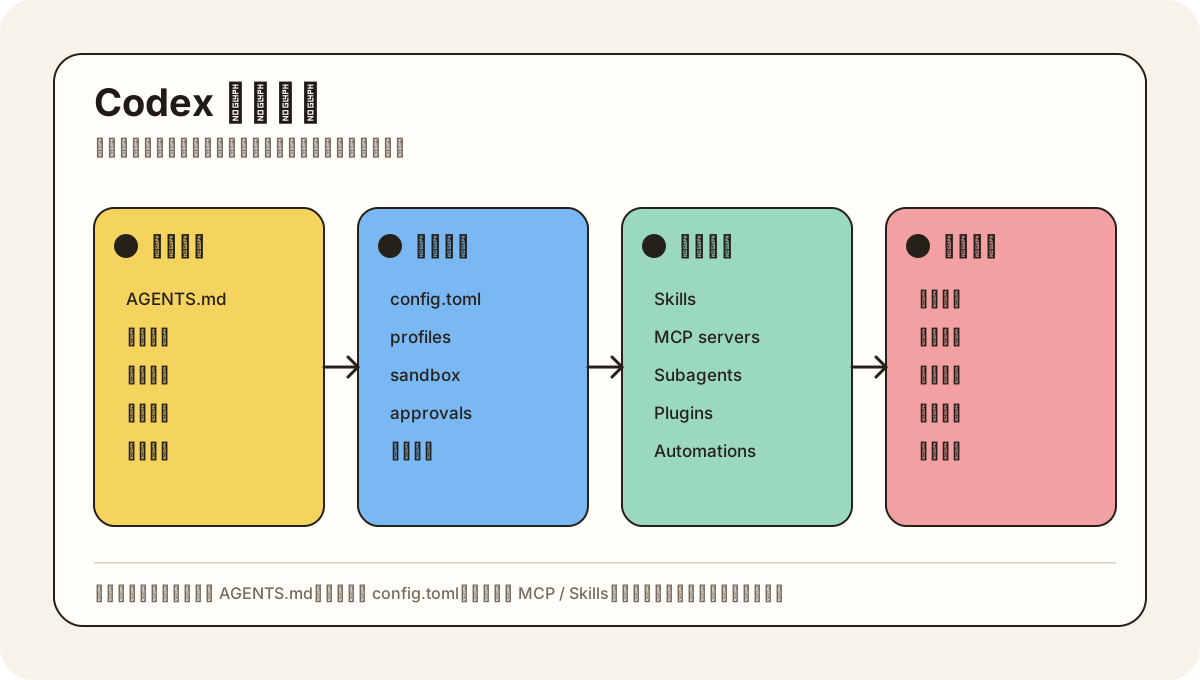
<p>Codex 的学习曲线有两个阶段：先会用，再会配置。会用解决单次任务，会配置能把 Codex 变成稳定的个人工作台和团队协作工具。</p>
<div class="hint-container tip">
<p class="hint-container-title">最后核对</p>
<p>官方资料最后核对日期：2026-05-27。本文参考 <a href="https://developers.openai.com/codex/" target="_blank" rel="noopener noreferrer">Codex 文档入口</a>、<a href="https://developers.openai.com/codex/cli/features" target="_blank" rel="noopener noreferrer">Codex CLI features</a>、<a href="https://developers.openai.com/codex/config-basic" target="_blank" rel="noopener noreferrer">基础配置</a>、<a href="https://developers.openai.com/codex/guides/agents-md" target="_blank" rel="noopener noreferrer">AGENTS.md</a>、<a href="https://developers.openai.com/codex/skills" target="_blank" rel="noopener noreferrer">Codex Skills</a> 与 <a href="https://developers.openai.com/codex/agent-approvals-security" target="_blank" rel="noopener noreferrer">Codex security</a>。</p>
</div>]]></summary>
    <content type="html"><![CDATA[
<p>Codex 的学习曲线有两个阶段：先会用，再会配置。会用解决单次任务，会配置能把 Codex 变成稳定的个人工作台和团队协作工具。</p>
<div class="hint-container tip">
<p class="hint-container-title">最后核对</p>
<p>官方资料最后核对日期：2026-05-27。本文参考 <a href="https://developers.openai.com/codex/" target="_blank" rel="noopener noreferrer">Codex 文档入口</a>、<a href="https://developers.openai.com/codex/cli/features" target="_blank" rel="noopener noreferrer">Codex CLI features</a>、<a href="https://developers.openai.com/codex/config-basic" target="_blank" rel="noopener noreferrer">基础配置</a>、<a href="https://developers.openai.com/codex/guides/agents-md" target="_blank" rel="noopener noreferrer">AGENTS.md</a>、<a href="https://developers.openai.com/codex/skills" target="_blank" rel="noopener noreferrer">Codex Skills</a> 与 <a href="https://developers.openai.com/codex/agent-approvals-security" target="_blank" rel="noopener noreferrer">Codex security</a>。</p>
</div>
<p><img src="/images/codex-config-map.svg" alt="Codex 配置地图"></p>
<h2>先理解四层配置</h2>
<p>| 层级 | 典型文件或入口 | 解决的问题 | 初学者建议 |<br>
|</p>
]]></content>
  </entry>
  <entry>
    <title type="text">MCP、Skills 与 Subagents</title>
    <id>https://codexguide.offerya.cc/configuration/mcp-skills-subagents.html</id>
    <link href="https://codexguide.offerya.cc/configuration/mcp-skills-subagents.html"/>
    <updated>2026-06-21T15:59:30.056Z</updated>
    <summary type="html"><![CDATA[
<p>当你已经能稳定完成单次任务，下一步就是把 Codex 变成可扩展的工作系统：用 MCP 连接工具和数据源，用 Skills 固化流程，用 Subagents 拆分复杂工作。</p>
<div class="hint-container tip">
<p class="hint-container-title">最后核对</p>
<p>官方资料最后核对日期：2026-05-27。本文参考 <a href="https://developers.openai.com/codex/skills" target="_blank" rel="noopener noreferrer">Codex Skills</a>、<a href="https://developers.openai.com/codex/" target="_blank" rel="noopener noreferrer">Codex 文档入口</a>、<a href="https://github.com/openai/codex/blob/main/docs/skills.md" target="_blank" rel="noopener noreferrer">openai/codex skills docs</a> 与官方 MCP、Plugins、Subagents 相关页面。</p>
</div>]]></summary>
    <content type="html"><![CDATA[
<p>当你已经能稳定完成单次任务，下一步就是把 Codex 变成可扩展的工作系统：用 MCP 连接工具和数据源，用 Skills 固化流程，用 Subagents 拆分复杂工作。</p>
<div class="hint-container tip">
<p class="hint-container-title">最后核对</p>
<p>官方资料最后核对日期：2026-05-27。本文参考 <a href="https://developers.openai.com/codex/skills" target="_blank" rel="noopener noreferrer">Codex Skills</a>、<a href="https://developers.openai.com/codex/" target="_blank" rel="noopener noreferrer">Codex 文档入口</a>、<a href="https://github.com/openai/codex/blob/main/docs/skills.md" target="_blank" rel="noopener noreferrer">openai/codex skills docs</a> 与官方 MCP、Plugins、Subagents 相关页面。</p>
</div>
<h2>三个概念</h2>
<p>| 能力 | 解决的问题 | 适合沉淀什么 |<br>
|</p>
]]></content>
  </entry>
  <entry>
    <title type="text">安全、审批与管理</title>
    <id>https://codexguide.offerya.cc/configuration/security-admin.html</id>
    <link href="https://codexguide.offerya.cc/configuration/security-admin.html"/>
    <updated>2026-06-21T15:59:30.061Z</updated>
    <summary type="html"><![CDATA[
<p>Codex 能读代码、改文件、运行命令，也可能接触凭据、内部系统和生产资源。真正适合长期使用的 Codex 工作流，一定要把权限边界写清楚。</p>
<div class="hint-container tip">
<p class="hint-container-title">最后核对</p>
<p>官方资料最后核对日期：2026-05-27。本文参考 <a href="https://developers.openai.com/codex/agent-approvals-security" target="_blank" rel="noopener noreferrer">Codex security</a>、<a href="https://github.com/openai/codex/blob/main/docs/sandbox.md" target="_blank" rel="noopener noreferrer">sandbox 文档</a>、<a href="https://github.com/openai/codex/blob/main/docs/execpolicy.md" target="_blank" rel="noopener noreferrer">exec policy 文档</a> 与 <a href="https://developers.openai.com/codex/" target="_blank" rel="noopener noreferrer">Codex 文档入口</a>。</p>
</div>]]></summary>
    <content type="html"><![CDATA[
<p>Codex 能读代码、改文件、运行命令，也可能接触凭据、内部系统和生产资源。真正适合长期使用的 Codex 工作流，一定要把权限边界写清楚。</p>
<div class="hint-container tip">
<p class="hint-container-title">最后核对</p>
<p>官方资料最后核对日期：2026-05-27。本文参考 <a href="https://developers.openai.com/codex/agent-approvals-security" target="_blank" rel="noopener noreferrer">Codex security</a>、<a href="https://github.com/openai/codex/blob/main/docs/sandbox.md" target="_blank" rel="noopener noreferrer">sandbox 文档</a>、<a href="https://github.com/openai/codex/blob/main/docs/execpolicy.md" target="_blank" rel="noopener noreferrer">exec policy 文档</a> 与 <a href="https://developers.openai.com/codex/" target="_blank" rel="noopener noreferrer">Codex 文档入口</a>。</p>
</div>
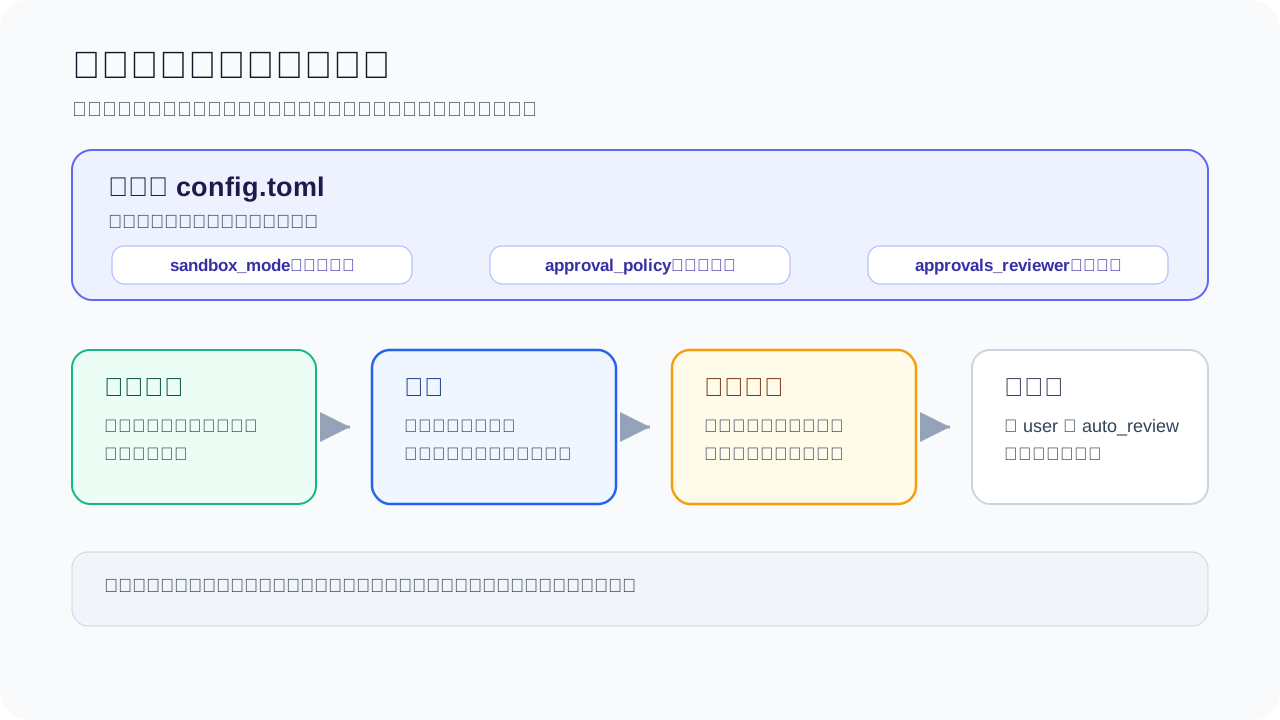
<p><img src="/images/codex-safety-layers.svg" alt="Codex 安全分层"></p>
<h2>先分清风险等级</h2>
<p>| 风险等级 | 例子 | 建议策略 |<br>
|</p>
]]></content>
  </entry>
  <entry>
    <title type="text">学习路线</title>
    <id>https://codexguide.offerya.cc/guide/00-overview.html</id>
    <link href="https://codexguide.offerya.cc/guide/00-overview.html"/>
    <updated>2026-06-21T15:59:30.064Z</updated>
    <summary type="html"><![CDATA[
<div class="hint-container tip">
<p class="hint-container-title">最后核对</p>
<p>官方资料最后核对日期：2026-06-12。核心来源包括 <a href="https://openai.com/codex/" target="_blank" rel="noopener noreferrer">OpenAI Codex 产品页</a>、<a href="https://developers.openai.com/codex/" target="_blank" rel="noopener noreferrer">Codex 文档入口</a>、<a href="https://github.com/openai/codex" target="_blank" rel="noopener noreferrer">Codex CLI 官方仓库</a> 与 <a href="https://help.openai.com/en/articles/11369540-codex-in-chatgpt" target="_blank" rel="noopener noreferrer">Codex Help Center</a>。</p>
</div>]]></summary>
    <content type="html"><![CDATA[
<div class="hint-container tip">
<p class="hint-container-title">最后核对</p>
<p>官方资料最后核对日期：2026-06-12。核心来源包括 <a href="https://openai.com/codex/" target="_blank" rel="noopener noreferrer">OpenAI Codex 产品页</a>、<a href="https://developers.openai.com/codex/" target="_blank" rel="noopener noreferrer">Codex 文档入口</a>、<a href="https://github.com/openai/codex" target="_blank" rel="noopener noreferrer">Codex CLI 官方仓库</a> 与 <a href="https://help.openai.com/en/articles/11369540-codex-in-chatgpt" target="_blank" rel="noopener noreferrer">Codex Help Center</a>。</p>
</div>
<p><img src="/images/codex-surfaces.svg?v=20260611" alt="Codex 使用入口地图"></p>
<h2>Codex 的产品形态</h2>
<p>Codex 有桌面 App、命令行、编辑器插件和网页几种形态。</p>
<ul>
<li>桌面 App：我们最熟悉的软件形态，第一次上手推荐用这个。选一个文件夹，让 Codex 读文件、改文档、整理内容，或者直接聊天。</li>
<li>CLI：终端里的 Codex，在项目文件夹里读代码、改文件、跑命令。</li>
<li>Cloud / Web / ChatGPT：任务交给云端处理，或在 ChatGPT 里跟进项目。</li>
<li>IDE：在 VS Code 等编辑器里用 Codex 插件，喜欢集成开发环境的开发者适用。</li>
<li>GitHub、Slack、Linear、MCP 等集成：偏团队和进阶场景。</li>
</ul>
<p>第一次用 Codex，推荐从桌面 App 开始。界面直观，功能齐全，对新手友好。</p>
<h2>快速开始</h2>
<ol>
<li><a href="/guide/01-app-installation.html" target="_blank">下载安装 Codex 桌面 App</a>，先把软件打开。</li>
<li>按需了解 <a href="/guide/02-subscribe-plus.html" target="_blank">订阅 ChatGPT Plus</a>，确认账号能不能用 Codex。OpenAI Help Center 说明 Codex 包含在符合条件的 ChatGPT 计划中，包括 Free 档；具体用量限制因计划而异。</li>
<li>阅读 <a href="/guide/03-app-overview.html" target="_blank">了解 Codex 基本组成</a>，知道项目、对话、设置大概在哪里。</li>
<li>跟着 <a href="/guide/06-app-first-task.html" target="_blank">用 Codex 完成第一个任务</a>，选一件小任务开始练手。</li>
<li>如果你常用手机，可以再看 <a href="/guide/04-mobile-control-desktop.html" target="_blank">手机端如何跟进桌面任务</a>。</li>
<li>如果你需要第三方 API，再看 <a href="/guide/05-third-party-api.html" target="_blank">连接第三方 API</a>。</li>
</ol>
<p>第一轮目标：装好 Codex，能跟它正常交流，让它读一个你指定的文件夹。之后结合真实需求，试着完成一个小任务。</p>
<h2>使用 Codex 开发</h2>
<p>用过 Claude Code 的话，Codex 很容易上手。没用过也没关系，像平时用 AI 一样自然地用就行。</p>
<p>推荐顺序：</p>
<ol>
<li>先看 <a href="/platform/" target="_blank">入口地图</a>，知道 CLI、桌面 App、Cloud 和 IDE 分别适合什么。</li>
<li>阅读 <a href="/guide/12-cli-installation.html" target="_blank">CLI 安装与登录</a>，确认命令能正常运行。</li>
<li>跟着 <a href="/guide/13-cli-first-run.html" target="_blank">第一次让 Codex 改代码</a>，从文档、测试或一个小 bug 开始。</li>
<li>阅读 <a href="/guide/07-task-execution.html" target="_blank">任务执行机制</a>，理解它会读哪些文件、运行哪些命令、怎么汇报结果。</li>
<li>了解 <a href="/guide/15-agents-md.html" target="_blank">AGENTS.md</a>，把项目规则写给 Codex 看。</li>
<li>阅读 <a href="/guide/16-sandbox-approvals.html" target="_blank">沙盒与审批</a>，知道哪些操作需要先确认。</li>
</ol>
<p>在开发过程中，你会碰到许多专有名词，这里先记住几个词就够了：</p>
<ul>
<li>
<p><strong>仓库（repository / repo）</strong>：<br>
一个项目的“家”。代码、文档、配置文件通常放这里，一般用 Git 记录变化。</p>
</li>
<li>
<p><strong>diff</strong>：<br>
“改了哪里”的对比清单。告诉你文件修改前什么样，修改后变成什么样。</p>
</li>
<li>
<p><strong>PR（Pull Request）</strong>：<br>
理解为“我改好了，请你帮我看一下”。<br>
团队协作时先提交改动，让别人审核，通过后再合并进主项目。</p>
</li>
<li>
<p><strong>CI（Continuous Integration）</strong>：<br>
自动检查流程。<br>
提交代码后，系统自动跑测试、检查格式、尝试构建，确认改动有没有明显问题。</p>
</li>
<li>
<p><strong><code>AGENTS.md</code></strong>：<br>
给 AI 编程助手看的“项目说明书”。<br>
告诉 Codex / Agent 项目规则、怎么运行、怎么测试、写代码注意什么。每次对话时，Agent 通常把它作为重要上下文参考。</p>
</li>
</ul>
<p>不用强记所有名词。碰到陌生的词，直接让 Codex 解释；用多了自然熟。</p>
<h2>使用 Codex 完成日常任务</h2>
<p>很多人以为 Codex 只能写代码。其实只要有文件、有目标、有结果可检查，它都能帮上忙。比如：</p>
<ul>
<li>把旅游攻略、酒店链接和预算表放在一起，让 Codex 帮你整理成一份行程清单。</li>
<li>读几份课程资料或 PDF，提炼重点、整理复习提纲。</li>
<li>把会议录音转写稿、聊天记录或零散备忘，整理成待办事项。</li>
<li>检查一份报名表、活动通知或教程，看看有没有缺步骤、时间写错、链接没说清楚。</li>
<li>把每周报销、周报、资料归档的重复步骤写成模板，下次直接复用。</li>
<li>整理家庭账单、购物清单、搬家清单、活动分工表这类零散文件。</li>
</ul>
<p>从最近实际需要处理的小事开始。任务说得越具体，Codex 解决得越快。</p>
<h2>下一步从哪里点</h2>
<ul>
<li>还没安装？：从 <a href="/guide/01-app-installation.html" target="_blank">桌面 App 下载与安装</a> 开始。</li>
<li>已经装好了：直接做 <a href="/guide/06-app-first-task.html" target="_blank">第一个任务</a>。</li>
<li>想先知道不同入口怎么选：看 <a href="/platform/" target="_blank">入口地图</a>。</li>
<li>准备改真实项目：看 <a href="/guide/12-cli-installation.html" target="_blank">CLI 安装与登录</a>。</li>
</ul>
]]></content>
  </entry>
  <entry>
    <title type="text">Codex 桌面 App 下载与安装</title>
    <id>https://codexguide.offerya.cc/guide/01-app-installation.html</id>
    <link href="https://codexguide.offerya.cc/guide/01-app-installation.html"/>
    <updated>2026-06-21T15:59:30.068Z</updated>
    <summary type="html"><![CDATA[
<div class="hint-container tip">
<p class="hint-container-title">最后核对</p>
<p>官方资料最后核对日期：2026-06-13。下载地址与安装方式以 <a href="https://openai.com/codex/" target="_blank" rel="noopener noreferrer">OpenAI Codex 产品页</a> 和 <a href="https://chatgpt.com/codex/get-started/" target="_blank" rel="noopener noreferrer">chatgpt.com/codex/get-started</a> 为准，不同地区和账号套餐下可用功能可能有所差异。</p>
</div>]]></summary>
    <content type="html"><![CDATA[
<div class="hint-container tip">
<p class="hint-container-title">最后核对</p>
<p>官方资料最后核对日期：2026-06-13。下载地址与安装方式以 <a href="https://openai.com/codex/" target="_blank" rel="noopener noreferrer">OpenAI Codex 产品页</a> 和 <a href="https://chatgpt.com/codex/get-started/" target="_blank" rel="noopener noreferrer">chatgpt.com/codex/get-started</a> 为准，不同地区和账号套餐下可用功能可能有所差异。</p>
</div>
<p>本教程里说的 <strong>Codex 桌面 App</strong>，是电脑上的客户端，不是手机 App。它由 OpenAI 官方发布，支持 macOS 和 Windows，安装后你可以在本地管理项目、发起任务、使用 Skills 和 Automations。</p>
<h2>下载</h2>
<p>打开 <a href="https://chatgpt.com/codex/get-started/" target="_blank" rel="noopener noreferrer">chatgpt.com/codex/get-started</a>，页面中央会显示对应系统的下载按钮。</p>
<p><strong>macOS：</strong></p>
<p></p>
<p>点击「Download for macOS」下载 <code>.dmg</code> 安装包。</p>
<ol>
<li>打开下载好的 <code>.dmg</code> 文件</li>
<li>把 Codex 图标拖进「Applications（应用程序）」文件夹</li>
<li>首次启动时，macOS 可能弹出「无法验证开发者」——无需担心，打开「系统设置 → 隐私与安全性」，点击「仍要打开」即可</li>
</ol>
<p><strong>Windows：</strong></p>
<p></p>
<p>Windows 用户点击对应的下载按钮，下载完成后运行安装程序，按提示完成安装。</p>
<h2>登录</h2>
<p>安装完成后打开 App，使用 ChatGPT / OpenAI 账号登录。</p>
<div class="hint-container warning">
<p class="hint-container-title">注意套餐限制</p>
<p>Codex 桌面 App 的完整功能（多 agent 并行、Skills、Automations 等）需要 <strong>Plus 及以上套餐</strong>。免费账号登录后部分功能会受限或无法使用。如需升级，参考下一章：<a href="/guide/02-subscribe-plus.html" target="_blank">订阅 ChatGPT Plus</a>。</p>
</div>
<div class="hint-container tip">
<p class="hint-container-title">提示</p>
<p>如果登录失败，可以尝试切换代理节点，比如非美国节点。</p>
</div>
<h2>安装后验证</h2>
<p>登录成功后，左侧栏会出现「Projects」和「Chats」两个入口，顶部显示当前账号信息。如果界面正常加载，说明安装成功。</p>
<p>下一步：<a href="/guide/02-subscribe-plus.html" target="_blank">订阅 ChatGPT Plus / Pro</a></p>
]]></content>
  </entry>
  <entry>
    <title type="text">订阅 ChatGPT Plus / Pro</title>
    <id>https://codexguide.offerya.cc/guide/02-subscribe-plus.html</id>
    <link href="https://codexguide.offerya.cc/guide/02-subscribe-plus.html"/>
    <updated>2026-06-21T15:59:30.071Z</updated>
    <summary type="html"><![CDATA[
<div class="hint-container tip">
<p class="hint-container-title">最后核对</p>
<p>官方资料最后核对日期：2026-06-13。定价与套餐以 <a href="https://chatgpt.com/pricing/" target="_blank" rel="noopener noreferrer">ChatGPT 定价页</a> 和 <a href="https://help.openai.com/en/articles/11369540-using-codex-with-your-chatgpt-plan" target="_blank" rel="noopener noreferrer">Using Codex with your ChatGPT plan</a> 为准。</p>
</div>]]></summary>
    <content type="html"><![CDATA[
<div class="hint-container tip">
<p class="hint-container-title">最后核对</p>
<p>官方资料最后核对日期：2026-06-13。定价与套餐以 <a href="https://chatgpt.com/pricing/" target="_blank" rel="noopener noreferrer">ChatGPT 定价页</a> 和 <a href="https://help.openai.com/en/articles/11369540-using-codex-with-your-chatgpt-plan" target="_blank" rel="noopener noreferrer">Using Codex with your ChatGPT plan</a> 为准。</p>
</div>
<h2>为什么需要订阅</h2>
<p>免费版 ChatGPT 可以体验基础对话，但 Codex 功能（包括桌面 App、Cloud 任务、多 agent 并行）需要付费套餐才能稳定使用。</p>
<p>| 套餐 | 月费（美元） | Codex 可用情况 |<br>
|</p>
]]></content>
  </entry>
  <entry>
    <title type="text">了解 Codex 基本组成</title>
    <id>https://codexguide.offerya.cc/guide/03-app-overview.html</id>
    <link href="https://codexguide.offerya.cc/guide/03-app-overview.html"/>
    <updated>2026-06-21T15:59:30.075Z</updated>
    <summary type="html"><![CDATA[
<div class="hint-container tip">
<p class="hint-container-title">最后核对</p>
<p>官方资料最后核对日期：2026-06-13。本章参考 <a href="https://developers.openai.com/codex/app" target="_blank" rel="noopener noreferrer">Codex App docs</a>、<a href="https://developers.openai.com/codex/app/settings" target="_blank" rel="noopener noreferrer">Settings</a>、<a href="https://developers.openai.com/codex/agent-approvals-security" target="_blank" rel="noopener noreferrer">Agent approvals and security</a> 等官方资料。界面说明以当前 Codex 桌面 App 实际版本为准，不同系统、地区、客户端版本和账号套餐下显示可能略有差异。</p>
</div>]]></summary>
    <content type="html"><![CDATA[
<div class="hint-container tip">
<p class="hint-container-title">最后核对</p>
<p>官方资料最后核对日期：2026-06-13。本章参考 <a href="https://developers.openai.com/codex/app" target="_blank" rel="noopener noreferrer">Codex App docs</a>、<a href="https://developers.openai.com/codex/app/settings" target="_blank" rel="noopener noreferrer">Settings</a>、<a href="https://developers.openai.com/codex/agent-approvals-security" target="_blank" rel="noopener noreferrer">Agent approvals and security</a> 等官方资料。界面说明以当前 Codex 桌面 App 实际版本为准，不同系统、地区、客户端版本和账号套餐下显示可能略有差异。</p>
</div>
<h2>认识对话和项目</h2>
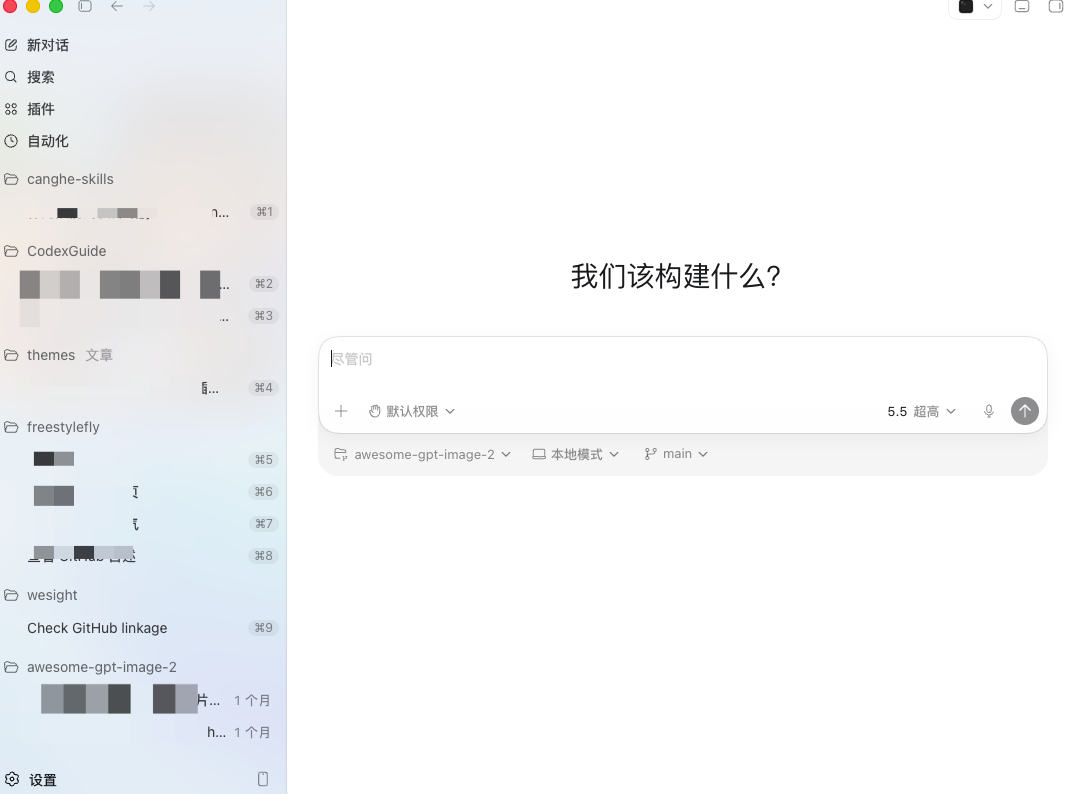
<p>打开 Codex，左侧栏就两个入口：<strong>Chat（对话）</strong> 和 <strong>Project（项目）</strong>。</p>
<p></p>
<p><strong>Chat 对话</strong></p>
<p>和 ChatGPT 网页版差不多，随手问问题。各对话互不相干，也不共享文件夹。</p>
<p><strong>Project 项目</strong></p>
<p>需要动本地文件时用它——写代码、改文档、做 PPT 都可以。项目里的所有对话共用同一个文件夹，方便一起管理。</p>
<p></p>
<p>在项目里下达指令后，Codex 的修改会直接应用到你本地文件夹中的文件。</p>
<h2>对话框功能说明</h2>
<p>Codex 的对话框和 ChatGPT 网页版类似，支持：</p>
<ol>
<li><strong>添加上下文</strong>：可以附加文件、截图或其他参考内容</li>
<li><strong>切换模型</strong>：在不同模型之间切换</li>
</ol>
<p>并额外支持：</p>
<ol start="3">
<li><strong>控制权限</strong>：设定 Codex 在当前任务中的操作权限</li>
<li><strong>选择工作目录</strong>：指定 Codex 在哪个本地文件夹下执行任务</li>
</ol>
<p></p>
<h2>插件与技能</h2>
<p>包括 OpenAI 官方定制或推荐的插件与技能。</p>
<p></p>
<p>Skills 默认包含 Skills Creator、Skills Installer、OpenAI Docs 等技能，用来创建、安装技能，或获取 OpenAI 官方最新文档。在对话框中使用 <code>$</code> 即可调用 Skills：</p>
<p></p>
<p>插件是 OpenAI 定义的外部工具入口，也可能包含 Skills、MCP、脚本等能力。常见插件包括 Computer Use、Browser Use、PPT、Docs、Excel、Slack、GitHub 等。不同插件可能有额外配置。</p>
<p></p>
<h2>自动化</h2>
<p>Codex 支持自动化执行任务，包括使用 MCP 服务器、钩子和插件等。</p>
<p></p>
<p>自动化会执行你指定的命令，你可以指定工作树、项目地址和定时的间隔。在下图中输入你的指令，并且配置即可。</p>
<p></p>
<div class="hint-container tip">
<p class="hint-container-title">注意</p>
<p>自动化任务以默认沙盒设置运行。若工具调用需修改工作空间外文件、访问网络或操作电脑应用，该操作将执行失败。可通过规则选择性允许特定命令在沙盒外运行。</p>
</div>
<h2>设置面板</h2>
<p>点击左下角头像或设置图标可以打开设置面板。</p>
<p></p>
<p></p>
<p>左侧是设置菜单。里面包含丰富的配置选项，详情如下：</p>
<div class="hint-container warning">
<p class="hint-container-title">先用默认配置</p>
<p>截图里的开关只是示例。尤其是「完全访问权限」、浏览器控制、电脑操控、钩子和 MCP 服务器，先按任务逐步开启。配置选项可参考如下。</p>
</div>
<h2>设置说明</h2>
<p>大部分情况下都是保持默认配置即可。配置很多时候都是按需开启。</p>
<h3>个人</h3>
<div class="setting-card-grid">
  <section class="setting-card">
    <div class="setting-card-body">
      <strong>常规</strong>
      <ul>
        <li><strong>工作模式</strong>：编程模式保留更多技术细节；日常工作模式更适合问答、整理和写作。</li>
        <li>
          <strong>权限</strong>：提供三个权限选项。
          <ul>
            <li><strong>默认权限</strong>：在沙盒环境中运行，安全但部分操作可能受限，例如访问工作目录外的文件、修改本机环境变量。</li>
            <li><strong>自动审核</strong>：也称“替我审批”，部分越权命令可以在模型审核认定安全后自动使用，无须用户授权。</li>
            <li><strong>完全访问权限</strong>：只在明确需要时临时开启，例如启用 computer use。</li>
          </ul>
        </li>
        <li><strong>常规</strong>：可配置：文件打开位置、集成终端 Shell、Codex UI 的语言、底部面板、速度（指模型生成的速度）、代码审查、建议提示、从其他AI应用中导入工作内容，打开源许可证。<br>
          通常而言，模型生成速度默认标准即可。仅在Pro 5x及以上的套餐才会推荐启用快速模式（消耗更多配额）。
        </li>
        <li><strong>编辑器</strong>：可配置：上下文窗口使用情况、跟进行为、需按 ^ + 回车键发送长文本提示。</li>
        <li><strong>弹出窗口</strong>：可配置：弹出窗口快捷键、默认使用无项目聊天。</li>
        <li><strong>听写</strong>：可配置：按住听写快捷键、切换听写快捷键、保持听写栏可见、听写词典、最近的听写记录。</li>
        <li><strong>通知</strong>：可配置：轮次完成通知、权限通知、问题通知。。</li>
      </ul>
    </div>
    <div class="setting-card-recommend"><strong>推荐配置选项</strong>：通常而言，推荐开启自动审核、标准速度、始终轮次完成通知</div>
  </section>
  <section class="setting-card">
    <div class="setting-card-body">
      <strong>个人资料</strong>
      <p>查看账号资料、Token 活动</p>
      <ul>
        <li><strong>资料</strong>：头像、名称、用户名。</li>
        <li><strong>用量</strong>：活动、token、任务记录等个人统计。</li>
      </ul>
    </div>
    <div class="setting-card-recommend"><strong>推荐配置选项</strong>：保持默认即可</div>
  </section>
  <section class="setting-card">
    <div class="setting-card-body">
      <strong>外观</strong>
      <p>调整 UI 和配色方案。可配置：主题导入、主题复制、强调色、背景、前景、UI 字体、代码字体、半透明侧边栏、对比度、指针光标、动态效果、字号、差异标记、宠物外观。</p>
    </div>
    <div class="setting-card-recommend"><strong>推荐配置选项</strong>：按照自己的喜好即可。</div>
  </section>
  <section class="setting-card">
    <div class="setting-card-body">
      <strong>配置</strong>
      <p>管理 agent 的执行边界和config.toml的配置</p>
      <ul>
        <li><strong>自定义 config.toml 设置</strong>：Codex 的核心配置文件。详情见：<a href="../configuration/config-file.html">config.toml 参考</a></li>
        <li><strong>工作空间依赖项</strong>：可配置 Codex 安装随附的Node.js和Python、进行诊断和重置并安装工作空间。</li>
      </ul>
    </div>
    <div class="setting-card-recommend"><strong>推荐配置选项</strong>：批准策略用按请求；沙盒用只读或工作区写入；联网按任务开启。</div>
  </section>
  <section class="setting-card">
    <div class="setting-card-body">
      <div class="setting-card-title">个性化</div>
      <p>选择 Codex 的性格，配置自定义指令和记忆。</p>
    </div>
    <div class="setting-card-recommend"><strong>推荐配置选项</strong>：自定义指令写跨项目偏好。</div>
  </section>
  <section class="setting-card">
    <div class="setting-card-body">
      <strong>键盘快捷键</strong>
      <p>查看、搜索和重设快捷键。</p>
    </div>
    <div class="setting-card-recommend"><strong>推荐配置选项</strong>：保持默认。后续根据需要自定义修改。</div>
  </section>
  <section class="setting-card">
    <div class="setting-card-body">
      <strong>使用情况和计费</strong>
      <p>查看额度和套餐状态。</p>
    </div>
  </section>
</div>
<h3>集成</h3>
<div class="setting-card-grid">
  <section class="setting-card">
    <div class="setting-card-body">
      <strong>MCP 服务器</strong>
      <p>给 Codex 接入外部工具和上下文，比如文档、浏览器、设计工具或内部系统。</p>
    </div>
    <div class="setting-card-recommend"><strong>推荐配置选项</strong>：根据项目需要配置MCP。更多请看<a href="../configuration/mcp-skills-subagents.html">MCP,SKILLS和SubAgents</a>。</div>
  </section>
  <section class="setting-card">
    <div class="setting-card-body">
      <strong>浏览器</strong>
      <p>让 Codex 打开网页、点击、输入、截图和检查页面状态。需要在插件处下载。可配置：清除浏览数据、批注截图、打开网站前审批、网站权限。</p>
    </div>
    <div class="setting-card-recommend"><strong>推荐配置选项</strong>：通常始终包含批注截图，审批则视情况选择。</div>
  </section>
  <section class="setting-card">
    <div class="setting-card-body">
      <strong>电脑操控</strong>
      <p>让 Codex 看屏幕、点应用、输入内容。Codex会读取本机上已经安装的APP，然后通过视觉识别和脚本发起键鼠操作。需要在插件处下载。</p>
    </div>
    <div class="setting-card-recommend"><strong>需要注意</strong>：电脑操作会接管你的电脑，一般而言AI接管过程中不建议用户操作。</div>
  </section>
</div>
<h3>编码</h3>
<div class="setting-card-grid">
  <section class="setting-card">
    <div class="setting-card-body">
      <strong>钩子</strong>
      <p>在 Codex 的生命周期事件中运行自定义脚本。可用于日志、提示检查、记忆整理、验证检查和按目录调整提示。详情见：<a href="./18-hooks.html">Hooks</a>。</p>
    </div>
    <div class="setting-card-recommend"><strong>推荐配置选项</strong>：默认无需配置。当需要搭建工作流时再考虑。</div>
  </section>
  <section class="setting-card">
    <div class="setting-card-body">
      <strong>连接</strong>
      <p>管理设备远程连接。可通过手机/SSH的方式远程连接Codex。</p>
    </div>
  </section>
  <section class="setting-card">
    <div class="setting-card-body">
      <strong>Git</strong>
      <p>让 Codex 按你的偏好处理 Git。可配置：分支前缀、PR 合并方法、侧边栏 PR 图标、强制推送、草稿 PR、旧工作树自动清理、保留数量、提交信息和 PR 标题/描述生成指令。</p>
    </div>
    <div class="setting-card-recommend"><strong>推荐配置选项</strong>：保持默认即可。视实际开发需要而修改。</div>
  </section>
  <section class="setting-card">
    <div class="setting-card-body">
      <strong>环境</strong>
      <p>指定一个项目目录，告诉 Codex 这个项目该怎么构建和运行。可配置：设置脚本，清理脚本，自定义操作。例如安装依赖、构建项目、启动开发服务器和运行测试。</p>
    </div>
    <div class="setting-card-recommend"><strong>推荐配置选项</strong>：当你需要频繁地使用命令来打开一个项目时，考虑配置。</div>
  </section>
  <section class="setting-card">
    <div class="setting-card-body">
      <strong>工作树</strong>
      <p>让 Codex 为不同任务准备独立的工作区。适合同时修不同问题、比较不同方案，或把长任务放到一边继续做别的事。使用前先确认当前改动已经保存或提交。</p>
    </div>
    <div class="setting-card-recommend"><strong>推荐配置选项</strong>：熟悉 Git 分支后再用。任务结束后清理不用的工作树。</div>
  </section>
</div>
<h3>已归档</h3>
<div class="setting-card-grid">
  <section class="setting-card">
    <div class="setting-card-body">
      <strong>已归档对话</strong>
      <p>收起不再活跃的对话。可恢复。</p>
    </div>
  </section>
</div>
<div class="hint-container tip">
<p class="hint-container-title">注意</p>
<p>设置页里的名称会随着客户端迭代变化。遇到和教程截图不一致时，先看 OpenAI 官方的 <a href="https://developers.openai.com/codex/app" target="_blank" rel="noopener noreferrer">Codex App docs</a>，再回到本教程查中文场景解释。</p>
</div>
<p>下一步：<a href="/guide/04-mobile-control-desktop.html" target="_blank">用手机端 Codex 跟进桌面任务</a></p>
]]></content>
  </entry>
  <entry>
    <title type="text">用手机端 Codex 跟进桌面任务</title>
    <id>https://codexguide.offerya.cc/guide/04-mobile-control-desktop.html</id>
    <link href="https://codexguide.offerya.cc/guide/04-mobile-control-desktop.html"/>
    <updated>2026-06-21T15:59:30.081Z</updated>
    <summary type="html"><![CDATA[
<div class="hint-container tip">
<p class="hint-container-title">最后核对</p>
<p>官方资料最后核对日期：2026-06-13。本文参考 OpenAI 官方文章 <a href="https://openai.com/index/work-with-codex-from-anywhere/" target="_blank" rel="noopener noreferrer">Work with Codex from anywhere</a>。具体入口、可用地区、系统支持和界面名称会随客户端更新变化，请以当前 ChatGPT 手机 App 和 Codex 桌面 App 为准。</p>
</div>]]></summary>
    <content type="html"><![CDATA[
<div class="hint-container tip">
<p class="hint-container-title">最后核对</p>
<p>官方资料最后核对日期：2026-06-13。本文参考 OpenAI 官方文章 <a href="https://openai.com/index/work-with-codex-from-anywhere/" target="_blank" rel="noopener noreferrer">Work with Codex from anywhere</a>。具体入口、可用地区、系统支持和界面名称会随客户端更新变化，请以当前 ChatGPT 手机 App 和 Codex 桌面 App 为准。</p>
</div>
<p>Codex 现在支持 Android 和 iOS 手机。在手机上发消息，就能操作电脑上的 Codex。</p>
<p>简单说：电脑上的 Codex 在跑，手机连过去，离开电脑时也能查看、回复、审批和调整任务。</p>
<p>把 ChatGPT App 更新到最新版，然后选择连接电脑上的 Codex。</p>
<p></p>
<p>连接桌面 Codex APP：</p>
<p></p>
<p>在 ChatGPT 里打开 Codex 就能用。</p>
<p></p>
<h2>它能做什么</h2>
<p>手机连上电脑后，你可以在以下场景派上用场：</p>
<ul>
<li>查看正在进行的线程和任务状态。</li>
<li>阅读 Codex 的阶段性输出、终端输出、截图、diff 和测试结果。</li>
<li>回复 Codex 的进一步提问。</li>
<li>审批命令、网络访问或其他需要人工确认的操作。</li>
<li>改变任务方向、切换模型或补充新的上下文。</li>
<li>新建任务，让 Codex 从已连接的开发环境里开始工作。</li>
</ul>
<p>任务实际还是在电脑上跑。文件、依赖、凭据、权限和本地配置不会因为连了手机就搬到手机上。</p>
<h2>使用前提</h2>
<p>使用前先确认：</p>
<ul>
<li>手机上安装并更新 ChatGPT App。</li>
<li>电脑上安装并更新 Codex 桌面 App。</li>
<li>手机和电脑登录同一个 ChatGPT / OpenAI 账号，且处在支持 Codex 的地区和套餐范围内。</li>
<li>桌面 App 已经连接到对应项目，或 Codex 正在某台已授权机器、devbox、远程环境中运行。</li>
<li>如果任务会写文件、跑命令、访问网络，仍然需要理解并确认对应权限。</li>
</ul>
<h2>推荐使用场景</h2>
<p>手机端适合「离开电脑但不想让任务停住」的场景：</p>
<ul>
<li>通勤路上查看长任务进展。</li>
<li>Codex 需要你选择方案时，快速给出方向。</li>
<li>任务卡在权限审批时，从手机上批准或拒绝。</li>
<li>会议前让 Codex 汇总最新代码、issue、文档或客户背景。</li>
<li>突然想到一个改动点，先发给 Codex 开始探索，回到电脑后再细看 diff。</li>
</ul>
<h2>不适合怎么用</h2>
<p>手机端不能替代完整的本地审查。下面这些事情最好回电脑上做：</p>
<ul>
<li>大范围代码合并前的最终 review。</li>
<li>涉及生产环境、密钥、账单、发布部署的高风险操作。</li>
<li>需要长时间阅读大量 diff 的任务。</li>
<li>需要你手动操作 IDE、调试器或本地 GUI 的任务。</li>
</ul>
<p>毕竟电脑的大屏优势仍然是不可替代的。</p>
<h2>一个典型流程</h2>
<ol>
<li>在电脑上打开 Codex 桌面 App，进入对应项目。</li>
<li>让 Codex 开始一个需要较长时间的任务，例如排查失败测试或整理文档。</li>
<li>离开电脑，在 ChatGPT 手机 App 中进入 Codex。</li>
<li>打开同一个正在运行的任务线程。</li>
<li>查看 Codex 的输出、截图、终端日志、测试结果或 diff。</li>
<li>Codex 需要确认时，直接在手机上回复、审批或调整方向。</li>
<li>回到电脑后，再做完整 diff review、运行验证命令和提交。</li>
</ol>
<h2>和 Codex Cloud 的区别</h2>
<p>| 对比项 | 手机端连接桌面 App | Codex Cloud |<br>
|</p>
]]></content>
  </entry>
  <entry>
    <title type="text">连接第三方 API</title>
    <id>https://codexguide.offerya.cc/guide/05-third-party-api.html</id>
    <link href="https://codexguide.offerya.cc/guide/05-third-party-api.html"/>
    <updated>2026-06-21T15:59:30.087Z</updated>
    <summary type="html"><![CDATA[
<p>Codex 默认最稳妥的使用方式，是通过官方 ChatGPT / OpenAI 账号登录，并使用官方支持的模型与服务。连接第三方 API 属于进阶配置，适合已经理解 <code>config.toml</code>、API Key、Base URL、模型名和代理网关含义的用户。</p>
<div class="hint-container warning">
<p class="hint-container-title">第三方 API 风险</p>
<p>本文只整理接入思路，不推荐任何具体中转商或 API 服务。第三方 API 可能涉及账号安全、API Key 泄露、账单超额、服务稳定性、日志留存、数据跨境、模型能力降级和合规风险。请只使用你信任、能承担责任的服务，并避免把密钥写进截图、仓库和公开文档。</p>
</div>]]></summary>
    <content type="html"><![CDATA[
<p>Codex 默认最稳妥的使用方式，是通过官方 ChatGPT / OpenAI 账号登录，并使用官方支持的模型与服务。连接第三方 API 属于进阶配置，适合已经理解 <code>config.toml</code>、API Key、Base URL、模型名和代理网关含义的用户。</p>
<div class="hint-container warning">
<p class="hint-container-title">第三方 API 风险</p>
<p>本文只整理接入思路，不推荐任何具体中转商或 API 服务。第三方 API 可能涉及账号安全、API Key 泄露、账单超额、服务稳定性、日志留存、数据跨境、模型能力降级和合规风险。请只使用你信任、能承担责任的服务，并避免把密钥写进截图、仓库和公开文档。</p>
</div>
<div class="hint-container tip">
<p class="hint-container-title">最后核对</p>
<p>官方资料最后核对日期：2026-05-29。本文参考 <a href="https://developers.openai.com/codex/config-reference" target="_blank" rel="noopener noreferrer">OpenAI Codex config reference</a>。社区工具资料最后核对日期：2026-05-29，参考 <a href="https://github.com/BigPizzaV3/CodexPlusPlus" target="_blank" rel="noopener noreferrer">Codex++</a>、<a href="https://github.com/BenedictKing/ccx" target="_blank" rel="noopener noreferrer">CCX</a> 与 <a href="https://github.com/farion1231/cc-switch" target="_blank" rel="noopener noreferrer">CC Switch</a>。</p>
</div>
<h2>三种方案怎么选</h2>
<p>| 方案 | 适合谁 | 优点 | 需要注意 |<br>
|</p>
]]></content>
  </entry>
  <entry>
    <title type="text">用 Codex 完成第一个任务</title>
    <id>https://codexguide.offerya.cc/guide/06-app-first-task.html</id>
    <link href="https://codexguide.offerya.cc/guide/06-app-first-task.html"/>
    <updated>2026-06-21T15:59:30.094Z</updated>
    <summary type="html"><![CDATA[
<div class="hint-container tip">
<p class="hint-container-title">最后核对</p>
<p>官方资料最后核对日期：2026-05-27。本章以开发一个简单网页为例，演示从创建工作目录到任务迭代的完整操作流程。</p>
</div>
<p>本章以&quot;用 Codex 桌面 App 开发一个关于 AI 发展历史的简单网页&quot;为例，走完一次完整的任务闭环，帮助你快速上手 Codex 桌面 App 的基本用法。</p>
<h2>第一步：创建本地工作文件夹</h2>
<p>在本地新建一个空文件夹，作为 Codex 的工作目录。Codex 生成的所有文件都会保存在这里。</p>]]></summary>
    <content type="html"><![CDATA[
<div class="hint-container tip">
<p class="hint-container-title">最后核对</p>
<p>官方资料最后核对日期：2026-05-27。本章以开发一个简单网页为例，演示从创建工作目录到任务迭代的完整操作流程。</p>
</div>
<p>本章以&quot;用 Codex 桌面 App 开发一个关于 AI 发展历史的简单网页&quot;为例，走完一次完整的任务闭环，帮助你快速上手 Codex 桌面 App 的基本用法。</p>
<h2>第一步：创建本地工作文件夹</h2>
<p>在本地新建一个空文件夹，作为 Codex 的工作目录。Codex 生成的所有文件都会保存在这里。</p>
<div class="hint-container warning">
<p class="hint-container-title">注意</p>
<p>文件夹路径中尽量不要包含中文，避免部分工具出现兼容性问题。</p>
</div>
<p></p>
<h2>第二步：选择对话还是项目</h2>
<p>打开 Codex 桌面 App 后，你需要选择用&quot;对话&quot;还是&quot;项目&quot;来开始任务。</p>
<ul>
<li><strong>对话</strong>：适合一次性任务，操作简单，但多个对话之间不共享工作目录。</li>
<li><strong>项目</strong>：支持在同一工作目录下创建多个对话，每个对话处理不同的子任务，管理更方便。</li>
</ul>
<p>如果你不确定选哪个，<strong>优先选择项目</strong>——后续扩展任务时更灵活，工作目录也只需要配置一次。</p>
<h2>第三步：添加工作目录</h2>
<p>选择项目后，点击&quot;使用现有文件夹&quot;，选中刚才创建的文件夹。</p>
<p></p>
<p>选择完成后，对话框左下角会显示当前工作目录的路径，确认路径正确即可。</p>
<p></p>
<h2>第四步：输入任务描述，开始执行</h2>
<p>在对话框中输入你的需求，点击发送，Codex 就会开始执行任务。</p>
<p></p>
<p>任务完成后，Codex 会在对话中展示结果，同时将生成的文件写入工作目录。</p>
<p></p>
<p>如果生成的是网页文件，可以直接点击 Codex 弹出的&quot;打开&quot;按钮，在 App 内置浏览器中预览效果，无需手动打开文件夹。</p>
<p></p>
<h2>第五步：逐步迭代</h2>
<p>对结果不满意时，直接在当前对话框中继续描述修改需求，Codex 会在已有基础上进行调整。</p>
<p>随着对话轮次增加，上下文窗口会逐渐被填满。点击对话框右下角的小圆圈图标，可以查看当前上下文使用情况。</p>
<p></p>
<div class="hint-container info">
<p class="hint-container-title">什么是上下文窗口？</p>
<p>每次对话都有容量上限，每一轮问答都会占用一定空间。当上下文接近满载时，建议在项目中新建一个对话继续处理后续任务——新对话仍然共享同一工作目录，不需要重新配置。</p>
</div>
<p></p>
<p>如果使用的是&quot;对话&quot;模式而非项目，新建对话时需要重新指定工作目录，两个对话之间也是相互隔离的，不方便统一管理。这也是推荐使用项目的主要原因之一。</p>
]]></content>
  </entry>
  <entry>
    <title type="text">任务的顺序执行和并行</title>
    <id>https://codexguide.offerya.cc/guide/07-task-execution.html</id>
    <link href="https://codexguide.offerya.cc/guide/07-task-execution.html"/>
    <updated>2026-06-21T15:59:30.097Z</updated>
    <summary type="html"><![CDATA[
<p>本小节来介绍一下，在使用 codex 的过程中，如何进行任务顺序执行的管理以及任务的并行操作。</p>
<p>我们使用codex开发obsidian新手教程网站作为示例：来说明任务的顺序执行管理和并行操作</p>
<h1>1.顺序执行</h1>
<p>选择本地项目/创建新的项目，该项目实际上就对应我们本地的一个文件夹，它存储在我们的本地。</p>
<p>然后点击创建新的对话。</p>
<p></p>
<p>我们向 CodeX 发送任务，让他帮我们设计一个网站，这个时候他就会开始执行。</p>
<p></p>
<p>在这个任务没有执行的过程中，如果我们去给他下达新的命令，就只能等待。显示的是下面这种情况：</p>]]></summary>
    <content type="html"><![CDATA[
<p>本小节来介绍一下，在使用 codex 的过程中，如何进行任务顺序执行的管理以及任务的并行操作。</p>
<p>我们使用codex开发obsidian新手教程网站作为示例：来说明任务的顺序执行管理和并行操作</p>
<h1>1.顺序执行</h1>
<p>选择本地项目/创建新的项目，该项目实际上就对应我们本地的一个文件夹，它存储在我们的本地。</p>
<p>然后点击创建新的对话。</p>
<p></p>
<p>我们向 CodeX 发送任务，让他帮我们设计一个网站，这个时候他就会开始执行。</p>
<p></p>
<p>在这个任务没有执行的过程中，如果我们去给他下达新的命令，就只能等待。显示的是下面这种情况：</p>
<p></p>
<p>这种相当于当前他正在执行一个任务，我们给他的另外两个命令就需要排队，必须等前面的任务执行完成之后才能执行。</p>
<p>但是如果我们想修改一下要求，比如想让他明确这个网站的背景风格为“手绘风格”，如果等他设计完成之后再去修改就会比较麻烦。我希望他在正在设计的时候就知道我的风格要求。</p>
<p>这时候，我们可以点击<strong>引导</strong>选项。这样操作后，他就会执行一个“插队”的操作：</p>
<ol>
<li>
<p>原本的任务顺序：<br>
(a) 执行网站设计<br>
(b) 介绍技术选型<br>
(c) 执行手绘风格要求（原定第三个任务）</p>
</li>
<li>
<p>插队后的效果：<br>
我们想让“手绘风格”在设计过程中就发挥作用，通过点击引导提示，这个任务就会直接插队到当前正在执行的任务当中。</p>
</li>
</ol>
<p>这实际上就是通过这样一个过程，演示如何对顺序执行的任务进行管理以及相关的插队操作。</p>
<h1>2.如何并行</h1>
<p></p>
<p>实际上就是一个项目（Project）里面，我们同时去执行多个任务。</p>
<p>这个时候，我们只需要在左侧边栏点击“新建对话”就可以了。这样的话，它的几个任务就会并行执行，互不干扰。</p>
]]></content>
  </entry>
  <entry>
    <title type="text">权限管理</title>
    <id>https://codexguide.offerya.cc/guide/08-permissions.html</id>
    <link href="https://codexguide.offerya.cc/guide/08-permissions.html"/>
    <updated>2026-06-21T15:59:30.099Z</updated>
    <summary type="html"><![CDATA[
<p>这一节介绍 Codex App 里的权限选项。包括：</p>
<ol>
<li>聊天框下方的权限选择</li>
<li>设置里的“配置”项</li>
</ol>
<p>权限管理和<strong>沙盒</strong>（Sandbox）本质上是同一个概念。想深入可以看 <a href="https://developers.openai.com/codex/concepts/sandboxing#how-you-control-it" target="_blank" rel="noopener noreferrer">OpenAI 官方文档</a> 或者 <a href="/guide/16-sandbox-approvals.html" target="_blank">沙盒与审批</a> 以了解更多。</p>]]></summary>
    <content type="html"><![CDATA[
<p>这一节介绍 Codex App 里的权限选项。包括：</p>
<ol>
<li>聊天框下方的权限选择</li>
<li>设置里的“配置”项</li>
</ol>
<p>权限管理和<strong>沙盒</strong>（Sandbox）本质上是同一个概念。想深入可以看 <a href="https://developers.openai.com/codex/concepts/sandboxing#how-you-control-it" target="_blank" rel="noopener noreferrer">OpenAI 官方文档</a> 或者 <a href="/guide/16-sandbox-approvals.html" target="_blank">沙盒与审批</a> 以了解更多。</p>
<div class="hint-container tip">
<p class="hint-container-title">最后核对</p>
<p>官方资料最后核对日期：2026-06-15。本文参考 <a href="https://developers.openai.com/codex/app/settings" target="_blank" rel="noopener noreferrer">Codex app settings</a>、<a href="https://developers.openai.com/codex/concepts/sandboxing#how-you-control-it" target="_blank" rel="noopener noreferrer">Sandboxing</a>、<a href="https://developers.openai.com/codex/permissions" target="_blank" rel="noopener noreferrer">Permissions</a> 与 <a href="https://developers.openai.com/codex/agent-approvals-security" target="_blank" rel="noopener noreferrer">Agent approvals &amp; security</a>。不同版本的界面具体名称、入口和可用选项会有所不同，请以你当前使用的客户端界面为准。</p>
</div>
<h2>聊天框里的权限选项</h2>
<p>权限入口在聊天框下方，官方叫它 permissions selector。四个常见选项：</p>
<ol>
<li><code>Default permissions</code>（默认权限）</li>
<li><code>Auto-review</code>（自动审核）</li>
<li><code>Full access</code>（完全访问）</li>
<li><code>Custom (config.toml)</code>（自定义配置）</li>
</ol>
<p></p>
<p>对于 CLI 而言，权限配置的细粒度和复杂度都会更高。这里不做展开。</p>
<h3>默认权限</h3>
<p>又称：请求批准。</p>
<p>默认权限是 Codex 的安全基线。Codex 运行在<strong>沙盒</strong>（Sandbox）内，只能读写当前工作区（即你打开的文件夹）里的文件、运行常规本地命令。一旦操作超出该文件夹范围、访问网络，或调用更敏感的能力（如读取系统环境变量、操作已登录的 CLI），Codex 会暂停并请求确认——通过对话询问，或弹出审批窗口。</p>
<p>这个“沙盒”本质上是一道围栏，将 Codex 的活动范围限制在当前项目内，防止误触外部文件。</p>
<p>官方文档里，这套默认配置对应：</p>
<ul>
<li><code>sandbox_mode = &quot;workspace-write&quot;</code></li>
<li><code>approval_policy = &quot;on-request&quot;</code></li>
<li><code>approvals_reviewer = &quot;user&quot;</code>（即用户本人审批）。</li>
</ul>
<p><strong>适用场景：</strong></p>
<ul>
<li>修改文档、样式、测试或小范围代码。</li>
<li>安全性敏感的任务。</li>
</ul>
<p>若任务步骤较多，频繁弹窗可能影响效率，此时可考虑切换至<strong>自动审核</strong>。</p>
<h3>自动审核</h3>
<p>又称：替我审批。</p>
<p>自动审核适合希望减少手动审批打断、但又不愿完全放开权限的场景。执行命令时，Codex 会将请求转给 <strong>reviewer agent</strong>（一个专门负责风险评估的助手）判断。低风险或中风险直接放行；高风险仍需要用户明确同意。</p>
<p>这是最<strong>推荐</strong>的权限机制。保证安全性的同时也能兼顾用户体验和工作效率。</p>
<p></p>
<p><strong>适用场景：</strong></p>
<ul>
<li>项目经常需要访问当前文件夹以外的资源，如调用本机 CLI、联网查询，且风险可控。</li>
<li>本地开发任务步骤较多，不希望被频繁弹窗打断。</li>
<li>已信任当前项目目录，但仍希望拦截危险操作（如删除文件、修改配置、泄露凭据）。</li>
</ul>
<h3>完全访问权限</h3>
<p>只在明确需要时<strong>临时开启</strong>。官方将 Full access 对应到 <code>sandbox_mode = &quot;danger-full-access&quot;</code> 和 <code>approval_policy = &quot;never&quot;</code>：沙盒限制被完全移除，Codex 不再触发审批弹窗，直接执行任何它打算执行的命令。</p>
<p>这是<strong>最高权限机制</strong>，务必考虑可能带来的风险。</p>
<p><strong>适用场景：</strong></p>
<ul>
<li>调试特殊本机环境、Computer Use 或系统级操作。</li>
<li>任务必须高频访问工作区外的本机资源。</li>
<li>操作范围清晰，且项目有 Git 或备份机制可回滚。</li>
</ul>
<h3>自定义配置</h3>
<p>选择 <code>Custom (config.toml)</code>，Codex 会按本地 <code>config.toml</code> 中的设置工作。例如同时开放多个可写目录、给特定网络域名放行、将审批交给自动审核，或通过 rules 对某些命令前缀设置“允许 / 询问 / 禁止”标识。</p>
<p>属于进阶配置，适合已熟悉沙盒和权限机制、希望按个人习惯定制权限边界的用户。</p>
<p>| 选项 | 大致含义 | App 里怎么理解 |<br>
|</p>
]]></content>
  </entry>
  <entry>
    <title type="text">Skills 和 Plugins</title>
    <id>https://codexguide.offerya.cc/guide/09-skills-plugins.html</id>
    <link href="https://codexguide.offerya.cc/guide/09-skills-plugins.html"/>
    <updated>2026-06-21T15:59:30.120Z</updated>
    <summary type="html"><![CDATA[
<p>Codex 里有两个经常一起出现、但含义不同的概念：Skills 和 Plugins。</p>
<ul>
<li><code>Skill</code> 是告诉 Codex 某类任务该怎么做的可复用流程说明。</li>
<li><code>Plugin</code> 则是安装和分发单元，能把 Skills、MCP、Hooks、App 集成和资源文件打包到一起。</li>
</ul>
<div class="hint-container tip">
<p class="hint-container-title">最后核对</p>
<p>官方资料最后核对日期：2026-06-20。本文参考 <a href="https://agentskills.io/" target="_blank" rel="noopener noreferrer">Agent Skills 标准</a>、<a href="https://developers.openai.com/codex/skills" target="_blank" rel="noopener noreferrer">Codex Skills</a>、<a href="https://developers.openai.com/codex/plugins" target="_blank" rel="noopener noreferrer">Codex Plugins</a> 与 <a href="https://developers.openai.com/codex/plugins/build" target="_blank" rel="noopener noreferrer">Build plugins</a>。如果你的界面与本文截图不完全一致，请优先以当前客户端和工作区可用功能为准。</p>
</div>]]></summary>
    <content type="html"><![CDATA[
<p>Codex 里有两个经常一起出现、但含义不同的概念：Skills 和 Plugins。</p>
<ul>
<li><code>Skill</code> 是告诉 Codex 某类任务该怎么做的可复用流程说明。</li>
<li><code>Plugin</code> 则是安装和分发单元，能把 Skills、MCP、Hooks、App 集成和资源文件打包到一起。</li>
</ul>
<div class="hint-container tip">
<p class="hint-container-title">最后核对</p>
<p>官方资料最后核对日期：2026-06-20。本文参考 <a href="https://agentskills.io/" target="_blank" rel="noopener noreferrer">Agent Skills 标准</a>、<a href="https://developers.openai.com/codex/skills" target="_blank" rel="noopener noreferrer">Codex Skills</a>、<a href="https://developers.openai.com/codex/plugins" target="_blank" rel="noopener noreferrer">Codex Plugins</a> 与 <a href="https://developers.openai.com/codex/plugins/build" target="_blank" rel="noopener noreferrer">Build plugins</a>。如果你的界面与本文截图不完全一致，请优先以当前客户端和工作区可用功能为准。</p>
</div>
<p>如果你在 App 中看到了和技能、插件相关的入口，可以先用这张图定位它们：</p>
<p></p>
<h2>三个核心概念</h2>
<p>理解这三者最快的方式，是把 <code>AGENTS.md</code>、<code>Skill</code>、<code>Plugin</code> 放在一起看：</p>
<p>| 概念 | 解决什么问题 | 更像什么 |<br>
|</p>
]]></content>
  </entry>
  <entry>
    <title type="text">自动化</title>
    <id>https://codexguide.offerya.cc/guide/10-automation.html</id>
    <link href="https://codexguide.offerya.cc/guide/10-automation.html"/>
    <updated>2026-06-21T15:59:30.156Z</updated>
    <summary type="html"><![CDATA[
<p>这一节介绍 Codex 中的 <code>Automation</code>。如果说 Skill 更关注“怎么做”，那么 Automation 更关注“什么时候自动去做”。</p>
<div class="hint-container tip">
<p class="hint-container-title">最后核对</p>
<p>官方资料最后核对日期：2026-05-27。本文参考 <a href="https://help.openai.com/en/articles/11369540-using-codex-with-your-chatgpt-plan" target="_blank" rel="noopener noreferrer">Using Codex with your ChatGPT plan</a> 与 <a href="https://developers.openai.com/codex/use-cases/" target="_blank" rel="noopener noreferrer">Codex use cases</a>。不同客户端、工作区套餐和权限设置下，自动化入口和可选项可能会有所不同。</p>
</div>]]></summary>
    <content type="html"><![CDATA[
<p>这一节介绍 Codex 中的 <code>Automation</code>。如果说 Skill 更关注“怎么做”，那么 Automation 更关注“什么时候自动去做”。</p>
<div class="hint-container tip">
<p class="hint-container-title">最后核对</p>
<p>官方资料最后核对日期：2026-05-27。本文参考 <a href="https://help.openai.com/en/articles/11369540-using-codex-with-your-chatgpt-plan" target="_blank" rel="noopener noreferrer">Using Codex with your ChatGPT plan</a> 与 <a href="https://developers.openai.com/codex/use-cases/" target="_blank" rel="noopener noreferrer">Codex use cases</a>。不同客户端、工作区套餐和权限设置下，自动化入口和可选项可能会有所不同。</p>
</div>
<p>当一个工作流已经足够稳定、而且会重复发生时，就可以考虑把它交给 Automation，在后台按计划触发，而不是每次都手动发起。</p>
<p>适合自动化的任务包括：</p>
<ul>
<li>定期检查文档死链</li>
<li>每周整理一次 issue 或 PR 摘要</li>
<li>每天汇总 failing CI</li>
<li>在固定时间提醒补复盘或更新文档</li>
</ul>
<h2>可以怎么理解自动化</h2>
<p>一个自动化任务通常至少会包含三部分：</p>
<ol>
<li>目标对象<br>
它对应哪个项目、仓库或线程。</li>
<li>触发时机<br>
比如固定时间、固定间隔，或者稍后回到当前任务继续跟进。</li>
<li>执行内容<br>
也就是让 Codex 到时具体去完成什么。</li>
</ol>
<h2>常见使用流程</h2>
<p>在支持 Automations 的界面里，你通常会经历类似下面的流程：</p>
<ol>
<li>选择对应的项目、仓库或当前线程。</li>
<li>设定执行时间或执行周期。</li>
<li>写清楚自动化任务本身的目标、输出格式和边界。</li>
<li>保存后观察第一次运行结果，再决定是否长期保留。</li>
</ol>
<p>这里最容易被忽略的一点是：自动化 prompt 要尽量写成”自包含”的任务说明。不要默认它会记得你之前说过什么，最好把检查范围、输出格式和验证要求写完整。</p>
<p>❌ 不够自包含的写法：</p>
<div class="language-text line-numbers-mode" data-highlighter="shiki" data-ext="text" style="--shiki-light:#383A42;--shiki-dark:#abb2bf;--shiki-light-bg:#FAFAFA;--shiki-dark-bg:#282c34"><pre class="shiki shiki-themes one-light one-dark-pro vp-code"><code class="language-text"><span class="line"><span>请检查一下文档里的链接有没有问题。</span></span></code></pre>
<div class="line-numbers" aria-hidden="true" style="counter-reset:line-number 0"><div class="line-number"></div></div></div><p>✅ 推荐的写法：</p>
<div class="language-text line-numbers-mode" data-highlighter="shiki" data-ext="text" style="--shiki-light:#383A42;--shiki-dark:#abb2bf;--shiki-light-bg:#FAFAFA;--shiki-dark-bg:#282c34"><pre class="shiki shiki-themes one-light one-dark-pro vp-code"><code class="language-text"><span class="line"><span>请检查 docs/ 目录下所有 .md 文件中的外部链接是否有效。</span></span>
<span class="line"><span></span></span>
<span class="line"><span>检查范围：仅检查以 http:// 或 https:// 开头的链接，忽略锚点和相对路径。</span></span>
<span class="line"><span>输出格式：按”文件路径 | 行号 | 链接 | 状态”列出失效链接；全部正常时输出”全部链接正常”。</span></span>
<span class="line"><span>验证方式：对每个链接发起 HEAD 请求，超时 5 秒视为失效。</span></span>
<span class="line"><span>限制：不修改任何文件，不创建新文件。</span></span></code></pre>
<div class="line-numbers" aria-hidden="true" style="counter-reset:line-number 0"><div class="line-number"></div><div class="line-number"></div><div class="line-number"></div><div class="line-number"></div><div class="line-number"></div><div class="line-number"></div></div></div><p>两者的区别在于：第一种每次触发时 Codex 都要靠猜测来填补缺失的细节，结果容易不稳定；第二种把边界、格式、验证方式都写明白了，无论在哪次执行、哪个上下文里，行为都是一致可预期的。</p>
<h2>使用时的提醒</h2>
<ul>
<li>不同工作区里的自动化能力可能并不完全一样，有些支持项目级任务，有些更偏向提醒和跟进。</li>
<li>第一次配置时，建议先从低风险、只读型任务开始。</li>
<li>如果自动化会写文件、访问外部系统或触发通知，最好先确认权限边界和人工复核方式。</li>
</ul>
<p></p>
]]></content>
  </entry>
  <entry>
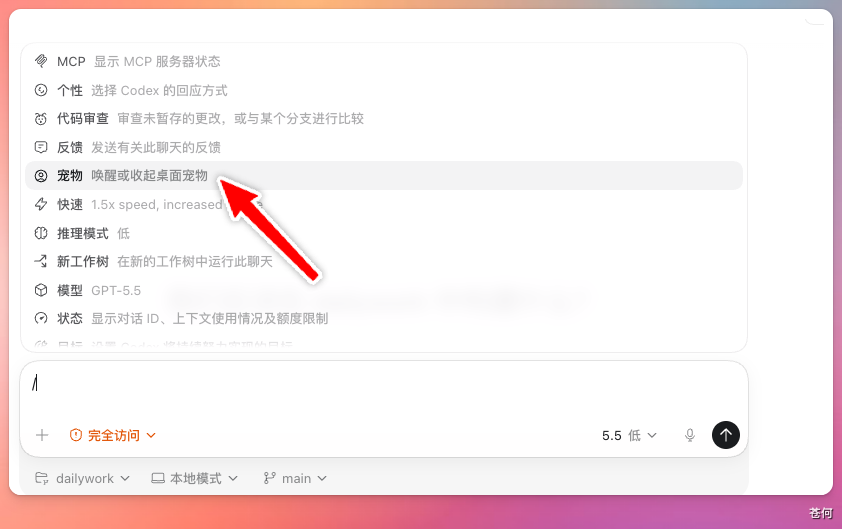
    <title type="text">如何设置自己的 Codex 桌面宠物</title>
    <id>https://codexguide.offerya.cc/guide/11-desktop-pet.html</id>
    <link href="https://codexguide.offerya.cc/guide/11-desktop-pet.html"/>
    <updated>2026-06-21T15:59:30.158Z</updated>
    <summary type="html"><![CDATA[
<p>前段时间，Codex 新增了一个会陪你工作的<strong>桌面小宠物</strong>。它不只是一个装饰，还会把 Codex 当前在忙什么实际显示出来。</p>
<p>这个宠物最大的价值在于<strong>状态的可视化</strong>：</p>
<ol>
<li><strong>任务进度一目了然：</strong> 不用一直切换回 Codex 的界面，就能看到当前任务的进度。</li>
<li><strong>实时状态反馈：</strong>
<ul>
<li>它会在 Codex 忙碌的时候显示忙碌的画面。</li>
<li>在需要你确认的时候会发出提醒。</li>
<li>任务完成之后，它也会让你知道可以去检查结果了。</li>
</ul>
</li>
</ol>]]></summary>
    <content type="html"><![CDATA[
<p>前段时间，Codex 新增了一个会陪你工作的<strong>桌面小宠物</strong>。它不只是一个装饰，还会把 Codex 当前在忙什么实际显示出来。</p>
<p>这个宠物最大的价值在于<strong>状态的可视化</strong>：</p>
<ol>
<li><strong>任务进度一目了然：</strong> 不用一直切换回 Codex 的界面，就能看到当前任务的进度。</li>
<li><strong>实时状态反馈：</strong>
<ul>
<li>它会在 Codex 忙碌的时候显示忙碌的画面。</li>
<li>在需要你确认的时候会发出提醒。</li>
<li>任务完成之后，它也会让你知道可以去检查结果了。</li>
</ul>
</li>
</ol>
]]></content>
  </entry>
  <entry>
    <title type="text">安装与登录</title>
    <id>https://codexguide.offerya.cc/guide/12-cli-installation.html</id>
    <link href="https://codexguide.offerya.cc/guide/12-cli-installation.html"/>
    <updated>2026-06-21T15:59:30.159Z</updated>
    <summary type="html"><![CDATA[
<p>本页先覆盖 Codex CLI 的安装与登录。桌面端、ChatGPT、Cloud 和 IDE 入口会在 <a href="/platform/" target="_blank">入口地图</a> 中分别展开。</p>
<div class="hint-container tip">
<p class="hint-container-title">最后核对</p>
<p>官方资料最后核对日期：2026-05-27。CLI 系统要求与安装方式参考 <a href="https://github.com/openai/codex" target="_blank" rel="noopener noreferrer">openai/codex 官方仓库</a>、<a href="https://github.com/openai/codex/blob/main/docs/install.md" target="_blank" rel="noopener noreferrer">CLI install 文档</a> 和 <a href="https://help.openai.com/en/articles/11096431-openai-codex-cli-getting-started" target="_blank" rel="noopener noreferrer">Codex CLI Help Center</a>。</p>
</div>]]></summary>
    <content type="html"><![CDATA[
<p>本页先覆盖 Codex CLI 的安装与登录。桌面端、ChatGPT、Cloud 和 IDE 入口会在 <a href="/platform/" target="_blank">入口地图</a> 中分别展开。</p>
<div class="hint-container tip">
<p class="hint-container-title">最后核对</p>
<p>官方资料最后核对日期：2026-05-27。CLI 系统要求与安装方式参考 <a href="https://github.com/openai/codex" target="_blank" rel="noopener noreferrer">openai/codex 官方仓库</a>、<a href="https://github.com/openai/codex/blob/main/docs/install.md" target="_blank" rel="noopener noreferrer">CLI install 文档</a> 和 <a href="https://help.openai.com/en/articles/11096431-openai-codex-cli-getting-started" target="_blank" rel="noopener noreferrer">Codex CLI Help Center</a>。</p>
</div>
<h2>安装前检查</h2>
<p>官方仓库当前给出的 CLI 运行环境建议：</p>
<p>| 项目 | 建议 |<br>
|</p>
]]></content>
  </entry>
  <entry>
    <title type="text">第一次让 Codex 改代码</title>
    <id>https://codexguide.offerya.cc/guide/13-cli-first-run.html</id>
    <link href="https://codexguide.offerya.cc/guide/13-cli-first-run.html"/>
    <updated>2026-06-21T15:59:30.161Z</updated>
    <summary type="html"><![CDATA[
<p>第一次实战不要选择“重构整个项目”。选择一个小、可验证、失败也容易回滚的任务，先建立你和 Codex 的协作节奏。</p>
<div class="hint-container tip">
<p class="hint-container-title">最后核对</p>
<p>官方资料最后核对日期：2026-05-27。本文参考 <a href="https://developers.openai.com/codex/cli/features" target="_blank" rel="noopener noreferrer">Codex CLI features</a>、<a href="https://github.com/openai/codex/blob/main/docs/getting-started.md" target="_blank" rel="noopener noreferrer">openai/codex getting started</a>、<a href="https://developers.openai.com/codex/guides/agents-md" target="_blank" rel="noopener noreferrer">AGENTS.md guide</a> 与 <a href="https://developers.openai.com/codex/agent-approvals-security" target="_blank" rel="noopener noreferrer">Codex security</a>。</p>
</div>]]></summary>
    <content type="html"><![CDATA[
<p>第一次实战不要选择“重构整个项目”。选择一个小、可验证、失败也容易回滚的任务，先建立你和 Codex 的协作节奏。</p>
<div class="hint-container tip">
<p class="hint-container-title">最后核对</p>
<p>官方资料最后核对日期：2026-05-27。本文参考 <a href="https://developers.openai.com/codex/cli/features" target="_blank" rel="noopener noreferrer">Codex CLI features</a>、<a href="https://github.com/openai/codex/blob/main/docs/getting-started.md" target="_blank" rel="noopener noreferrer">openai/codex getting started</a>、<a href="https://developers.openai.com/codex/guides/agents-md" target="_blank" rel="noopener noreferrer">AGENTS.md guide</a> 与 <a href="https://developers.openai.com/codex/agent-approvals-security" target="_blank" rel="noopener noreferrer">Codex security</a>。</p>
</div>
<h2>选择第一个任务</h2>
<p>适合新手：</p>
<ul>
<li>修复一个文案错别字。</li>
<li>给一个纯函数补测试。</li>
<li>更新 README 里的过期命令。</li>
<li>解释一个小模块，并补充必要注释。</li>
<li>修复一个已经有失败测试覆盖的 bug。</li>
<li>为文档站补一段截图占位说明。</li>
</ul>
<p>暂时避开：</p>
<ul>
<li>大规模架构重构。</li>
<li>跨多个服务的迁移。</li>
<li>没有测试的核心业务逻辑改动。</li>
<li>涉及生产凭据、账单、权限和删除数据的操作。</li>
<li>需要同时修改十几个文件的需求。</li>
</ul>
<h2>第一步：只读建图</h2>
<p>先让 Codex 理解仓库：</p>
<div class="language-text line-numbers-mode" data-highlighter="shiki" data-ext="text" style="--shiki-light:#383A42;--shiki-dark:#abb2bf;--shiki-light-bg:#FAFAFA;--shiki-dark-bg:#282c34"><pre class="shiki shiki-themes one-light one-dark-pro vp-code"><code class="language-text"><span class="line"><span>请只读分析当前仓库，不要修改文件。</span></span>
<span class="line"><span></span></span>
<span class="line"><span>请输出：</span></span>
<span class="line"><span>1. 项目用途</span></span>
<span class="line"><span>2. 关键目录</span></span>
<span class="line"><span>3. 安装、测试、构建命令</span></span>
<span class="line"><span>4. 当前任务适合从哪里开始</span></span>
<span class="line"><span>5. 你建议我第一次交给你的低风险任务</span></span></code></pre>
<div class="line-numbers" aria-hidden="true" style="counter-reset:line-number 0"><div class="line-number"></div><div class="line-number"></div><div class="line-number"></div><div class="line-number"></div><div class="line-number"></div><div class="line-number"></div><div class="line-number"></div><div class="line-number"></div></div></div><p></p>
<h2>第二步：给出小任务</h2>
<p>推荐复制这个模板：</p>
<div class="language-text line-numbers-mode" data-highlighter="shiki" data-ext="text" style="--shiki-light:#383A42;--shiki-dark:#abb2bf;--shiki-light-bg:#FAFAFA;--shiki-dark-bg:#282c34"><pre class="shiki shiki-themes one-light one-dark-pro vp-code"><code class="language-text"><span class="line"><span>请修复当前仓库中最小范围的一个测试失败。</span></span>
<span class="line"><span></span></span>
<span class="line"><span>要求：</span></span>
<span class="line"><span>1. 先运行测试，确认失败信息。</span></span>
<span class="line"><span>2. 阅读相关代码和测试，不做无关重构。</span></span>
<span class="line"><span>3. 修改最少必要文件。</span></span>
<span class="line"><span>4. 修复后重新运行相关测试。</span></span>
<span class="line"><span>5. 最后总结：失败原因、改了哪些文件、验证命令和剩余风险。</span></span></code></pre>
<div class="line-numbers" aria-hidden="true" style="counter-reset:line-number 0"><div class="line-number"></div><div class="line-number"></div><div class="line-number"></div><div class="line-number"></div><div class="line-number"></div><div class="line-number"></div><div class="line-number"></div><div class="line-number"></div></div></div><p>如果任务是文档：</p>
<div class="language-text line-numbers-mode" data-highlighter="shiki" data-ext="text" style="--shiki-light:#383A42;--shiki-dark:#abb2bf;--shiki-light-bg:#FAFAFA;--shiki-dark-bg:#282c34"><pre class="shiki shiki-themes one-light one-dark-pro vp-code"><code class="language-text"><span class="line"><span>请更新 [文档文件] 中关于 [主题] 的说明。</span></span>
<span class="line"><span></span></span>
<span class="line"><span>要求：</span></span>
<span class="line"><span>1. 先读取相关官方资料和现有文档结构。</span></span>
<span class="line"><span>2. 保持中文教程风格，避免整段翻译官方原文。</span></span>
<span class="line"><span>3. 涉及操作步骤时添加截图占位。</span></span>
<span class="line"><span>4. 修改后运行文档站构建。</span></span>
<span class="line"><span>5. 最后列出来源链接和需要人工补图的位置。</span></span></code></pre>
<div class="line-numbers" aria-hidden="true" style="counter-reset:line-number 0"><div class="line-number"></div><div class="line-number"></div><div class="line-number"></div><div class="line-number"></div><div class="line-number"></div><div class="line-number"></div><div class="line-number"></div><div class="line-number"></div></div></div><p></p>
<h2>第三步：观察过程</h2>
<p>重点观察五件事：</p>
<p>| 观察点 | 说明 |<br>
|</p>
]]></content>
  </entry>
  <entry>
    <title type="text">在 VS Code 中使用 Codex</title>
    <id>https://codexguide.offerya.cc/guide/14-ide-vscode.html</id>
    <link href="https://codexguide.offerya.cc/guide/14-ide-vscode.html"/>
    <updated>2026-06-21T15:59:30.166Z</updated>
    <summary type="html"><![CDATA[
<div class="hint-container tip">
<p class="hint-container-title">最后核对</p>
<p>官方资料最后核对日期：2026-05-27。本章以 VS Code 为例演示插件安装与基本用法，操作界面以实际版本为准。</p>
</div>
<p>本章介绍如何在 VS Code 代码编辑器中安装 Codex 插件，并通过插件完成开发任务。相比桌面 App，在 VS Code 中使用 Codex 可以更直接地看到文件目录结构和修改前后的对比，适合习惯在编辑器里工作的开发者。</p>
<h2>安装 Codex 插件</h2>
<p>打开 VS Code，点击左侧边栏的「扩展」图标，在搜索框中输入 <strong>Codex</strong>，选择第一个结果，点击「安装」即可。</p>]]></summary>
    <content type="html"><![CDATA[
<div class="hint-container tip">
<p class="hint-container-title">最后核对</p>
<p>官方资料最后核对日期：2026-05-27。本章以 VS Code 为例演示插件安装与基本用法，操作界面以实际版本为准。</p>
</div>
<p>本章介绍如何在 VS Code 代码编辑器中安装 Codex 插件，并通过插件完成开发任务。相比桌面 App，在 VS Code 中使用 Codex 可以更直接地看到文件目录结构和修改前后的对比，适合习惯在编辑器里工作的开发者。</p>
<h2>安装 Codex 插件</h2>
<p>打开 VS Code，点击左侧边栏的「扩展」图标，在搜索框中输入 <strong>Codex</strong>，选择第一个结果，点击「安装」即可。</p>
<div class="hint-container tip">
<p class="hint-container-title">提示</p>
<p>这里安装的是 OpenAI 官方发布的 ChatGPT 插件，其中集成了 Codex 的对话与代码辅助能力。</p>
</div>
<p></p>
<h2>打开插件对话窗口</h2>
<p>安装完成后，在 VS Code 中打开任意一个项目文件，右上角会出现 ChatGPT 的图标。点击该图标，右侧边栏就会展开 Codex 的对话窗口。</p>
<p></p>
<p></p>
<h2>开始使用</h2>
<p>对话窗口打开后，直接输入需求，Codex 就会开始辅助完成开发任务，用法与 Codex 桌面 App 基本一致。</p>
<p><strong>使用 <code>@</code> 指定文件：</strong></p>
<p>在对话框中输入 <code>@</code> 后选择具体文件，Codex 会直接定位到该文件进行分析或修改，比让它全局搜索更快、更准确。建议在任务目标明确时优先使用 <code>@</code> 指定相关文件。</p>
<p></p>
<h2>App 与 VS Code 插件怎么选</h2>
<p>| | Codex 桌面 App | VS Code 插件 |<br>
|</p>
]]></content>
  </entry>
  <entry>
    <title type="text">AGENTS.md</title>
    <id>https://codexguide.offerya.cc/guide/15-agents-md.html</id>
    <link href="https://codexguide.offerya.cc/guide/15-agents-md.html"/>
    <updated>2026-06-21T15:59:30.168Z</updated>
    <summary type="html"><![CDATA[<div class="hint-container tip">
<p class="hint-container-title">最后核对</p>
<p><code>AGENTS.md</code> 机制请以 <a href="https://developers.openai.com/codex/guides/agents-md" target="_blank" rel="noopener noreferrer">Codex AGENTS.md 官方文档</a>、<a href="https://agents.md/" target="_blank" rel="noopener noreferrer">AGENTS.md 标准网站</a> 和 <a href="https://github.com/openai/codex" target="_blank" rel="noopener noreferrer">openai/codex GitHub repository</a> 为准。最后核对日期：2026-06-19。</p>
</div>]]></summary>
    <content type="html"><![CDATA[<div class="hint-container tip">
<p class="hint-container-title">最后核对</p>
<p><code>AGENTS.md</code> 机制请以 <a href="https://developers.openai.com/codex/guides/agents-md" target="_blank" rel="noopener noreferrer">Codex AGENTS.md 官方文档</a>、<a href="https://agents.md/" target="_blank" rel="noopener noreferrer">AGENTS.md 标准网站</a> 和 <a href="https://github.com/openai/codex" target="_blank" rel="noopener noreferrer">openai/codex GitHub repository</a> 为准。最后核对日期：2026-06-19。</p>
</div>
<h1><a href="http://AGENTS.md" target="_blank" rel="noopener noreferrer">AGENTS.md</a></h1>
<p>对于 Codex，每开启一个新的对话窗口，它都会进入一个全新的上下文。它不知道这个项目用什么命令、有哪些目录边界、哪些文件不能改，也不知道团队平时怎么验证结果。</p>
<p><code>AGENTS.md</code> 正是为了解决这类问题而存在的项目级指令文件。它是一个简单、开放的 Markdown 约定，目标是给不同 coding agent 提供一个稳定、可预测的项目指令入口，把项目结构、开发命令、测试要求、代码风格和协作边界显式写下来，减少反复解释。</p>
<p>更准确地说，<code>AGENTS.md</code> 是面向 coding agent 的 README。README 主要给人看，讲项目是什么、怎么上手；<code>AGENTS.md</code> 给 Codex 和其他 coding agent 看，告诉它们改代码前应该遵守哪些项目规则。</p>
<p>可以把它理解为：</p>
<ul>
<li>对个人用户：减少重复解释“项目怎么跑、怎么测、哪些地方不能碰”。</li>
<li>对团队项目：把团队共同认可的 agent 使用规则沉淀到仓库里。</li>
<li>对多工具环境：让 Codex、IDE agent、CLI agent 等工具尽量读取同一份项目说明。</li>
</ul>
<p>本质上就是一份普通的 Markdown 文件。</p>
<p>另外需要注意，截至目前，Claude Code 并不遵守 <code>AGENTS.md</code> 约定，取而代之的是 <code>CLAUDE.md</code> 约定。</p>
<h2>存放位置与读取机制</h2>
<h3>文件位置</h3>
<p>对于普通项目，最推荐的做法是在项目根目录创建 <code>AGENTS.md</code>。Codex 在开始处理任务前会自动读取它，并把内容作为工作上下文带入新的对话。</p>
<p></p>
<p>若希望全局生效，可以撰写 Codex 的全局指令：</p>
<ol>
<li>在 Codex_Home 目录中创建 <code>AGENTS.md</code>。默认位置通常是 <code>~/.codex/AGENTS.md</code>；如果设置了 <code>CODEX_HOME</code>，则以对应目录为准。</li>
<li>在 Codex 桌面 App 里配置个人偏好或自定义指令。本质上也是写入 Codex_Home 的 <code>AGENTS.md</code>，与上述方法等价。</li>
</ol>
<p>设置全局规则后，它会影响你打开的所有项目；项目级 <code>AGENTS.md</code> 只影响当前仓库。两者作用域不同，要分清。</p>
<p></p>
<p>请确保文件名始终为 <code>AGENTS.md</code>，并确认<strong>大小写</strong>是否正确。否则 Codex 不会自动识别。</p>
<h3>读取顺序与合并规则</h3>
<p>Codex 读取 <code>AGENTS.md</code> 遵循以下顺序：</p>
<ol>
<li><strong>先读取全局规则</strong>：默认读取 <code>~/.codex/AGENTS.md</code>。如果同一位置存在 <code>AGENTS.override.md</code>，则优先读取它，适合临时覆盖全局规则。</li>
<li><strong>然后读取项目规则</strong>：进入项目后，Codex 通常会从 Git 根目录开始，一路走到当前工作目录。沿途每一层目录，它会尝试读取项目指令文件。</li>
</ol>
<p>项目指令文件的默认优先级是：</p>
<div class="language-text line-numbers-mode" data-highlighter="shiki" data-ext="text" style="--shiki-light:#383A42;--shiki-dark:#abb2bf;--shiki-light-bg:#FAFAFA;--shiki-dark-bg:#282c34"><pre class="shiki shiki-themes one-light one-dark-pro vp-code"><code class="language-text"><span class="line"><span>AGENTS.override.md</span></span>
<span class="line"><span>AGENTS.md</span></span></code></pre>
<div class="line-numbers" aria-hidden="true" style="counter-reset:line-number 0"><div class="line-number"></div><div class="line-number"></div></div></div><p>也就是说，同一目录里如果同时存在这两个文件，<code>AGENTS.override.md</code> 会覆盖 <code>AGENTS.md</code>。</p>
<p>Codex 会把读取到的指令从上到下合并。根目录的规则先出现，子目录的规则后出现。越靠近当前目录的规则越具体，因此也更适合写局部要求。</p>
<p>一个文件结构的示例：</p>
<div class="language-text line-numbers-mode" data-highlighter="shiki" data-ext="text" style="--shiki-light:#383A42;--shiki-dark:#abb2bf;--shiki-light-bg:#FAFAFA;--shiki-dark-bg:#282c34"><pre class="shiki shiki-themes one-light one-dark-pro vp-code"><code class="language-text"><span class="line"><span>AGENTS.md</span></span>
<span class="line"><span>apps/</span></span>
<span class="line"><span>  web/</span></span>
<span class="line"><span>    AGENTS.md</span></span>
<span class="line"><span>packages/</span></span>
<span class="line"><span>  database/</span></span>
<span class="line"><span>    AGENTS.md</span></span></code></pre>
<div class="line-numbers" aria-hidden="true" style="counter-reset:line-number 0"><div class="line-number"></div><div class="line-number"></div><div class="line-number"></div><div class="line-number"></div><div class="line-number"></div><div class="line-number"></div><div class="line-number"></div></div></div><p>上述示例中，根目录 <code>AGENTS.md</code> 写全仓库通用规则，<code>apps/web/AGENTS.md</code> 写前端规则，<code>packages/database/AGENTS.md</code> 写数据库迁移和测试要求。</p>
<p><strong>注意事项</strong>：</p>
<ol>
<li>如果你的项目已经有其他规则文件，可以通过 Codex 配置里的 <code>project_doc_fallback_filenames</code> 添加备用文件名。Codex 会在找不到 <code>AGENTS.override.md</code> 和 <code>AGENTS.md</code> 时，再尝试这些 fallback 文件。</li>
<li>Codex 还会限制合并后的项目指令大小。官方默认值是 <code>project_doc_max_bytes = 32768</code>，也就是 32 KiB。规则文件太大时，后面的内容可能不会进入上下文，所以尽量保持 <code>AGENTS.md</code> 精简。</li>
</ol>
<h2>团队协作</h2>
<p>多人协作时，<code>AGENTS.md</code> 适合保存团队共同认可的项目规则；个人路径、本机工具习惯、临时约束和私有工作流偏好，则更适合留在本地。这样团队规则保持稳定，个人习惯也不会被提交到仓库。</p>
<h3>使用场景</h3>
<p>下面这些内容适合放在本地私有规则里：</p>
<ul>
<li>本机缓存、SDK、脚本或临时目录路径。</li>
<li>个人常用命令、别名、编辑器习惯。</li>
<li>只对自己有效的语言风格、回复格式、验证偏好。</li>
<li>不方便进入团队文档的临时限制，例如“今天先只做只读分析”。</li>
</ul>
<h3>文件分工</h3>
<p>| 文件 | 作用 | 是否提交到 Git |<br>
|</p>
]]></content>
  </entry>
  <entry>
    <title type="text">沙盒与审批：Codex 的安全护栏</title>
    <id>https://codexguide.offerya.cc/guide/16-sandbox-approvals.html</id>
    <link href="https://codexguide.offerya.cc/guide/16-sandbox-approvals.html"/>
    <updated>2026-06-21T15:59:30.176Z</updated>
    <summary type="html"><![CDATA[
<p>Codex 能读取代码、修改文件、执行命令。这些操作需要受控边界：哪些目录可写、哪些命令可执行、什么情况下必须暂停并请求确认。</p>
<p>沙盒和审批就是这套边界。</p>
<p>对于绝大多数人而言，只需要把 <code>Auto-Reivew</code> 模式打开就够了。本文章旨在让你更好地理解 Codex 的沙盒机制和审批策略，同时补充一些进阶用法。</p>
<p>当你在利用沙盒和权限机制来约束 Codex 行为的时候，你已经在实践 <code>Harness Engineering </code>，即“约束工程” 。</p>
<p><img src="/images/codex-safety-layers.svg" alt="Codex 沙盒、审批策略、审批人与配置项关系图"></p>]]></summary>
    <content type="html"><![CDATA[
<p>Codex 能读取代码、修改文件、执行命令。这些操作需要受控边界：哪些目录可写、哪些命令可执行、什么情况下必须暂停并请求确认。</p>
<p>沙盒和审批就是这套边界。</p>
<p>对于绝大多数人而言，只需要把 <code>Auto-Reivew</code> 模式打开就够了。本文章旨在让你更好地理解 Codex 的沙盒机制和审批策略，同时补充一些进阶用法。</p>
<p>当你在利用沙盒和权限机制来约束 Codex 行为的时候，你已经在实践 <code>Harness Engineering </code>，即“约束工程” 。</p>
<p><img src="/images/codex-safety-layers.svg" alt="Codex 沙盒、审批策略、审批人与配置项关系图"></p>
<div class="hint-container tip">
<p class="hint-container-title">最后核对</p>
<p>官方资料最后核对日期：2026-06-18。本文依据 <a href="https://developers.openai.com/codex/concepts/sandboxing" target="_blank" rel="noopener noreferrer">Codex Sandboxing</a>、<a href="https://developers.openai.com/codex/agent-approvals-security" target="_blank" rel="noopener noreferrer">Agent approvals &amp; security</a>、<a href="https://developers.openai.com/codex/permissions" target="_blank" rel="noopener noreferrer">Permissions</a>、<a href="https://developers.openai.com/codex/rules" target="_blank" rel="noopener noreferrer">Rules</a>、<a href="https://developers.openai.com/codex/windows" target="_blank" rel="noopener noreferrer">Windows</a> 和 <a href="https://developers.openai.com/codex/concepts/sandboxing/auto-review" target="_blank" rel="noopener noreferrer">Auto-review</a> 整理。</p>
</div>
<h2>三个概念</h2>
<p>想象 Codex 在你的电脑里工作，就像在一个有玻璃墙和门禁的实验室里操作。</p>
<ul>
<li><strong>沙盒</strong>就是实验室的墙和门禁：它规定 Codex 能碰哪些设备、能不能连外网、能不能写入项目外文件夹。墙内的常规操作，Codex 可以自己做；墙外的事情，需要先获得许可。</li>
<li><strong>审批策略</strong>就是门禁的触发规则：是「沙盒外区域每次请求确认」，还是「只在 Codex 越过沙盒边界时请求确认」，还是「完全不请求，自行处理」。</li>
<li><strong>审批人</strong>就是谁来回答门禁：你自己看门放行，还是让另一个智能门禁系统（Auto-review）先判断一下。</li>
</ul>
<p>三者加在一起，决定 Codex 在你的电脑上到底能做什么、不能做什么。</p>
<h2>默认推荐</h2>
<p>Codex 启动时会根据目录状态自动推荐权限：</p>
<ul>
<li>版本控制目录（带有.git文件夹）：<code>Auto</code>，也就是 <code>workspace-write + on-request</code>。</li>
<li>非版本控制目录（不带有.git文件夹）：<code>read-only</code>。</li>
<li>某些情况下，Codex 会先保持 <code>read-only</code>，直到你明确信任当前工作目录。</li>
</ul>
<p>日常开发最常用的是</p>
<ol>
<li>沙盒设置：workspace write（工作区写入）</li>
<li>批准机制：on-request（按请求）</li>
</ol>
<p><strong>旧版写法（仍可用）：</strong></p>
<div class="language-text line-numbers-mode" data-highlighter="shiki" data-ext="text" style="--shiki-light:#383A42;--shiki-dark:#abb2bf;--shiki-light-bg:#FAFAFA;--shiki-dark-bg:#282c34"><pre class="shiki shiki-themes one-light one-dark-pro vp-code"><code class="language-text"><span class="line"><span>sandbox_mode = "workspace-write"</span></span>
<span class="line"><span>approval_policy = "on-request"</span></span>
<span class="line"><span>approvals_reviewer = "user"</span></span></code></pre>
<div class="line-numbers" aria-hidden="true" style="counter-reset:line-number 0"><div class="line-number"></div><div class="line-number"></div><div class="line-number"></div></div></div><p><strong>新版 permission profiles 写法（beta）：</strong></p>
<div class="language-text line-numbers-mode" data-highlighter="shiki" data-ext="text" style="--shiki-light:#383A42;--shiki-dark:#abb2bf;--shiki-light-bg:#FAFAFA;--shiki-dark-bg:#282c34"><pre class="shiki shiki-themes one-light one-dark-pro vp-code"><code class="language-text"><span class="line"><span>default_permissions = ":workspace"</span></span>
<span class="line"><span>approval_policy = "on-request"</span></span>
<span class="line"><span>approvals_reviewer = "user"</span></span></code></pre>
<div class="line-numbers" aria-hidden="true" style="counter-reset:line-number 0"><div class="line-number"></div><div class="line-number"></div><div class="line-number"></div></div></div><blockquote>
<p><strong>新旧配置不要混用。</strong> 这些配置通常写在 <code>~/.codex/config.toml</code>。如果任意已加载配置里出现 <code>sandbox_mode</code>，或命令行传了 <code>--sandbox</code>，Codex 会使用旧版 sandbox 设置，而不是 <code>default_permissions</code>。</p>
</blockquote>
<p>这段话什么意思？用上面的类比解释：</p>
<ul>
<li>Codex 可以在当前项目文件夹（workspace）里正常操作：读取文件、修改文件、运行常规的本地命令（比如 <code>git</code>、测试脚本、编译）。</li>
<li>如果需要联网、写到项目外面、或者做越界的事情，就会触发审批，暂停并请求确认。</li>
</ul>
<p>这是官方推荐的默认设置。它不会每一步都要求交互确认，也不会让 Codex 获取整台电脑的权限。</p>
<h2>沙盒模式</h2>
<p>三种沙盒模式，对应不同的权限边界：</p>
<p>| 模式 | 对应英文 | 范围 | 审批触发条件 |<br>
|</p>
]]></content>
  </entry>
  <entry>
    <title type="text">Codex Cloud：使用云端模式</title>
    <id>https://codexguide.offerya.cc/guide/17-cloud-ide-app.html</id>
    <link href="https://codexguide.offerya.cc/guide/17-cloud-ide-app.html"/>
    <updated>2026-06-21T15:59:30.187Z</updated>
    <summary type="html"><![CDATA[
<p>Codex Cloud 是一种不依赖本地环境的使用方式。你不需要在自己电脑上打开 App 或 CLI，直接在浏览器里连接 GitHub 仓库，让 Codex 在云端完成任务。</p>
<div class="hint-container tip">
<p class="hint-container-title">提示</p>
<p>CLI 的使用方式见 <a href="/guide/12-cli-installation.html" target="_blank">CLI 安装与登录</a>，IDE 插件见 <a href="/guide/14-ide-vscode.html" target="_blank">在 VS Code 中使用 Codex</a>，桌面 App 的使用见 <a href="/guide/01-app-installation.html" target="_blank">Codex 桌面 App 下载与安装</a>。</p>
</div>]]></summary>
    <content type="html"><![CDATA[
<p>Codex Cloud 是一种不依赖本地环境的使用方式。你不需要在自己电脑上打开 App 或 CLI，直接在浏览器里连接 GitHub 仓库，让 Codex 在云端完成任务。</p>
<div class="hint-container tip">
<p class="hint-container-title">提示</p>
<p>CLI 的使用方式见 <a href="/guide/12-cli-installation.html" target="_blank">CLI 安装与登录</a>，IDE 插件见 <a href="/guide/14-ide-vscode.html" target="_blank">在 VS Code 中使用 Codex</a>，桌面 App 的使用见 <a href="/guide/01-app-installation.html" target="_blank">Codex 桌面 App 下载与安装</a>。</p>
</div>
]]></content>
  </entry>
  <entry>
    <title type="text">Hooks</title>
    <id>https://codexguide.offerya.cc/guide/18-hooks.html</id>
    <link href="https://codexguide.offerya.cc/guide/18-hooks.html"/>
    <updated>2026-06-21T15:59:30.190Z</updated>
    <summary type="html"><![CDATA[
<p>Hooks 是 Codex 的生命周期扩展机制，允许在固定时机运行外部脚本，例如用户提交提示词、工具调用前后、上下文压缩前后，或一次 turn 即将结束时。它适合执行确定性的自动检查，不适合替代 Codex 本身的推理，可以将其视为在 agent 工作流旁运行的轻量 guardrail 脚本。</p>
<p>需要注意，Hooks是非常进阶的用法，一般推荐通过社区获取推荐的Hooks。也可以使用 Codex 撰写。</p>
<p>Hooks常见用途包括：</p>
<ul>
<li>把对话或工具调用记录发送到团队日志系统。</li>
<li>检查用户提示词里是否误贴了 API key、token 或私密信息。</li>
<li>在会话开始时加载本地说明、项目约定或临时上下文。</li>
<li>在工具调用前拦截高风险命令，例如删除文件、发布、部署、数据库迁移。</li>
<li>在工具调用后检查输出，提醒 Codex 继续验证或修正。</li>
<li>在对话停止前要求 Codex 再跑一次测试、补充总结或生成交付说明。</li>
</ul>]]></summary>
    <content type="html"><![CDATA[
<p>Hooks 是 Codex 的生命周期扩展机制，允许在固定时机运行外部脚本，例如用户提交提示词、工具调用前后、上下文压缩前后，或一次 turn 即将结束时。它适合执行确定性的自动检查，不适合替代 Codex 本身的推理，可以将其视为在 agent 工作流旁运行的轻量 guardrail 脚本。</p>
<p>需要注意，Hooks是非常进阶的用法，一般推荐通过社区获取推荐的Hooks。也可以使用 Codex 撰写。</p>
<p>Hooks常见用途包括：</p>
<ul>
<li>把对话或工具调用记录发送到团队日志系统。</li>
<li>检查用户提示词里是否误贴了 API key、token 或私密信息。</li>
<li>在会话开始时加载本地说明、项目约定或临时上下文。</li>
<li>在工具调用前拦截高风险命令，例如删除文件、发布、部署、数据库迁移。</li>
<li>在工具调用后检查输出，提醒 Codex 继续验证或修正。</li>
<li>在对话停止前要求 Codex 再跑一次测试、补充总结或生成交付说明。</li>
</ul>
<p>Hooks 的优势在于确定性：脚本怎么写，就怎么执行。其边界也在于此：脚本本身必须安全、可审查、可维护。</p>
<h2>默认开启</h2>
<p>Codex 默认启用 Hooks。如果想在本机关闭，可以在 <code>config.toml</code> 中写：</p>
<div class="language-toml line-numbers-mode" data-highlighter="shiki" data-ext="toml" style="--shiki-light:#383A42;--shiki-dark:#abb2bf;--shiki-light-bg:#FAFAFA;--shiki-dark-bg:#282c34"><pre class="shiki shiki-themes one-light one-dark-pro vp-code"><code class="language-toml"><span class="line"><span style="--shiki-light:#383A42;--shiki-dark:#ABB2BF">[</span><span style="--shiki-light:#4078F2;--shiki-dark:#61AFEF">features</span><span style="--shiki-light:#383A42;--shiki-dark:#ABB2BF">]</span></span>
<span class="line"><span style="--shiki-light:#E45649;--shiki-dark:#E06C75">hooks</span><span style="--shiki-light:#383A42;--shiki-dark:#ABB2BF"> = </span><span style="--shiki-light:#986801;--shiki-dark:#D19A66">false</span></span></code></pre>
<div class="line-numbers" aria-hidden="true" style="counter-reset:line-number 0"><div class="line-number"></div><div class="line-number"></div></div></div><p>官方推荐使用 <code>hooks</code> 这个 feature key。旧的 <code>codex_hooks</code> 仍可用，但已弃用。</p>
<p>团队或企业管理员也可以通过 <code>requirements.toml</code> 强制关闭或管理 Hooks。普通个人用户通常只需要理解本机和项目里的配置。</p>
<h2>配置位置</h2>
<p>Codex 会在激活的配置层旁边查找 Hooks。常见位置有四个：</p>
<div class="language-text line-numbers-mode" data-highlighter="shiki" data-ext="text" style="--shiki-light:#383A42;--shiki-dark:#abb2bf;--shiki-light-bg:#FAFAFA;--shiki-dark-bg:#282c34"><pre class="shiki shiki-themes one-light one-dark-pro vp-code"><code class="language-text"><span class="line"><span>~/.codex/hooks.json</span></span>
<span class="line"><span>~/.codex/config.toml</span></span>
<span class="line"><span>&#x3C;repo>/.codex/hooks.json</span></span>
<span class="line"><span>&#x3C;repo>/.codex/config.toml</span></span></code></pre>
<div class="line-numbers" aria-hidden="true" style="counter-reset:line-number 0"><div class="line-number"></div><div class="line-number"></div><div class="line-number"></div><div class="line-number"></div></div></div><p>也就是说，Hooks 可以单独写在 <code>hooks.json</code>，也可以写在项目目录的<code>.codex/config.toml</code> 的 <code>[hooks]</code> 表。</p>
<p>如果多个位置都有匹配的 Hook，Codex 会全部加载。为避免混淆，同一层里建议二选一：要么用 <code>hooks.json</code>，要么用 <code>config.toml</code> 内联写法。</p>
<p>项目内的 Hooks 只有在项目 <code>.codex/</code> 配置层被信任后才会加载。未信任项目里，Codex 仍会加载用户级或系统级 Hooks。</p>
<h2>基本结构</h2>
<p>Hooks 配置包含三层：</p>
<ol>
<li>事件：什么时候触发，例如 <code>SessionStart</code>、<code>PreToolUse</code>、<code>PostToolUse</code>、<code>Stop</code>。</li>
<li>matcher：匹配哪些场景，例如只匹配 <code>Bash</code>，或只匹配 <code>startup|resume</code>。</li>
<li>handler：真正执行的命令。</li>
</ol>
<p>一个最小 <code>hooks.json</code> 可以这样写：</p>
<div class="language-json line-numbers-mode" data-highlighter="shiki" data-ext="json" style="--shiki-light:#383A42;--shiki-dark:#abb2bf;--shiki-light-bg:#FAFAFA;--shiki-dark-bg:#282c34"><pre class="shiki shiki-themes one-light one-dark-pro vp-code"><code class="language-json"><span class="line"><span style="--shiki-light:#383A42;--shiki-dark:#ABB2BF">{</span></span>
<span class="line"><span style="--shiki-light:#E45649;--shiki-dark:#E06C75">  "hooks"</span><span style="--shiki-light:#383A42;--shiki-dark:#ABB2BF">: {</span></span>
<span class="line"><span style="--shiki-light:#E45649;--shiki-dark:#E06C75">    "SessionStart"</span><span style="--shiki-light:#383A42;--shiki-dark:#ABB2BF">: [</span></span>
<span class="line"><span style="--shiki-light:#383A42;--shiki-dark:#ABB2BF">      {</span></span>
<span class="line"><span style="--shiki-light:#E45649;--shiki-dark:#E06C75">        "matcher"</span><span style="--shiki-light:#383A42;--shiki-dark:#ABB2BF">: </span><span style="--shiki-light:#50A14F;--shiki-dark:#98C379">"startup|resume"</span><span style="--shiki-light:#383A42;--shiki-dark:#ABB2BF">,</span></span>
<span class="line"><span style="--shiki-light:#E45649;--shiki-dark:#E06C75">        "hooks"</span><span style="--shiki-light:#383A42;--shiki-dark:#ABB2BF">: [</span></span>
<span class="line"><span style="--shiki-light:#383A42;--shiki-dark:#ABB2BF">          {</span></span>
<span class="line"><span style="--shiki-light:#E45649;--shiki-dark:#E06C75">            "type"</span><span style="--shiki-light:#383A42;--shiki-dark:#ABB2BF">: </span><span style="--shiki-light:#50A14F;--shiki-dark:#98C379">"command"</span><span style="--shiki-light:#383A42;--shiki-dark:#ABB2BF">,</span></span>
<span class="line"><span style="--shiki-light:#E45649;--shiki-dark:#E06C75">            "command"</span><span style="--shiki-light:#383A42;--shiki-dark:#ABB2BF">: </span><span style="--shiki-light:#50A14F;--shiki-dark:#98C379">"python3 ~/.codex/hooks/session_start.py"</span><span style="--shiki-light:#383A42;--shiki-dark:#ABB2BF">,</span></span>
<span class="line"><span style="--shiki-light:#E45649;--shiki-dark:#E06C75">            "statusMessage"</span><span style="--shiki-light:#383A42;--shiki-dark:#ABB2BF">: </span><span style="--shiki-light:#50A14F;--shiki-dark:#98C379">"Loading session notes"</span></span>
<span class="line"><span style="--shiki-light:#383A42;--shiki-dark:#ABB2BF">          }</span></span>
<span class="line"><span style="--shiki-light:#383A42;--shiki-dark:#ABB2BF">        ]</span></span>
<span class="line"><span style="--shiki-light:#383A42;--shiki-dark:#ABB2BF">      }</span></span>
<span class="line"><span style="--shiki-light:#383A42;--shiki-dark:#ABB2BF">    ]</span></span>
<span class="line"><span style="--shiki-light:#383A42;--shiki-dark:#ABB2BF">  }</span></span>
<span class="line"><span style="--shiki-light:#383A42;--shiki-dark:#ABB2BF">}</span></span></code></pre>
<div class="line-numbers" aria-hidden="true" style="counter-reset:line-number 0"><div class="line-number"></div><div class="line-number"></div><div class="line-number"></div><div class="line-number"></div><div class="line-number"></div><div class="line-number"></div><div class="line-number"></div><div class="line-number"></div><div class="line-number"></div><div class="line-number"></div><div class="line-number"></div><div class="line-number"></div><div class="line-number"></div><div class="line-number"></div><div class="line-number"></div><div class="line-number"></div></div></div><p>当前实际执行的 handler 类型是 <code>type: &quot;command&quot;</code>。<code>prompt</code> 和 <code>agent</code> 这类 handler 目前会被解析，但不会执行。</p>
<h2>事件与触发</h2>
<p>Hooks 绑定在 Codex 的固定生命周期节点上，而不是随机触发。</p>
<h3>生命周期</h3>
<p>一次典型对话的生命周期如下：</p>
<div class="language-text line-numbers-mode" data-highlighter="shiki" data-ext="text" style="--shiki-light:#383A42;--shiki-dark:#abb2bf;--shiki-light-bg:#FAFAFA;--shiki-dark-bg:#282c34"><pre class="shiki shiki-themes one-light one-dark-pro vp-code"><code class="language-text"><span class="line"><span>会话启动</span></span>
<span class="line"><span>  -> SessionStart</span></span>
<span class="line"><span>用户提交提示词</span></span>
<span class="line"><span>  -> UserPromptSubmit</span></span>
<span class="line"><span>Codex 准备调用工具</span></span>
<span class="line"><span>  -> PreToolUse</span></span>
<span class="line"><span>如果工具需要额外权限</span></span>
<span class="line"><span>  -> PermissionRequest</span></span>
<span class="line"><span>工具执行完成</span></span>
<span class="line"><span>  -> PostToolUse</span></span>
<span class="line"><span>当前 turn 准备结束</span></span>
<span class="line"><span>  -> Stop</span></span></code></pre>
<div class="line-numbers" aria-hidden="true" style="counter-reset:line-number 0"><div class="line-number"></div><div class="line-number"></div><div class="line-number"></div><div class="line-number"></div><div class="line-number"></div><div class="line-number"></div><div class="line-number"></div><div class="line-number"></div><div class="line-number"></div><div class="line-number"></div><div class="line-number"></div><div class="line-number"></div></div></div><p>如果中途发生上下文压缩，会触发 <code>PreCompact</code> 和 <code>PostCompact</code>。如果 Codex 启动子代理，会触发 <code>SubagentStart</code> 和 <code>SubagentStop</code>。</p>
<h3>匹配规则</h3>
<p>事件触发后，Codex 会检查这个事件下配置的 matcher。matcher 命中，才会启动对应 command handler。</p>
<p>例如：</p>
<div class="language-json line-numbers-mode" data-highlighter="shiki" data-ext="json" style="--shiki-light:#383A42;--shiki-dark:#abb2bf;--shiki-light-bg:#FAFAFA;--shiki-dark-bg:#282c34"><pre class="shiki shiki-themes one-light one-dark-pro vp-code"><code class="language-json"><span class="line"><span style="--shiki-light:#383A42;--shiki-dark:#ABB2BF">{</span></span>
<span class="line"><span style="--shiki-light:#E45649;--shiki-dark:#E06C75">  "hooks"</span><span style="--shiki-light:#383A42;--shiki-dark:#ABB2BF">: {</span></span>
<span class="line"><span style="--shiki-light:#E45649;--shiki-dark:#E06C75">    "PreToolUse"</span><span style="--shiki-light:#383A42;--shiki-dark:#ABB2BF">: [</span></span>
<span class="line"><span style="--shiki-light:#383A42;--shiki-dark:#ABB2BF">      {</span></span>
<span class="line"><span style="--shiki-light:#E45649;--shiki-dark:#E06C75">        "matcher"</span><span style="--shiki-light:#383A42;--shiki-dark:#ABB2BF">: </span><span style="--shiki-light:#50A14F;--shiki-dark:#98C379">"^Bash$"</span><span style="--shiki-light:#383A42;--shiki-dark:#ABB2BF">,</span></span>
<span class="line"><span style="--shiki-light:#E45649;--shiki-dark:#E06C75">        "hooks"</span><span style="--shiki-light:#383A42;--shiki-dark:#ABB2BF">: [</span></span>
<span class="line"><span style="--shiki-light:#383A42;--shiki-dark:#ABB2BF">          {</span></span>
<span class="line"><span style="--shiki-light:#E45649;--shiki-dark:#E06C75">            "type"</span><span style="--shiki-light:#383A42;--shiki-dark:#ABB2BF">: </span><span style="--shiki-light:#50A14F;--shiki-dark:#98C379">"command"</span><span style="--shiki-light:#383A42;--shiki-dark:#ABB2BF">,</span></span>
<span class="line"><span style="--shiki-light:#E45649;--shiki-dark:#E06C75">            "command"</span><span style="--shiki-light:#383A42;--shiki-dark:#ABB2BF">: </span><span style="--shiki-light:#50A14F;--shiki-dark:#98C379">"python3 check_bash.py"</span></span>
<span class="line"><span style="--shiki-light:#383A42;--shiki-dark:#ABB2BF">          }</span></span>
<span class="line"><span style="--shiki-light:#383A42;--shiki-dark:#ABB2BF">        ]</span></span>
<span class="line"><span style="--shiki-light:#383A42;--shiki-dark:#ABB2BF">      }</span></span>
<span class="line"><span style="--shiki-light:#383A42;--shiki-dark:#ABB2BF">    ]</span></span>
<span class="line"><span style="--shiki-light:#383A42;--shiki-dark:#ABB2BF">  }</span></span>
<span class="line"><span style="--shiki-light:#383A42;--shiki-dark:#ABB2BF">}</span></span></code></pre>
<div class="line-numbers" aria-hidden="true" style="counter-reset:line-number 0"><div class="line-number"></div><div class="line-number"></div><div class="line-number"></div><div class="line-number"></div><div class="line-number"></div><div class="line-number"></div><div class="line-number"></div><div class="line-number"></div><div class="line-number"></div><div class="line-number"></div><div class="line-number"></div><div class="line-number"></div><div class="line-number"></div><div class="line-number"></div><div class="line-number"></div></div></div><p>这段配置只会在 Codex 准备调用 <code>Bash</code> 工具前触发。调用 <code>apply_patch</code>、MCP 工具或其他工具时不会触发这个 handler。</p>
<h3>并发与冲突</h3>
<p>如果多个配置层里都有匹配 Hook，Codex 会全部运行。高优先级配置层不会覆盖低优先级 Hooks。</p>
<p>同一个事件下如果有多个 matching command hooks，它们会并发启动。因此，一个 Hook 不能靠“先运行”来阻止另一个匹配 Hook 启动。</p>
<p>这会带来两个实践要求：</p>
<ul>
<li>Hook 之间不要依赖固定顺序。</li>
<li>如果多个 Hook 都可能做决定，要按官方事件规则理解冲突处理。例如 <code>PermissionRequest</code> 里任何一个 <code>deny</code> 都会优先。</li>
</ul>
<h3>事件能力</h3>
<p>不同事件能改变 Codex 行为的程度不同：</p>
<p>| 事件 | 能否阻止或改变后续行为 |<br>
|</p>
]]></content>
  </entry>
  <entry>
    <title type="text">排障手册</title>
    <id>https://codexguide.offerya.cc/guide/19-troubleshooting.html</id>
    <link href="https://codexguide.offerya.cc/guide/19-troubleshooting.html"/>
    <updated>2026-06-21T15:59:30.212Z</updated>
    <summary type="html"><![CDATA[
<p>本页收集 Codex 使用中的常见问题。欢迎通过 PR 持续补充。</p>
<h2>Codex 找不到项目上下文</h2>
<p>可能原因：</p>
<ul>
<li>你不在项目根目录。</li>
<li>仓库缺少 README、测试命令或项目说明。</li>
<li>monorepo 没有说明包边界。</li>
</ul>
<p>处理方式：</p>
<ul>
<li>先让 Codex 只读目录并总结项目结构。</li>
<li>添加或更新 <code>AGENTS.md</code>。</li>
<li>在任务说明里指定相关目录。</li>
</ul>
<h2>Codex 改动范围太大</h2>]]></summary>
    <content type="html"><![CDATA[
<p>本页收集 Codex 使用中的常见问题。欢迎通过 PR 持续补充。</p>
<h2>Codex 找不到项目上下文</h2>
<p>可能原因：</p>
<ul>
<li>你不在项目根目录。</li>
<li>仓库缺少 README、测试命令或项目说明。</li>
<li>monorepo 没有说明包边界。</li>
</ul>
<p>处理方式：</p>
<ul>
<li>先让 Codex 只读目录并总结项目结构。</li>
<li>添加或更新 <code>AGENTS.md</code>。</li>
<li>在任务说明里指定相关目录。</li>
</ul>
<h2>Codex 改动范围太大</h2>
<p>处理方式：</p>
<ul>
<li>明确“只修改这些文件”。</li>
<li>要求“先输出计划，不要动手”。</li>
<li>把任务拆成更小的步骤。</li>
<li>在 review 时拒绝无关重构。</li>
</ul>
<h2>测试跑不起来</h2>
<p>处理方式：</p>
<ul>
<li>让 Codex 先定位测试命令。</li>
<li>检查依赖是否安装。</li>
<li>区分环境问题和代码问题。</li>
<li>如果是环境问题，让 Codex 记录阻塞，而不是继续乱改。</li>
</ul>
<h2>生成内容不准确</h2>
<p>处理方式：</p>
<ul>
<li>要求 Codex 引用它依据的文件。</li>
<li>对官方事实要求附链接。</li>
<li>让它区分“已确认”和“推测”。</li>
<li>让它先读代码再写文档。</li>
</ul>
<h2>登录或权限问题</h2>
<p>处理方式：</p>
<ul>
<li>更新 Codex CLI 到最新版本。</li>
<li>重新运行登录流程。</li>
<li>检查当前账号计划和组织策略。</li>
<li>查看官方 Help Center 的 Codex 相关文章。</li>
</ul>
<h2>Windows 桌面 App / CLI 专项排障</h2>
<p>如果问题发生在 Windows 桌面 App、Microsoft Store / winget 安装、Windows sandbox、Worktree、Browser / Computer Use 插件、WSL 混合路径或 PowerShell 环境，可以参考社区维护的 Windows 专项排障库：</p>
<ul>
<li><a href="https://github.com/toby-bridges/community-codex-windows-troubleshooting" target="_blank" rel="noopener noreferrer">Community Codex Windows Troubleshooting</a></li>
<li><a href="https://github.com/toby-bridges/community-codex-windows-troubleshooting/blob/main/WINDOWS-CODEX-ERROR-GUIDE.md" target="_blank" rel="noopener noreferrer">Windows Codex Error Guide</a></li>
<li><a href="https://github.com/toby-bridges/community-codex-windows-troubleshooting/blob/main/DOGFOOD-MATRIX.md" target="_blank" rel="noopener noreferrer">Dogfood Matrix</a></li>
</ul>
<p>这个项目会把 Windows 报错按证据等级、复现等级和 workaround 状态整理，并提供只读诊断脚本。提交日志、截图或诊断输出前，请先脱敏用户名、路径、私有仓库名、token 和账号信息。</p>
<h2>切换 provider 后旧会话不可见</h2>
<p>可能原因：</p>
<ul>
<li>修改过 <code>config.toml</code> 根级 <code>model_provider</code>。</li>
<li>旧会话文件还在，但会话 metadata、SQLite 状态或项目路径缓存仍指向旧 provider。</li>
<li>CLI <code>/resume</code> 能看到旧会话，但 Codex Desktop 项目侧看不到，可能只是 Desktop 最近 50 条会话的首屏显示限制。</li>
</ul>
<p>处理方式：</p>
<ul>
<li>先确认 <code>~/.codex/sessions</code> 或 <code>~/.codex/archived_sessions</code> 里是否还存在旧会话文件。</li>
<li>如果只是 Desktop 项目侧不可见，先判断是否被最近 50 条显示限制挡住。</li>
<li>如果确认是切换 provider 后 metadata 不一致，再参考 <a href="/configuration/config-file.html#%E5%88%87%E6%8D%A2-provider-%E5%90%8E%E5%8E%86%E5%8F%B2%E4%BC%9A%E8%AF%9D%E4%B8%8D%E5%8F%AF%E8%A7%81%E6%80%8E%E4%B9%88%E5%8A%9E" target="_blank">config.toml 里的社区工具说明</a>。</li>
<li>使用第三方工具前先备份 <code>~/.codex</code>，不要把它当成官方认证或账号切换工具。</li>
</ul>
]]></content>
  </entry>
  <entry>
    <title type="text">桌面 App（电脑端）</title>
    <id>https://codexguide.offerya.cc/platform/app.html</id>
    <link href="https://codexguide.offerya.cc/platform/app.html"/>
    <updated>2026-06-21T15:59:30.213Z</updated>
    <summary type="html"><![CDATA[
<p>这里的桌面 App 指电脑端客户端，不是手机 App。它更像一个本地 Codex 工作台，适合在一个项目里管理多条任务线：你可以让不同 agent 并行探索、实现、验证，也可以用 Skills、Automations、Worktrees 和插件化能力沉淀长期流程。</p>
<div class="hint-container tip">
<p class="hint-container-title">最后核对</p>
<p>官方资料最后核对日期：2026-05-27。本文参考 <a href="https://developers.openai.com/codex/app" target="_blank" rel="noopener noreferrer">Codex 桌面 App 文档</a>、<a href="https://developers.openai.com/codex/" target="_blank" rel="noopener noreferrer">Codex 文档入口</a>、<a href="https://developers.openai.com/codex/skills" target="_blank" rel="noopener noreferrer">Codex Skills</a> 与 <a href="https://openai.com/index/introducing-the-codex-app/" target="_blank" rel="noopener noreferrer">Introducing the Codex app</a>。</p>
</div>]]></summary>
    <content type="html"><![CDATA[
<p>这里的桌面 App 指电脑端客户端，不是手机 App。它更像一个本地 Codex 工作台，适合在一个项目里管理多条任务线：你可以让不同 agent 并行探索、实现、验证，也可以用 Skills、Automations、Worktrees 和插件化能力沉淀长期流程。</p>
<div class="hint-container tip">
<p class="hint-container-title">最后核对</p>
<p>官方资料最后核对日期：2026-05-27。本文参考 <a href="https://developers.openai.com/codex/app" target="_blank" rel="noopener noreferrer">Codex 桌面 App 文档</a>、<a href="https://developers.openai.com/codex/" target="_blank" rel="noopener noreferrer">Codex 文档入口</a>、<a href="https://developers.openai.com/codex/skills" target="_blank" rel="noopener noreferrer">Codex Skills</a> 与 <a href="https://openai.com/index/introducing-the-codex-app/" target="_blank" rel="noopener noreferrer">Introducing the Codex app</a>。</p>
</div>
<h2>桌面 App 适合什么</h2>
<ul>
<li>本地仓库中的长任务和多阶段任务。</li>
<li>同时推进多个不互相阻塞的任务。</li>
<li>使用 Worktrees 隔离不同实现分支。</li>
<li>把重复流程写成 Skills。</li>
<li>用 Automations 做提醒、定期检查或后续跟进。</li>
<li>配合浏览器、文档、表格、演示文稿等插件做跨工具工作。</li>
</ul>
<p><img src="/screenshots/app/01-workspace.png" alt="Codex 桌面 App 项目工作区"></p>
<h2>核心能力地图</h2>
<p>| 能力 | 用途 | 学习重点 |<br>
|</p>
]]></content>
  </entry>
  <entry>
    <title type="text">ChatGPT 中的 Codex</title>
    <id>https://codexguide.offerya.cc/platform/chatgpt.html</id>
    <link href="https://codexguide.offerya.cc/platform/chatgpt.html"/>
    <updated>2026-06-21T15:59:30.216Z</updated>
    <summary type="html"><![CDATA[
<p>ChatGPT 中的 Codex 适合从对话里分派仓库任务、查看任务状态、理解代码库和推动团队协作。具体功能会受到账号计划、组织策略、所在地区和产品更新影响。</p>
<div class="hint-container tip">
<p class="hint-container-title">官方边界</p>
<p>计划可用性、消息限额、连接方式和具体入口请以 <a href="https://help.openai.com/en/articles/11369540-codex-in-chatgpt" target="_blank" rel="noopener noreferrer">Codex in ChatGPT Help Center</a> 为准。本文最后核对日期：2026-05-27。</p>
</div>]]></summary>
    <content type="html"><![CDATA[
<p>ChatGPT 中的 Codex 适合从对话里分派仓库任务、查看任务状态、理解代码库和推动团队协作。具体功能会受到账号计划、组织策略、所在地区和产品更新影响。</p>
<div class="hint-container tip">
<p class="hint-container-title">官方边界</p>
<p>计划可用性、消息限额、连接方式和具体入口请以 <a href="https://help.openai.com/en/articles/11369540-codex-in-chatgpt" target="_blank" rel="noopener noreferrer">Codex in ChatGPT Help Center</a> 为准。本文最后核对日期：2026-05-27。</p>
</div>
<h2>适用场景</h2>
<ul>
<li>连接 GitHub 仓库后发起任务。</li>
<li>让 Codex 阅读仓库并总结架构。</li>
<li>将 issue 转成可执行任务。</li>
<li>生成 PR 摘要或变更说明。</li>
<li>面向非开发者解释技术改动。</li>
<li>把复杂任务拆成阶段计划。</li>
</ul>
<div class="hint-container info">
<p class="hint-container-title">截图占位</p>
<p>请补充 ChatGPT 中 Codex 入口截图。建议文件：<code>docs/.vuepress/public/screenshots/chatgpt/01-codex-entry.png</code>。</p>
</div>
<h2>第一次任务怎么写</h2>
<p>先让 Codex 只读分析：</p>
<div class="language-text line-numbers-mode" data-highlighter="shiki" data-ext="text" style="--shiki-light:#383A42;--shiki-dark:#abb2bf;--shiki-light-bg:#FAFAFA;--shiki-dark-bg:#282c34"><pre class="shiki shiki-themes one-light one-dark-pro vp-code"><code class="language-text"><span class="line"><span>请阅读这个仓库并帮我理解 [主题]。请先总结相关目录和关键文件，再给出执行建议。暂时不要修改代码。</span></span></code></pre>
<div class="line-numbers" aria-hidden="true" style="counter-reset:line-number 0"><div class="line-number"></div></div></div><p>进一步推进时：</p>
<div class="language-text line-numbers-mode" data-highlighter="shiki" data-ext="text" style="--shiki-light:#383A42;--shiki-dark:#abb2bf;--shiki-light-bg:#FAFAFA;--shiki-dark-bg:#282c34"><pre class="shiki shiki-themes one-light one-dark-pro vp-code"><code class="language-text"><span class="line"><span>请基于刚才的分析，完成第一步最小改动，并创建可审查的结果。请说明改动原因、验证方式和剩余风险。</span></span></code></pre>
<div class="line-numbers" aria-hidden="true" style="counter-reset:line-number 0"><div class="line-number"></div></div></div><div class="hint-container info">
<p class="hint-container-title">截图占位</p>
<p>请补充 ChatGPT 中连接仓库或创建任务截图。建议文件：<code>docs/.vuepress/public/screenshots/chatgpt/02-repo-task.png</code>。</p>
</div>
<h2>适合非开发者的用法</h2>
<p>| 场景 | 任务说明 |<br>
|</p>
]]></content>
  </entry>
  <entry>
    <title type="text">CLI</title>
    <id>https://codexguide.offerya.cc/platform/cli.html</id>
    <link href="https://codexguide.offerya.cc/platform/cli.html"/>
    <updated>2026-06-21T15:59:30.219Z</updated>
    <summary type="html"><![CDATA[
<p>CLI 是最适合建立 Codex 基本功的入口。它贴近本地仓库、终端命令和测试输出，能让你清楚看到 Codex 如何阅读上下文、修改文件、运行验证并解释结果。</p>
<div class="hint-container tip">
<p class="hint-container-title">最后核对</p>
<p>官方资料最后核对日期：2026-05-27。本文参考 <a href="https://developers.openai.com/codex/cli/features" target="_blank" rel="noopener noreferrer">Codex CLI features</a>、<a href="https://github.com/openai/codex" target="_blank" rel="noopener noreferrer">openai/codex</a>、<a href="https://github.com/openai/codex/blob/main/docs/install.md" target="_blank" rel="noopener noreferrer">CLI install</a>、<a href="https://github.com/openai/codex/blob/main/docs/getting-started.md" target="_blank" rel="noopener noreferrer">getting started</a>、<a href="https://github.com/openai/codex/blob/main/docs/exec.md" target="_blank" rel="noopener noreferrer">exec</a> 与 <a href="https://github.com/openai/codex/blob/main/docs/slash_commands.md" target="_blank" rel="noopener noreferrer">slash commands</a>。</p>
</div>]]></summary>
    <content type="html"><![CDATA[
<p>CLI 是最适合建立 Codex 基本功的入口。它贴近本地仓库、终端命令和测试输出，能让你清楚看到 Codex 如何阅读上下文、修改文件、运行验证并解释结果。</p>
<div class="hint-container tip">
<p class="hint-container-title">最后核对</p>
<p>官方资料最后核对日期：2026-05-27。本文参考 <a href="https://developers.openai.com/codex/cli/features" target="_blank" rel="noopener noreferrer">Codex CLI features</a>、<a href="https://github.com/openai/codex" target="_blank" rel="noopener noreferrer">openai/codex</a>、<a href="https://github.com/openai/codex/blob/main/docs/install.md" target="_blank" rel="noopener noreferrer">CLI install</a>、<a href="https://github.com/openai/codex/blob/main/docs/getting-started.md" target="_blank" rel="noopener noreferrer">getting started</a>、<a href="https://github.com/openai/codex/blob/main/docs/exec.md" target="_blank" rel="noopener noreferrer">exec</a> 与 <a href="https://github.com/openai/codex/blob/main/docs/slash_commands.md" target="_blank" rel="noopener noreferrer">slash commands</a>。</p>
</div>
<h2>CLI 能做什么</h2>
<ul>
<li>只读理解仓库结构、入口、测试命令和风险点。</li>
<li>修改代码、文档、配置和测试。</li>
<li>运行 lint、typecheck、unit test、build 等验证命令。</li>
<li>在终端里查看 diff、调整审批策略、恢复会话。</li>
<li>通过 <code>codex exec</code> 执行标准化的一次性任务。</li>
<li>配合 <code>AGENTS.md</code>、<code>config.toml</code>、Skills、MCP 构建长期工作流。</li>
</ul>
<h2>推荐学习顺序</h2>
<ol>
<li>安装 CLI 并完成登录。</li>
<li>在陌生仓库中做一次只读总结。</li>
<li>学会交互模式中的常用 Slash Commands。</li>
<li>完成一次低风险修改，并运行验证。</li>
<li>学会 <code>codex exec</code>，把可重复任务脚本化。</li>
<li>增加 <code>AGENTS.md</code> 和本地 <code>config.toml</code>。</li>
</ol>
<h2>交互模式</h2>
<p>进入项目根目录：</p>
<div class="language-bash line-numbers-mode" data-highlighter="shiki" data-ext="bash" style="--shiki-light:#383A42;--shiki-dark:#abb2bf;--shiki-light-bg:#FAFAFA;--shiki-dark-bg:#282c34"><pre class="shiki shiki-themes one-light one-dark-pro vp-code"><code class="language-bash"><span class="line"><span style="--shiki-light:#0184BC;--shiki-dark:#56B6C2">cd</span><span style="--shiki-light:#50A14F;--shiki-dark:#98C379"> path/to/project</span></span>
<span class="line"><span style="--shiki-light:#4078F2;--shiki-dark:#61AFEF">codex</span></span></code></pre>
<div class="line-numbers" aria-hidden="true" style="counter-reset:line-number 0"><div class="line-number"></div><div class="line-number"></div></div></div><p>第一轮建议不要直接让 Codex 改代码。先让它建立地图：</p>
<div class="language-text line-numbers-mode" data-highlighter="shiki" data-ext="text" style="--shiki-light:#383A42;--shiki-dark:#abb2bf;--shiki-light-bg:#FAFAFA;--shiki-dark-bg:#282c34"><pre class="shiki shiki-themes one-light one-dark-pro vp-code"><code class="language-text"><span class="line"><span>请只读分析当前仓库，不要修改文件。</span></span>
<span class="line"><span></span></span>
<span class="line"><span>请输出：</span></span>
<span class="line"><span>1. 项目用途</span></span>
<span class="line"><span>2. 主要目录和入口文件</span></span>
<span class="line"><span>3. 安装、启动、测试、构建命令</span></span>
<span class="line"><span>4. 当前仓库对 Codex 来说最需要注意的风险</span></span>
<span class="line"><span>5. 适合第一次交给 Codex 的 5 个低风险任务</span></span></code></pre>
<div class="line-numbers" aria-hidden="true" style="counter-reset:line-number 0"><div class="line-number"></div><div class="line-number"></div><div class="line-number"></div><div class="line-number"></div><div class="line-number"></div><div class="line-number"></div><div class="line-number"></div><div class="line-number"></div></div></div><div class="hint-container info">
<p class="hint-container-title">截图占位</p>
<p>请补充 CLI 只读仓库总结截图。建议文件：<code>docs/.vuepress/public/screenshots/cli/02-repo-summary.png</code>。</p>
</div>
<h2>非交互模式</h2>
<p><code>codex exec</code> 更适合批处理和自动化：</p>
<div class="language-bash line-numbers-mode" data-highlighter="shiki" data-ext="bash" style="--shiki-light:#383A42;--shiki-dark:#abb2bf;--shiki-light-bg:#FAFAFA;--shiki-dark-bg:#282c34"><pre class="shiki shiki-themes one-light one-dark-pro vp-code"><code class="language-bash"><span class="line"><span style="--shiki-light:#4078F2;--shiki-dark:#61AFEF">codex</span><span style="--shiki-light:#50A14F;--shiki-dark:#98C379"> exec</span><span style="--shiki-light:#50A14F;--shiki-dark:#98C379"> "请只读分析当前仓库，输出安装、测试和构建命令。不要修改文件。"</span></span></code></pre>
<div class="line-numbers" aria-hidden="true" style="counter-reset:line-number 0"><div class="line-number"></div></div></div><p>建议让输出格式稳定：</p>
<div class="language-text line-numbers-mode" data-highlighter="shiki" data-ext="text" style="--shiki-light:#383A42;--shiki-dark:#abb2bf;--shiki-light-bg:#FAFAFA;--shiki-dark-bg:#282c34"><pre class="shiki shiki-themes one-light one-dark-pro vp-code"><code class="language-text"><span class="line"><span>请读取当前仓库，不要修改文件。</span></span>
<span class="line"><span></span></span>
<span class="line"><span>输出格式：</span></span>
<span class="line"><span>## 项目概览</span></span>
<span class="line"><span>## 本地运行</span></span>
<span class="line"><span>## 测试命令</span></span>
<span class="line"><span>## CI 风险</span></span>
<span class="line"><span>## 适合 Codex 处理的任务</span></span></code></pre>
<div class="line-numbers" aria-hidden="true" style="counter-reset:line-number 0"><div class="line-number"></div><div class="line-number"></div><div class="line-number"></div><div class="line-number"></div><div class="line-number"></div><div class="line-number"></div><div class="line-number"></div><div class="line-number"></div></div></div><p>适合脚本化的任务：</p>
<p>| 任务 | 产出 |<br>
|</p>
]]></content>
  </entry>
  <entry>
    <title type="text">Cloud / Web</title>
    <id>https://codexguide.offerya.cc/platform/cloud.html</id>
    <link href="https://codexguide.offerya.cc/platform/cloud.html"/>
    <updated>2026-06-21T15:59:30.225Z</updated>
    <summary type="html"><![CDATA[
<p>Cloud / Web 入口适合处理耗时更长、需要后台运行或需要与 GitHub 协作的任务。它把 Codex 任务放进可管理的云端环境，适合团队分派、长任务跟踪和 PR 工作流。</p>
<div class="hint-container tip">
<p class="hint-container-title">最后核对</p>
<p>官方资料最后核对日期：2026-05-27。本文参考 <a href="https://platform.openai.com/docs/codex" target="_blank" rel="noopener noreferrer">Codex cloud docs</a>、<a href="https://developers.openai.com/codex/" target="_blank" rel="noopener noreferrer">Codex 文档入口</a>、<a href="https://help.openai.com/en/articles/11369540-codex-in-chatgpt" target="_blank" rel="noopener noreferrer">Codex in ChatGPT Help Center</a> 与 <a href="https://openai.com/index/introducing-codex/" target="_blank" rel="noopener noreferrer">Introducing Codex</a>。</p>
</div>]]></summary>
    <content type="html"><![CDATA[
<p>Cloud / Web 入口适合处理耗时更长、需要后台运行或需要与 GitHub 协作的任务。它把 Codex 任务放进可管理的云端环境，适合团队分派、长任务跟踪和 PR 工作流。</p>
<div class="hint-container tip">
<p class="hint-container-title">最后核对</p>
<p>官方资料最后核对日期：2026-05-27。本文参考 <a href="https://platform.openai.com/docs/codex" target="_blank" rel="noopener noreferrer">Codex cloud docs</a>、<a href="https://developers.openai.com/codex/" target="_blank" rel="noopener noreferrer">Codex 文档入口</a>、<a href="https://help.openai.com/en/articles/11369540-codex-in-chatgpt" target="_blank" rel="noopener noreferrer">Codex in ChatGPT Help Center</a> 与 <a href="https://openai.com/index/introducing-codex/" target="_blank" rel="noopener noreferrer">Introducing Codex</a>。</p>
</div>
<h2>Cloud 适合什么</h2>
<ul>
<li>连接 GitHub 仓库后分派任务。</li>
<li>在后台处理长时间修复、迁移或分析。</li>
<li>基于 issue 或需求生成分支和 PR。</li>
<li>团队成员共同查看任务进度。</li>
<li>为大型仓库做结构分析和风险扫描。</li>
</ul>
<div class="hint-container info">
<p class="hint-container-title">截图占位</p>
<p>请补充 Cloud/Web 新建任务界面截图。建议文件：<code>docs/.vuepress/public/screenshots/cloud/01-new-task.png</code>。</p>
</div>
<h2>提交任务前的清单</h2>
<p>| 检查项 | 为什么重要 |<br>
|</p>
]]></content>
  </entry>
  <entry>
    <title type="text">IDE</title>
    <id>https://codexguide.offerya.cc/platform/ide.html</id>
    <link href="https://codexguide.offerya.cc/platform/ide.html"/>
    <updated>2026-06-21T15:59:30.228Z</updated>
    <summary type="html"><![CDATA[
<p>IDE 入口适合贴近编辑器上下文的高频小任务。它的优势是文件、选区、符号跳转、错误信息和开发者当前注意力都在同一个环境里。</p>
<div class="hint-container tip">
<p class="hint-container-title">最后核对</p>
<p>官方资料最后核对日期：2026-05-27。本文参考 <a href="https://developers.openai.com/codex/" target="_blank" rel="noopener noreferrer">Codex 文档入口</a> 与官方 IDE 相关页面。具体插件、入口和可用功能会随产品更新变化，请以官方页面和当前 IDE 插件说明为准。</p>
</div>]]></summary>
    <content type="html"><![CDATA[
<p>IDE 入口适合贴近编辑器上下文的高频小任务。它的优势是文件、选区、符号跳转、错误信息和开发者当前注意力都在同一个环境里。</p>
<div class="hint-container tip">
<p class="hint-container-title">最后核对</p>
<p>官方资料最后核对日期：2026-05-27。本文参考 <a href="https://developers.openai.com/codex/" target="_blank" rel="noopener noreferrer">Codex 文档入口</a> 与官方 IDE 相关页面。具体插件、入口和可用功能会随产品更新变化，请以官方页面和当前 IDE 插件说明为准。</p>
</div>
<h2>IDE 适合什么</h2>
<ul>
<li>解释当前文件或选中代码。</li>
<li>为一个函数补测试。</li>
<li>局部重构。</li>
<li>生成注释、文档或类型说明。</li>
<li>审查当前 diff。</li>
<li>快速理解错误信息和调用链。</li>
</ul>
<div class="hint-container info">
<p class="hint-container-title">截图占位</p>
<p>请补充 IDE 中选中代码并请求解释的截图。建议文件：<code>docs/.vuepress/public/screenshots/ide/01-explain-selection.png</code>。</p>
</div>
<h2>选区任务写法</h2>
<p>选区越准确，结果越稳定。推荐模板：</p>
<div class="language-text line-numbers-mode" data-highlighter="shiki" data-ext="text" style="--shiki-light:#383A42;--shiki-dark:#abb2bf;--shiki-light-bg:#FAFAFA;--shiki-dark-bg:#282c34"><pre class="shiki shiki-themes one-light one-dark-pro vp-code"><code class="language-text"><span class="line"><span>请只基于当前选中的代码解释：</span></span>
<span class="line"><span>1. 它在模块中的职责</span></span>
<span class="line"><span>2. 输入输出和副作用</span></span>
<span class="line"><span>3. 可能的边界情况</span></span>
<span class="line"><span>4. 如果要补测试，建议覆盖哪些场景</span></span></code></pre>
<div class="line-numbers" aria-hidden="true" style="counter-reset:line-number 0"><div class="line-number"></div><div class="line-number"></div><div class="line-number"></div><div class="line-number"></div><div class="line-number"></div></div></div><p>如果允许修改：</p>
<div class="language-text line-numbers-mode" data-highlighter="shiki" data-ext="text" style="--shiki-light:#383A42;--shiki-dark:#abb2bf;--shiki-light-bg:#FAFAFA;--shiki-dark-bg:#282c34"><pre class="shiki shiki-themes one-light one-dark-pro vp-code"><code class="language-text"><span class="line"><span>请只修改当前文件和对应测试文件。</span></span>
<span class="line"><span></span></span>
<span class="line"><span>目标：为当前函数补充边界测试。</span></span>
<span class="line"><span>要求：</span></span>
<span class="line"><span>1. 先解释测试场景。</span></span>
<span class="line"><span>2. 修改后运行相关测试。</span></span>
<span class="line"><span>3. 不做无关重构。</span></span></code></pre>
<div class="line-numbers" aria-hidden="true" style="counter-reset:line-number 0"><div class="line-number"></div><div class="line-number"></div><div class="line-number"></div><div class="line-number"></div><div class="line-number"></div><div class="line-number"></div><div class="line-number"></div></div></div><h2>IDE 中的高频任务</h2>
<p>| 任务 | 推荐输入 | 结果检查 |<br>
|</p>
]]></content>
  </entry>
  <entry>
    <title type="text">Codex 入口地图</title>
    <id>https://codexguide.offerya.cc/platform/</id>
    <link href="https://codexguide.offerya.cc/platform/"/>
    <updated>2026-06-21T15:59:30.232Z</updated>
    <summary type="html"><![CDATA[
<p>CodexGuide 把 Codex 看成一组入口协同的工作系统。学习时不要只盯着某一个界面；真正影响效率的是：你把什么任务放在哪个入口里处理。</p>
<p><img src="/images/codex-surfaces.svg?v=20260611" alt="Codex 使用入口地图"></p>
<div class="hint-container tip">
<p class="hint-container-title">最后核对</p>
<p>官方资料最后核对日期：2026-05-27。参考 <a href="https://openai.com/codex/" target="_blank" rel="noopener noreferrer">OpenAI Codex 产品页</a>、<a href="https://developers.openai.com/codex/" target="_blank" rel="noopener noreferrer">Codex 文档入口</a>、<a href="https://github.com/openai/codex" target="_blank" rel="noopener noreferrer">Codex CLI 官方仓库</a> 与 <a href="https://help.openai.com/en/articles/11369540-codex-in-chatgpt" target="_blank" rel="noopener noreferrer">Codex in ChatGPT Help Center</a>。</p>
</div>]]></summary>
    <content type="html"><![CDATA[
<p>CodexGuide 把 Codex 看成一组入口协同的工作系统。学习时不要只盯着某一个界面；真正影响效率的是：你把什么任务放在哪个入口里处理。</p>
<p><img src="/images/codex-surfaces.svg?v=20260611" alt="Codex 使用入口地图"></p>
<div class="hint-container tip">
<p class="hint-container-title">最后核对</p>
<p>官方资料最后核对日期：2026-05-27。参考 <a href="https://openai.com/codex/" target="_blank" rel="noopener noreferrer">OpenAI Codex 产品页</a>、<a href="https://developers.openai.com/codex/" target="_blank" rel="noopener noreferrer">Codex 文档入口</a>、<a href="https://github.com/openai/codex" target="_blank" rel="noopener noreferrer">Codex CLI 官方仓库</a> 与 <a href="https://help.openai.com/en/articles/11369540-codex-in-chatgpt" target="_blank" rel="noopener noreferrer">Codex in ChatGPT Help Center</a>。</p>
</div>
<h2>入口对照表</h2>
<p>| 入口 | 更适合 | 典型任务 | 学习优先级 |<br>
|</p>
]]></content>
  </entry>
  <entry>
    <title type="text">实践方法</title>
    <id>https://codexguide.offerya.cc/practice/</id>
    <link href="https://codexguide.offerya.cc/practice/"/>
    <updated>2026-06-21T15:59:30.235Z</updated>
    <summary type="html"><![CDATA[
<p>Codex 的学习重点不只在命令和界面。更关键的是把任务设计、上下文管理、安全边界和验证闭环训练成习惯。</p>
<p><img src="/images/codex-workflow-loop.svg?v=20260611-2" alt="Codex 高质量任务闭环"></p>
<h2>方法地图</h2>
<table>
<thead>
<tr>
<th>主题</th>
<th>解决什么问题</th>
</tr>
</thead>
<tbody>
<tr>
<td><a href="/practice/task-design.html" target="_blank">任务设计</a></td>
<td>如何把模糊需求写成 Codex 能稳定执行的任务</td>
</tr>
<tr>
<td><a href="/practice/non-dev-workflows.html" target="_blank">非开发工作流</a></td>
<td>如何用 Codex 做文档、学习、分析和团队知识管理</td>
</tr>
<tr>
<td><a href="/practice/team-playbook.html" target="_blank">团队实践</a></td>
<td>如何把 Codex 接入团队规范、PR、排障和知识库沉淀</td>
</tr>
</tbody>
</table>]]></summary>
    <content type="html"><![CDATA[
<p>Codex 的学习重点不只在命令和界面。更关键的是把任务设计、上下文管理、安全边界和验证闭环训练成习惯。</p>
<p><img src="/images/codex-workflow-loop.svg?v=20260611-2" alt="Codex 高质量任务闭环"></p>
<h2>方法地图</h2>
<p>| 主题 | 解决什么问题 |<br>
|</p>
]]></content>
  </entry>
  <entry>
    <title type="text">非开发工作流</title>
    <id>https://codexguide.offerya.cc/practice/non-dev-workflows.html</id>
    <link href="https://codexguide.offerya.cc/practice/non-dev-workflows.html"/>
    <updated>2026-06-21T15:59:30.237Z</updated>
    <summary type="html"><![CDATA[
<p>Codex 的价值不只体现在写代码。只要任务涉及一组文件、明确目标和可复核结果，Codex 就能提供帮助。</p>
<h2>文档工作</h2>
<p>适合任务：</p>
<ul>
<li>把 README 改成新手友好的版本。</li>
<li>根据代码生成模块说明。</li>
<li>整理迁移指南。</li>
<li>生成发布说明。</li>
<li>把 issue、PR、commit 整理成周报。</li>
</ul>
<p>任务模板：</p>
<div class="language-text line-numbers-mode" data-highlighter="shiki" data-ext="text" style="--shiki-light:#383A42;--shiki-dark:#abb2bf;--shiki-light-bg:#FAFAFA;--shiki-dark-bg:#282c34"><pre class="shiki shiki-themes one-light one-dark-pro vp-code"><code class="language-text"><span class="line"><span>请阅读当前仓库的 README、docs 和 package 配置，帮我整理一份新手上手指南。</span></span>
<span class="line"><span></span></span>
<span class="line"><span>要求：</span></span>
<span class="line"><span>1. 不修改代码。</span></span>
<span class="line"><span>2. 命令必须来自仓库真实配置。</span></span>
<span class="line"><span>3. 不确定的步骤标注为“待确认”。</span></span>
<span class="line"><span>4. 输出目录结构、安装步骤、开发命令、测试命令和常见问题。</span></span></code></pre>
<div class="line-numbers" aria-hidden="true" style="counter-reset:line-number 0"><div class="line-number"></div><div class="line-number"></div><div class="line-number"></div><div class="line-number"></div><div class="line-number"></div><div class="line-number"></div><div class="line-number"></div></div></div>]]></summary>
    <content type="html"><![CDATA[
<p>Codex 的价值不只体现在写代码。只要任务涉及一组文件、明确目标和可复核结果，Codex 就能提供帮助。</p>
<h2>文档工作</h2>
<p>适合任务：</p>
<ul>
<li>把 README 改成新手友好的版本。</li>
<li>根据代码生成模块说明。</li>
<li>整理迁移指南。</li>
<li>生成发布说明。</li>
<li>把 issue、PR、commit 整理成周报。</li>
</ul>
<p>任务模板：</p>
<div class="language-text line-numbers-mode" data-highlighter="shiki" data-ext="text" style="--shiki-light:#383A42;--shiki-dark:#abb2bf;--shiki-light-bg:#FAFAFA;--shiki-dark-bg:#282c34"><pre class="shiki shiki-themes one-light one-dark-pro vp-code"><code class="language-text"><span class="line"><span>请阅读当前仓库的 README、docs 和 package 配置，帮我整理一份新手上手指南。</span></span>
<span class="line"><span></span></span>
<span class="line"><span>要求：</span></span>
<span class="line"><span>1. 不修改代码。</span></span>
<span class="line"><span>2. 命令必须来自仓库真实配置。</span></span>
<span class="line"><span>3. 不确定的步骤标注为“待确认”。</span></span>
<span class="line"><span>4. 输出目录结构、安装步骤、开发命令、测试命令和常见问题。</span></span></code></pre>
<div class="line-numbers" aria-hidden="true" style="counter-reset:line-number 0"><div class="line-number"></div><div class="line-number"></div><div class="line-number"></div><div class="line-number"></div><div class="line-number"></div><div class="line-number"></div><div class="line-number"></div></div></div><h2>学习工作</h2>
<p>适合任务：</p>
<ul>
<li>让 Codex 按学习顺序解释代码库。</li>
<li>生成“从入口到核心模块”的阅读路线。</li>
<li>把复杂模块讲成产品、设计或运营也能理解的语言。</li>
<li>把陌生技术栈拆成学习清单。</li>
</ul>
<p>任务模板：</p>
<div class="language-text line-numbers-mode" data-highlighter="shiki" data-ext="text" style="--shiki-light:#383A42;--shiki-dark:#abb2bf;--shiki-light-bg:#FAFAFA;--shiki-dark-bg:#282c34"><pre class="shiki shiki-themes one-light one-dark-pro vp-code"><code class="language-text"><span class="line"><span>请把这个仓库当成学习材料。请按初学者阅读顺序讲解：</span></span>
<span class="line"><span>1. 先看哪些文件</span></span>
<span class="line"><span>2. 每个目录承担什么职责</span></span>
<span class="line"><span>3. 关键数据流或调用链</span></span>
<span class="line"><span>4. 学完后可以做的 3 个练习</span></span></code></pre>
<div class="line-numbers" aria-hidden="true" style="counter-reset:line-number 0"><div class="line-number"></div><div class="line-number"></div><div class="line-number"></div><div class="line-number"></div><div class="line-number"></div></div></div><h2>产品与运营工作</h2>
<p>适合任务：</p>
<ul>
<li>把 PR 改动翻译成用户影响。</li>
<li>生成发布公告草稿。</li>
<li>检查文案和功能说明是否一致。</li>
<li>从 issue 中提取用户痛点。</li>
</ul>
<p>任务模板：</p>
<div class="language-text line-numbers-mode" data-highlighter="shiki" data-ext="text" style="--shiki-light:#383A42;--shiki-dark:#abb2bf;--shiki-light-bg:#FAFAFA;--shiki-dark-bg:#282c34"><pre class="shiki shiki-themes one-light one-dark-pro vp-code"><code class="language-text"><span class="line"><span>请阅读当前 diff，把技术改动整理成产品发布说明。请包含：</span></span>
<span class="line"><span>1. 用户能感知到的变化</span></span>
<span class="line"><span>2. 管理后台或配置变化</span></span>
<span class="line"><span>3. 可能影响旧用户的地方</span></span>
<span class="line"><span>4. 需要客服或运营同步的话术</span></span></code></pre>
<div class="line-numbers" aria-hidden="true" style="counter-reset:line-number 0"><div class="line-number"></div><div class="line-number"></div><div class="line-number"></div><div class="line-number"></div><div class="line-number"></div></div></div><div class="hint-container info">
<p class="hint-container-title">截图占位</p>
<p>请补充“把 PR 转成发布说明”的示例截图。建议文件：<code>docs/.vuepress/public/screenshots/chatgpt/03-release-notes.png</code>。</p>
</div>
<h2>知识管理</h2>
<p>Codex 很适合把零散经验沉淀成模板：</p>
<ul>
<li>排障记录。</li>
<li>FAQ。</li>
<li>任务模板。</li>
<li>团队规范。</li>
<li>案例复盘。</li>
</ul>
<p>最终目标是把“每次临时问一次”变成“下一次直接复用”。</p>
]]></content>
  </entry>
  <entry>
    <title type="text">任务设计</title>
    <id>https://codexguide.offerya.cc/practice/task-design.html</id>
    <link href="https://codexguide.offerya.cc/practice/task-design.html"/>
    <updated>2026-06-21T15:59:30.240Z</updated>
    <summary type="html"><![CDATA[
<p>任务设计决定 Codex 的工作质量。一个好任务会同时说明目标、上下文、范围、约束、验证方式和最终交付。</p>
<h2>任务六要素</h2>
<table>
<thead>
<tr>
<th>要素</th>
<th>写法</th>
<th>示例</th>
</tr>
</thead>
<tbody>
<tr>
<td>目标</td>
<td>一句话说明结果</td>
<td>修复登录页刷新后状态丢失的问题</td>
</tr>
<tr>
<td>背景</td>
<td>给出现象和上下文</td>
<td>用户刷新页面后需要重新登录</td>
</tr>
<tr>
<td>范围</td>
<td>限定文件或模块</td>
<td>只修改 <code>auth</code> 模块和相关测试</td>
</tr>
<tr>
<td>约束</td>
<td>写明禁止事项</td>
<td>不改数据库 schema，不引入新依赖</td>
</tr>
<tr>
<td>验证</td>
<td>给出命令或检查方式</td>
<td><code>pnpm test auth</code></td>
</tr>
<tr>
<td>交付</td>
<td>要求复盘格式</td>
<td>总结根因、改动、测试和风险</td>
</tr>
</tbody>
</table>]]></summary>
    <content type="html"><![CDATA[
<p>任务设计决定 Codex 的工作质量。一个好任务会同时说明目标、上下文、范围、约束、验证方式和最终交付。</p>
<h2>任务六要素</h2>
<p>| 要素 | 写法 | 示例 |<br>
|</p>
]]></content>
  </entry>
  <entry>
    <title type="text">团队实践</title>
    <id>https://codexguide.offerya.cc/practice/team-playbook.html</id>
    <link href="https://codexguide.offerya.cc/practice/team-playbook.html"/>
    <updated>2026-06-21T15:59:30.242Z</updated>
    <summary type="html"><![CDATA[
<p>团队使用 Codex 的关键是把规则写清楚、把验证跑起来、把案例沉淀下来。</p>
<p><img src="/images/codex-safety-layers.svg" alt="Codex 安全边界分层"></p>
<h2>团队接入清单</h2>
<table>
<thead>
<tr>
<th>项目</th>
<th>建议</th>
</tr>
</thead>
<tbody>
<tr>
<td><code>AGENTS.md</code></td>
<td>写清项目结构、命令、风格、安全边界</td>
</tr>
<tr>
<td>测试命令</td>
<td>提供最小相关测试和全量测试命令</td>
</tr>
<tr>
<td>PR 模板</td>
<td>要求说明 Codex 参与范围、验证结果和风险</td>
</tr>
<tr>
<td>安全规则</td>
<td>明确生产数据、密钥、发布、迁移的审批要求</td>
</tr>
<tr>
<td>案例库</td>
<td>把成功任务和失败复盘都沉淀下来</td>
</tr>
</tbody>
</table>]]></summary>
    <content type="html"><![CDATA[
<p>团队使用 Codex 的关键是把规则写清楚、把验证跑起来、把案例沉淀下来。</p>
<p><img src="/images/codex-safety-layers.svg" alt="Codex 安全边界分层"></p>
<h2>团队接入清单</h2>
<p>| 项目 | 建议 |<br>
|</p>
]]></content>
  </entry>
  <entry>
    <title type="text">Codex × 安卓手机：扫码连接，远程操控</title>
    <id>https://codexguide.offerya.cc/recipes/android-remote-control.html</id>
    <link href="https://codexguide.offerya.cc/recipes/android-remote-control.html"/>
    <updated>2026-06-21T15:59:30.245Z</updated>
    <summary type="html"><![CDATA[
<p>Codex 支持连接手机端 ChatGPT App，连接后可以在手机上查看和管理 Codex 任务。</p>
<p>本篇介绍如何将安卓手机与 Codex 配对连接。</p>
<hr>
<h2>1. 准备工作</h2>
<p>在开始连接之前，请确保满足以下条件：</p>
<table>
<thead>
<tr>
<th>条件</th>
<th>说明</th>
</tr>
</thead>
<tbody>
<tr>
<td>Codex App 为最新版</td>
<td>检查电脑端是否有更新提示</td>
</tr>
<tr>
<td>电脑端已安装并登录 Codex</td>
<td>确保能正常使用</td>
</tr>
<tr>
<td>手机上已安装 ChatGPT App</td>
<td>从应用商店下载</td>
</tr>
<tr>
<td>电脑和手机登录同一个 ChatGPT 账号</td>
<td>这点非常重要</td>
</tr>
<tr>
<td>电脑和手机在同一网络下</td>
<td>比如连接同一个 WiFi</td>
</tr>
<tr>
<td>电脑保持联网和唤醒状态</td>
<td>不要让电脑进入睡眠</td>
</tr>
</tbody>
</table>]]></summary>
    <content type="html"><![CDATA[
<p>Codex 支持连接手机端 ChatGPT App，连接后可以在手机上查看和管理 Codex 任务。</p>
<p>本篇介绍如何将安卓手机与 Codex 配对连接。</p>
]]></content>
  </entry>
  <entry>
    <title type="text">Codex × Chrome：让 AI 直接控制浏览器</title>
    <id>https://codexguide.offerya.cc/recipes/chrome-browser-plugin.html</id>
    <link href="https://codexguide.offerya.cc/recipes/chrome-browser-plugin.html"/>
    <updated>2026-06-21T15:59:30.247Z</updated>
    <summary type="html"><![CDATA[
<p>这个案例介绍如何让 Codex 借助浏览器相关能力完成网页操作任务，比如打开页面、搜索内容、点击结果和返回链接。</p>
<div class="hint-container tip">
<p class="hint-container-title">最后核对</p>
<p>官方资料最后核对日期：2026-05-27。本文参考 <a href="https://help.openai.com/en/articles/11369540-using-codex-with-your-chatgpt-plan" target="_blank" rel="noopener noreferrer">Using Codex with your ChatGPT plan</a> 与 <a href="https://developers.openai.com/codex/explore/" target="_blank" rel="noopener noreferrer">Codex use cases</a>。具体插件名称、安装流程和入口位置可能会随客户端版本或工作区配置变化。</p>
</div>]]></summary>
    <content type="html"><![CDATA[
<p>这个案例介绍如何让 Codex 借助浏览器相关能力完成网页操作任务，比如打开页面、搜索内容、点击结果和返回链接。</p>
<div class="hint-container tip">
<p class="hint-container-title">最后核对</p>
<p>官方资料最后核对日期：2026-05-27。本文参考 <a href="https://help.openai.com/en/articles/11369540-using-codex-with-your-chatgpt-plan" target="_blank" rel="noopener noreferrer">Using Codex with your ChatGPT plan</a> 与 <a href="https://developers.openai.com/codex/explore/" target="_blank" rel="noopener noreferrer">Codex use cases</a>。具体插件名称、安装流程和入口位置可能会随客户端版本或工作区配置变化。</p>
</div>
<h2>适用场景</h2>
<ul>
<li>让 Codex 帮你在网页里搜索资料。</li>
<li>让 Codex 打开某个站点并完成简单点击流程。</li>
<li>在不离开当前工作区的前提下，把浏览器操作接入任务链路。</li>
</ul>
<h2>使用前先理解一件事</h2>
<p>这里说的“控制浏览器”，更准确地说，是让 Codex 借助浏览器或浏览器插件能力去完成网页交互。不同工作区里，入口可能叫 <code>Chrome</code>、<code>Browser</code>，也可能表现为浏览器插件或内置浏览能力。</p>
<p>因此，更稳妥的理解方式是：</p>
<ol>
<li>在当前工作区确认是否已经启用了相关浏览器能力。</li>
<li>如果是第一次使用，按界面引导完成浏览器侧安装或授权。</li>
<li>安装完成后，再在任务里明确告诉 Codex 你想让它做什么。</li>
</ol>
<h2>一个常见流程</h2>
<p>如果你的客户端提供了 Chrome 相关插件或浏览器能力，常见流程通常类似这样：</p>
<ol>
<li>在 Codex 桌面 App 中找到对应的浏览器能力并启用。</li>
<li>按引导完成浏览器侧的插件安装或连接配置。</li>
<li>回到任务中，明确描述目标网页、搜索词和预期输出。</li>
</ol>
<p></p>
<p>第一次点击后会跳转到浏览器插件安装页，点击添加扩展即可</p>
<p></p>
<h2>任务示例</h2>
<p>你可以像下面这样给出一个明确任务：</p>
<div class="language-text line-numbers-mode" data-highlighter="shiki" data-ext="text" style="--shiki-light:#383A42;--shiki-dark:#abb2bf;--shiki-light-bg:#FAFAFA;--shiki-dark-bg:#282c34"><pre class="shiki shiki-themes one-light one-dark-pro vp-code"><code class="language-text"><span class="line"><span>请使用浏览器能力打开 Bilibili，搜索“RAG 知识库 教程”，找一个适合新手入门的视频，并把标题和链接返回给我。</span></span></code></pre>
<div class="line-numbers" aria-hidden="true" style="counter-reset:line-number 0"><div class="line-number"></div></div></div><p>一个类似任务完成后，Codex 可能会：</p>
<ol>
<li>打开目标站点。</li>
<li>搜索你提供的关键词。</li>
<li>进入相关结果页。</li>
<li>把它认为最合适的结果链接返回给你。</li>
</ol>
<p></p>
<h2>你要重点检查什么</h2>
<ul>
<li>它打开的网站是不是你指定的那个站点。</li>
<li>搜索词有没有被错误改写。</li>
<li>点击结果后返回的是不是你真正需要的页面，而不是广告页或无关页。</li>
<li>如果涉及登录态、个人数据或付费后台，是否会超出你愿意授权的范围。</li>
</ul>
<h2>风险提醒</h2>
<ul>
<li>浏览器相关能力通常比纯文本任务权限更高，第一次使用时建议从只读、低风险页面开始。</li>
<li>不要直接让 Codex 操作带有支付、删除、发帖、提交表单等高风险页面，除非你准备全程复核。</li>
<li>如果教程依赖插件安装，未来界面名称或入口位置可能变化，因此文档里应优先描述“能力和流程”，而不是把某个按钮位置写死。</li>
</ul>
]]></content>
  </entry>
  <entry>
    <title type="text">Codex × 临床文献综述：把医学问题整理成可复核证据表</title>
    <id>https://codexguide.offerya.cc/recipes/clinical-literature-review.html</id>
    <link href="https://codexguide.offerya.cc/recipes/clinical-literature-review.html"/>
    <updated>2026-06-21T15:59:30.249Z</updated>
    <summary type="html"><![CDATA[
<p>临床科研和医学学习里，很多人并不是卡在“不会搜索”，而是卡在后续整理：问题没有拆清楚，文献摘要混在一起，证据等级、适用人群和不确定性没有分开，最后很容易把“研究总结”写得像“临床建议”。</p>
<p>这篇案例面向医护人员、研究生、规培医生和医学科研初学者，演示如何让 Codex 帮你把一个医学研究问题整理成可复核的文献工作台。它不替你诊断患者，也不替你下治疗决策；它只帮助你做研究辅助、资料整理和写作准备。</p>
<div class="hint-container tip">
<p class="hint-container-title">最后核对</p>
<p>本文只演示 Codex 辅助整理临床文献工作流，不提供医学事实结论或诊疗建议。任何疾病、干预、结局和研究结论都必须回到 PubMed、指南原文、论文全文和专业人员判断中核对。</p>
</div>]]></summary>
    <content type="html"><![CDATA[
<p>临床科研和医学学习里，很多人并不是卡在“不会搜索”，而是卡在后续整理：问题没有拆清楚，文献摘要混在一起，证据等级、适用人群和不确定性没有分开，最后很容易把“研究总结”写得像“临床建议”。</p>
<p>这篇案例面向医护人员、研究生、规培医生和医学科研初学者，演示如何让 Codex 帮你把一个医学研究问题整理成可复核的文献工作台。它不替你诊断患者，也不替你下治疗决策；它只帮助你做研究辅助、资料整理和写作准备。</p>
<div class="hint-container tip">
<p class="hint-container-title">最后核对</p>
<p>本文只演示 Codex 辅助整理临床文献工作流，不提供医学事实结论或诊疗建议。任何疾病、干预、结局和研究结论都必须回到 PubMed、指南原文、论文全文和专业人员判断中核对。</p>
</div>
<div class="hint-container warning">
<p class="hint-container-title">安全边界</p>
<p>不要把真实患者姓名、身份证号、病历号、联系方式、影像号、住院号、检查单原图或未脱敏病历发给 Codex。下面的流程只使用公开文献、脱敏摘要和自己整理的研究问题。</p>
</div>
<h2>适合什么场景</h2>
<ul>
<li>准备综述、开题报告或课题背景。</li>
<li>想把几篇论文整理成证据表。</li>
<li>想检查文献总结里有没有过度推断。</li>
<li>想把医学问题转成 PICO 或 PICOS 框架。</li>
<li>想给团队留下可追踪的文献阅读记录。</li>
</ul>
<p>不适合的场景：</p>
<ul>
<li>让 Codex 直接给某个患者诊断或治疗方案。</li>
<li>让 Codex 编造 PMID、DOI、指南或随机对照试验。</li>
<li>让 Codex 处理未脱敏的真实病历。</li>
<li>把模型输出当成最终医学结论。</li>
</ul>
<h2>推荐目录结构</h2>
<p>先在本地建一个小型资料夹，例如：</p>
<div class="language-text line-numbers-mode" data-highlighter="shiki" data-ext="text" style="--shiki-light:#383A42;--shiki-dark:#abb2bf;--shiki-light-bg:#FAFAFA;--shiki-dark-bg:#282c34"><pre class="shiki shiki-themes one-light one-dark-pro vp-code"><code class="language-text"><span class="line"><span>literature-review-demo/</span></span>
<span class="line"><span>├─ question.md</span></span>
<span class="line"><span>├─ papers/</span></span>
<span class="line"><span>│  ├─ paper-01.md</span></span>
<span class="line"><span>│  ├─ paper-02.md</span></span>
<span class="line"><span>│  └─ paper-03.md</span></span>
<span class="line"><span>├─ evidence-table.md</span></span>
<span class="line"><span>├─ gaps-and-risks.md</span></span>
<span class="line"><span>└─ summary-draft.md</span></span></code></pre>
<div class="line-numbers" aria-hidden="true" style="counter-reset:line-number 0"><div class="line-number"></div><div class="line-number"></div><div class="line-number"></div><div class="line-number"></div><div class="line-number"></div><div class="line-number"></div><div class="line-number"></div><div class="line-number"></div><div class="line-number"></div></div></div><p>每篇论文可以先放结构化笔记，不需要一开始就很完美：</p>
<div class="language-markdown line-numbers-mode" data-highlighter="shiki" data-ext="markdown" style="--shiki-light:#383A42;--shiki-dark:#abb2bf;--shiki-light-bg:#FAFAFA;--shiki-dark-bg:#282c34"><pre class="shiki shiki-themes one-light one-dark-pro vp-code"><code class="language-markdown"><span class="line"><span style="--shiki-light:#E45649;--shiki-dark:#E06C75"># Paper 01</span></span>
<span class="line"></span>
<span class="line"><span style="--shiki-light:#383A42;--shiki-dark:#ABB2BF">Title:</span></span>
<span class="line"><span style="--shiki-light:#383A42;--shiki-dark:#ABB2BF">Year:</span></span>
<span class="line"><span style="--shiki-light:#383A42;--shiki-dark:#ABB2BF">Study type:</span></span>
<span class="line"><span style="--shiki-light:#383A42;--shiki-dark:#ABB2BF">Population:</span></span>
<span class="line"><span style="--shiki-light:#383A42;--shiki-dark:#ABB2BF">Intervention or exposure:</span></span>
<span class="line"><span style="--shiki-light:#383A42;--shiki-dark:#ABB2BF">Comparator:</span></span>
<span class="line"><span style="--shiki-light:#383A42;--shiki-dark:#ABB2BF">Outcome:</span></span>
<span class="line"><span style="--shiki-light:#383A42;--shiki-dark:#ABB2BF">Key result:</span></span>
<span class="line"><span style="--shiki-light:#383A42;--shiki-dark:#ABB2BF">Limitations:</span></span>
<span class="line"><span style="--shiki-light:#383A42;--shiki-dark:#ABB2BF">PMID or DOI:</span></span></code></pre>
<div class="line-numbers" aria-hidden="true" style="counter-reset:line-number 0"><div class="line-number"></div><div class="line-number"></div><div class="line-number"></div><div class="line-number"></div><div class="line-number"></div><div class="line-number"></div><div class="line-number"></div><div class="line-number"></div><div class="line-number"></div><div class="line-number"></div><div class="line-number"></div><div class="line-number"></div></div></div><h2>第一步：把问题拆成 PICO</h2>
<p>先在 <code>question.md</code> 写下研究问题：</p>
<div class="language-markdown line-numbers-mode" data-highlighter="shiki" data-ext="markdown" style="--shiki-light:#383A42;--shiki-dark:#abb2bf;--shiki-light-bg:#FAFAFA;--shiki-dark-bg:#282c34"><pre class="shiki shiki-themes one-light one-dark-pro vp-code"><code class="language-markdown"><span class="line"><span style="--shiki-light:#E45649;--shiki-dark:#E06C75"># Research question</span></span>
<span class="line"></span>
<span class="line"><span style="--shiki-light:#383A42;--shiki-dark:#ABB2BF">在成人 2 型糖尿病患者中，连续葡萄糖监测是否能改善血糖控制和低血糖风险？</span></span></code></pre>
<div class="line-numbers" aria-hidden="true" style="counter-reset:line-number 0"><div class="line-number"></div><div class="line-number"></div><div class="line-number"></div></div></div><p>然后让 Codex 帮你拆解：</p>
<div class="language-text line-numbers-mode" data-highlighter="shiki" data-ext="text" style="--shiki-light:#383A42;--shiki-dark:#abb2bf;--shiki-light-bg:#FAFAFA;--shiki-dark-bg:#282c34"><pre class="shiki shiki-themes one-light one-dark-pro vp-code"><code class="language-text"><span class="line"><span>请只读取 question.md。</span></span>
<span class="line"><span></span></span>
<span class="line"><span>任务：</span></span>
<span class="line"><span>1. 把这个医学研究问题拆成 PICO。</span></span>
<span class="line"><span>2. 标出哪些信息还不明确。</span></span>
<span class="line"><span>3. 不要给临床建议。</span></span>
<span class="line"><span>4. 输出到 question.md 的 “PICO draft” 小节。</span></span></code></pre>
<div class="line-numbers" aria-hidden="true" style="counter-reset:line-number 0"><div class="line-number"></div><div class="line-number"></div><div class="line-number"></div><div class="line-number"></div><div class="line-number"></div><div class="line-number"></div><div class="line-number"></div></div></div><p>比较好的输出应该像这样：</p>
<p>| 元素 | 内容 | 需要补充 |<br>
|</p>
]]></content>
  </entry>
  <entry>
    <title type="text">参考来源与致谢</title>
    <id>https://codexguide.offerya.cc/recipes/credits.html</id>
    <link href="https://codexguide.offerya.cc/recipes/credits.html"/>
    <updated>2026-06-21T15:59:30.273Z</updated>
    <summary type="html"><![CDATA[
<p>本站实战案例在创作过程中参考了以下创作者的视频、文章和开源项目。感谢他们的无私分享，让这个知识库得以建立。</p>
<blockquote>
<p>所有案例截图均为作者本人实际操作所得，文字内容在参考基础上重新整理与二次创作。如有侵权，请联系删除。</p>
</blockquote>
<hr>
<h2>GitHub 开源仓库</h2>
<table>
<thead>
<tr>
<th>仓库</th>
<th>作者</th>
<th>用途</th>
<th>相关案例</th>
</tr>
</thead>
<tbody>
<tr>
<td><a href="https://github.com/op7418/guizang-ppt-skill" target="_blank" rel="noopener noreferrer">op7418/guizang-ppt-skill</a></td>
<td>藏师傅（op7418）</td>
<td>案例中使用的 PPT Skill，支持一句话生成演示文稿</td>
<td><a href="/recipes/ppt-skill-walkthrough.html" target="_blank">01 Codex × PPT Skill</a></td>
</tr>
<tr>
<td><a href="https://github.com/jgraph/drawio-mcp" target="_blank" rel="noopener noreferrer">jgraph/drawio-mcp</a></td>
<td><a href="http://Draw.io" target="_blank" rel="noopener noreferrer">Draw.io</a> 官方</td>
<td><a href="http://Draw.io" target="_blank" rel="noopener noreferrer">Draw.io</a> 官方发布的 MCP，让 Codex 直接绘制架构图</td>
<td><a href="/recipes/drawio-mcp.html" target="_blank">02 Codex × Draw.io MCP</a></td>
</tr>
<tr>
<td><a href="https://github.com/larksuite/cli/blob/main/README.zh.md" target="_blank" rel="noopener noreferrer">larksuite/cli</a></td>
<td>飞书官方</td>
<td>飞书官方开源 CLI，支持通过命令行操作飞书数据</td>
<td><a href="/recipes/feishu-cli-codex.html" target="_blank">06 Codex × 飞书 CLI</a></td>
</tr>
<tr>
<td><a href="https://github.com/wshuyi/remotion-video-skill" target="_blank" rel="noopener noreferrer">wshuyi/remotion-video-skill</a></td>
<td>王老师（wshuyi）</td>
<td>基于 Remotion 的视频生成 Skill，代码驱动制作视频</td>
<td><a href="/recipes/hyperframes-animation.html" target="_blank">04 Codex × HyperFrames</a></td>
</tr>
<tr>
<td><a href="https://gist.github.com/karpathy/442a6bf555914893e9891c11519de94f" target="_blank" rel="noopener noreferrer">karpathy/llm-wiki</a></td>
<td>Andrej Karpathy</td>
<td>LLM Wiki 理念原始设计文档，本站案例的核心参考</td>
<td><a href="/recipes/llm-wiki-codex.html" target="_blank">07 Codex × LLM Wiki</a></td>
</tr>
<tr>
<td><a href="https://github.com/Dailin521/codex-provider-sync" target="_blank" rel="noopener noreferrer">Dailin521/codex-provider-sync</a></td>
<td>Dailin521</td>
<td>社区工具，用于 Codex provider metadata 同步与历史会话可见性排障；最后核对日期：2026-05-29</td>
<td><a href="/configuration/config-file.html#%E5%88%87%E6%8D%A2-provider-%E5%90%8E%E5%8E%86%E5%8F%B2%E4%BC%9A%E8%AF%9D%E4%B8%8D%E5%8F%AF%E8%A7%81%E6%80%8E%E4%B9%88%E5%8A%9E" target="_blank">配置文件 config.toml</a></td>
</tr>
<tr>
<td><a href="https://github.com/BigPizzaV3/CodexPlusPlus" target="_blank" rel="noopener noreferrer">BigPizzaV3/CodexPlusPlus</a></td>
<td>BigPizzaV3</td>
<td>社区工具，用于 Codex 桌面 App 外部 launcher、中转注入和 provider 管理；最后核对日期：2026-05-29</td>
<td><a href="/guide/05-third-party-api.html" target="_blank">连接第三方 API</a></td>
</tr>
<tr>
<td><a href="https://github.com/BenedictKing/ccx" target="_blank" rel="noopener noreferrer">BenedictKing/ccx</a></td>
<td>BenedictKing</td>
<td>社区项目，提供 AI API 代理、协议转换、渠道编排和 Codex Responses 网关能力；最后核对日期：2026-05-29</td>
<td><a href="/guide/05-third-party-api.html" target="_blank">连接第三方 API</a></td>
</tr>
<tr>
<td><a href="https://github.com/farion1231/cc-switch" target="_blank" rel="noopener noreferrer">farion1231/cc-switch</a></td>
<td>farion1231</td>
<td>社区工具，用于管理 Codex、Claude Code、Gemini CLI 等工具的供应商配置和一键切换；最后核对日期：2026-05-29</td>
<td><a href="/guide/05-third-party-api.html" target="_blank">连接第三方 API</a></td>
</tr>
</tbody>
</table>]]></summary>
    <content type="html"><![CDATA[
<p>本站实战案例在创作过程中参考了以下创作者的视频、文章和开源项目。感谢他们的无私分享，让这个知识库得以建立。</p>
<blockquote>
<p>所有案例截图均为作者本人实际操作所得，文字内容在参考基础上重新整理与二次创作。如有侵权，请联系删除。</p>
</blockquote>
]]></content>
  </entry>
  <entry>
    <title type="text">Codex × DKFile：AI 网页一键发布到公网</title>
    <id>https://codexguide.offerya.cc/recipes/dkfile-deploy-codex.html</id>
    <link href="https://codexguide.offerya.cc/recipes/dkfile-deploy-codex.html"/>
    <updated>2026-06-21T15:59:30.275Z</updated>
    <summary type="html"><![CDATA[
<p>用 AI 做出来的 HTML 网页，很多人卡在同一个问题：<strong>网页只在本地，发给朋友根本打不开</strong>。</p>
<p>对有编程经验的人来说，解决方法有很多——GitHub Pages、Vercel、Cloudflare Pages——但这些工具对普通用户并不友好：什么是分支？什么是部署？什么是域名解析？</p>
<p>本篇介绍一个对新手极其友好的工具：<strong><a href="https://dkfile.net" target="_blank" rel="noopener noreferrer">DKFile</a></strong>。</p>
<hr>]]></summary>
    <content type="html"><![CDATA[
<p>用 AI 做出来的 HTML 网页，很多人卡在同一个问题：<strong>网页只在本地，发给朋友根本打不开</strong>。</p>
<p>对有编程经验的人来说，解决方法有很多——GitHub Pages、Vercel、Cloudflare Pages——但这些工具对普通用户并不友好：什么是分支？什么是部署？什么是域名解析？</p>
<p>本篇介绍一个对新手极其友好的工具：<strong><a href="https://dkfile.net" target="_blank" rel="noopener noreferrer">DKFile</a></strong>。</p>
]]></content>
  </entry>
  <entry>
    <title type="text">Codex × Draw.io MCP：AI 自动绘制架构图</title>
    <id>https://codexguide.offerya.cc/recipes/drawio-mcp.html</id>
    <link href="https://codexguide.offerya.cc/recipes/drawio-mcp.html"/>
    <updated>2026-06-21T15:59:30.278Z</updated>
    <summary type="html"><![CDATA[
<p>俗话说，一图胜千言。当我们想要介绍一个项目架构、业务流程，或者系统模块关系、日常读书的核心逻辑时，如果只用文字讲，读者很容易看累。如果我们能把它整理成一张信息图或者流程图，理解成本就会降低很多。</p>
<p><strong><a href="http://Draw.io" target="_blank" rel="noopener noreferrer">Draw.io</a></strong> 就是一个非常好的工具。它可以用来绘制：</p>
<ol>
<li>流程图</li>
<li>架构图</li>
<li>思维导图</li>
<li>系统设计图</li>
<li>业务流程图</li>
<li>技术路线图</li>
</ol>]]></summary>
    <content type="html"><![CDATA[
<p>俗话说，一图胜千言。当我们想要介绍一个项目架构、业务流程，或者系统模块关系、日常读书的核心逻辑时，如果只用文字讲，读者很容易看累。如果我们能把它整理成一张信息图或者流程图，理解成本就会降低很多。</p>
<p><strong><a href="http://Draw.io" target="_blank" rel="noopener noreferrer">Draw.io</a></strong> 就是一个非常好的工具。它可以用来绘制：</p>
<ol>
<li>流程图</li>
<li>架构图</li>
<li>思维导图</li>
<li>系统设计图</li>
<li>业务流程图</li>
<li>技术路线图</li>
</ol>
<p>很多程序员、产品经理、架构师都会用它来表达复杂系统之间的关系。前段时间，<a href="http://Draw.io" target="_blank" rel="noopener noreferrer">Draw.io</a> 官方发布了自己的 MCP。</p>
<p>GitHub 地址：<a href="https://github.com/jgraph/drawio-mcp" target="_blank" rel="noopener noreferrer">https://github.com/jgraph/drawio-mcp</a></p>
<p></p>
<p>本章节介绍如何使用 Codex 安装、使用 <a href="http://Draw.io" target="_blank" rel="noopener noreferrer">Draw.io</a> 的 MCP 工具，去绘制信息图或架构图。</p>
]]></content>
  </entry>
  <entry>
    <title type="text">Codex × 飞书 CLI：一句话处理飞书数据</title>
    <id>https://codexguide.offerya.cc/recipes/feishu-cli-codex.html</id>
    <link href="https://codexguide.offerya.cc/recipes/feishu-cli-codex.html"/>
    <updated>2026-06-21T15:59:30.281Z</updated>
    <summary type="html"><![CDATA[
<p>2026 年 3 月底，飞书正式开源了 <strong>飞书 CLI</strong>。</p>
<p>如果你的团队或个人经常使用飞书，那么接入飞书 CLI 之后，你就拥有了一种全新的使用方式——<strong>在 Codex 里一句话处理飞书里的所有信息和数据</strong>。</p>
<p>本篇介绍如何把 Codex 和飞书 CLI 结合，直接通过自然语言操作飞书中存储的数据和内容。</p>
<hr>
<h2>1. 安装飞书 CLI</h2>
<p>把飞书 CLI 的 GitHub README 链接丢给 Codex，让它帮你完成所有安装：</p>
<div class="language- line-numbers-mode" data-highlighter="shiki" data-ext style="--shiki-light:#383A42;--shiki-dark:#abb2bf;--shiki-light-bg:#FAFAFA;--shiki-dark-bg:#282c34"><pre class="shiki shiki-themes one-light one-dark-pro vp-code"><code class="language-"><span class="line"><span>帮我装一下所有的东西：https://github.com/larksuite/cli/blob/main/README.zh.md</span></span></code></pre>
<div class="line-numbers" aria-hidden="true" style="counter-reset:line-number 0"><div class="line-number"></div></div></div>]]></summary>
    <content type="html"><![CDATA[
<p>2026 年 3 月底，飞书正式开源了 <strong>飞书 CLI</strong>。</p>
<p>如果你的团队或个人经常使用飞书，那么接入飞书 CLI 之后，你就拥有了一种全新的使用方式——<strong>在 Codex 里一句话处理飞书里的所有信息和数据</strong>。</p>
<p>本篇介绍如何把 Codex 和飞书 CLI 结合，直接通过自然语言操作飞书中存储的数据和内容。</p>
]]></content>
  </entry>
  <entry>
    <title type="text">Codex × Figma MCP：让 AI 读懂你的设计稿</title>
    <id>https://codexguide.offerya.cc/recipes/figma-mcp-codex.html</id>
    <link href="https://codexguide.offerya.cc/recipes/figma-mcp-codex.html"/>
    <updated>2026-06-21T15:59:30.283Z</updated>
    <summary type="html"><![CDATA[
<p><strong>Figma MCP</strong> 能让 Codex 直接读取设计稿、截图分析节点、生成页面、修改组件、绘制流程图。安装之后，你只需要用自然语言下达设计需求，剩下的交给 Codex 去完成。</p>
<hr>
<h2>1. 安装</h2>
<p>在 Codex 桌面 App 的插件市场搜索 <strong>Figma</strong>，点击安装。</p>
<p>安装后会跳转到浏览器页面完成授权（流程和 Notion MCP 类似，按提示操作即可）。</p>
<p></p>
<hr>
<h2>2. 如何使用</h2>
<p>新建对话，用 <code>@</code> 符号调用 Figma MCP，然后直接描述你的需求。</p>]]></summary>
    <content type="html"><![CDATA[
<p><strong>Figma MCP</strong> 能让 Codex 直接读取设计稿、截图分析节点、生成页面、修改组件、绘制流程图。安装之后，你只需要用自然语言下达设计需求，剩下的交给 Codex 去完成。</p>
]]></content>
  </entry>
  <entry>
    <title type="text">Codex × GitHub Actions：CI 失败自动修复实测</title>
    <id>https://codexguide.offerya.cc/recipes/github-actions-ci-fix.html</id>
    <link href="https://codexguide.offerya.cc/recipes/github-actions-ci-fix.html"/>
    <updated>2026-06-21T15:59:30.284Z</updated>
    <summary type="html"><![CDATA[
<p>这篇文章记录了一次真实的实测：CI 一挂，Codex 自动读代码、找问题、改好、开 PR，等你合并，全程不需要人工介入。</p>
<p>演示用的是一个购物车项目。</p>
<hr>
<h2>传统方式是什么样的</h2>
<p>CI 失败是开发日常里很常见的事，但处理起来并不轻松。</p>
<p>通常的流程是这样的：收到邮件或消息通知 → 打开 CI 日志，逐行看报错 → 切换到本地，找到出问题的代码 → 修复、提交、再推一次 → 等 CI 重新跑，确认通过 → 开 PR，等人审查合并。</p>
<p>整个链路全靠人在中间串起来。如果报错信息不明确，还要加上一段排查时间。遇到下班时间或者跨时区协作，一个 CI 失败拖到第二天才处理也很正常。</p>]]></summary>
    <content type="html"><![CDATA[
<p>这篇文章记录了一次真实的实测：CI 一挂，Codex 自动读代码、找问题、改好、开 PR，等你合并，全程不需要人工介入。</p>
<p>演示用的是一个购物车项目。</p>
]]></content>
  </entry>
  <entry>
    <title type="text">Codex × Hatch Pet：用一张照片生成专属宠物</title>
    <id>https://codexguide.offerya.cc/recipes/hatch-pet-photo.html</id>
    <link href="https://codexguide.offerya.cc/recipes/hatch-pet-photo.html"/>
    <updated>2026-06-21T15:59:30.288Z</updated>
    <summary type="html"><![CDATA[
<p>Codex 内置了一个宠物系统——<strong>Hatch Pet</strong>。</p>
<p>你不仅可以从现有宠物中选择，还可以用一张照片生成<strong>专属动画宠物</strong>，让编程时有一只独一无二的电子宠物。</p>
<p>本篇介绍如何用 Codex 的 Hatch Pet 功能，快速制作自定义宠物。</p>
<hr>
<h2>1. 打开 Hatch Pet</h2>
<p>在对话框中输入 <code>/</code>，选择「Hatch Pet」。</p>
<p><img src="https://cdn.canghecode.com/yanyan/20260603164239865.png" alt="image.png"></p>]]></summary>
    <content type="html"><![CDATA[
<p>Codex 内置了一个宠物系统——<strong>Hatch Pet</strong>。</p>
<p>你不仅可以从现有宠物中选择，还可以用一张照片生成<strong>专属动画宠物</strong>，让编程时有一只独一无二的电子宠物。</p>
<p>本篇介绍如何用 Codex 的 Hatch Pet 功能，快速制作自定义宠物。</p>
]]></content>
  </entry>
  <entry>
    <title type="text">Codex × HyperFrames：用代码生成动画视频</title>
    <id>https://codexguide.offerya.cc/recipes/hyperframes-animation.html</id>
    <link href="https://codexguide.offerya.cc/recipes/hyperframes-animation.html"/>
    <updated>2026-06-21T15:59:30.320Z</updated>
    <summary type="html"><![CDATA[
<p><strong>HyperFrames</strong> 和前段时间很火的 <strong>Remotion</strong> 都属于代码化的视频生成：</p>
<ol>
<li>Remotion：使用 React 写视频</li>
<li>HyperFrames：使用 HTML、CSS 或 JS 做视频</li>
</ol>
<p>如果你想做一些轻量化的视频，比如网页转视频、文档转视频等，那么使用 <strong>HyperFrames</strong> 就是一个非常不错的选择。</p>
<hr>
<h2>1. 安装插件</h2>
<p>打开 Codex 桌面 App 的左侧边栏，找到&quot;<strong>插件和技能</strong>&quot;。进入后搜索 <strong>HyperFrames</strong> 即可找到该插件，直接安装即可。</p>]]></summary>
    <content type="html"><![CDATA[
<p><strong>HyperFrames</strong> 和前段时间很火的 <strong>Remotion</strong> 都属于代码化的视频生成：</p>
<ol>
<li>Remotion：使用 React 写视频</li>
<li>HyperFrames：使用 HTML、CSS 或 JS 做视频</li>
</ol>
<p>如果你想做一些轻量化的视频，比如网页转视频、文档转视频等，那么使用 <strong>HyperFrames</strong> 就是一个非常不错的选择。</p>
]]></content>
  </entry>
  <entry>
    <title type="text">实战案例库</title>
    <id>https://codexguide.offerya.cc/recipes/</id>
    <link href="https://codexguide.offerya.cc/recipes/"/>
    <updated>2026-06-21T15:59:30.321Z</updated>
    <summary type="html"><![CDATA[
<p>这里收集可复现、可改写、可迁移到真实工作流里的 Codex 使用案例。当前版本已收录 16 个案例，覆盖 Skill、MCP、浏览器自动化、知识库、临床文献综述、移动端协同、个性化工作台、设计稿、团队协作、远程排障和 CI 自动修复。</p>
<h2>当前案例概览</h2>
<table>
<thead>
<tr>
<th>类型</th>
<th>已收录案例</th>
<th>适合学习什么</th>
</tr>
</thead>
<tbody>
<tr>
<td>内容生产与表达</td>
<td>PPT Skill、<a href="http://Draw.io" target="_blank" rel="noopener noreferrer">Draw.io</a> MCP、HyperFrames</td>
<td>把一句话需求转成演示文稿、架构图和动画视频</td>
</tr>
<tr>
<td>知识库与个人工作台</td>
<td>Obsidian、LLM Wiki、Notion MCP</td>
<td>在笔记、Wiki、知识空间中组织资料和生成内容</td>
</tr>
<tr>
<td>医学科研与证据整理</td>
<td>临床文献综述</td>
<td>把研究问题拆成 PICO、证据表、局限性和安全边界</td>
</tr>
<tr>
<td>移动协同与个性化工作台</td>
<td>安卓手机远程操控、Hatch Pet</td>
<td>在手机端跟进桌面任务，并用自定义宠物优化工作台体验</td>
</tr>
<tr>
<td>浏览器与前端自动化</td>
<td>Playwright MCP、Chrome 浏览器插件</td>
<td>让 Codex 操作网页、检查页面、执行浏览器任务</td>
</tr>
<tr>
<td>设计与协作平台</td>
<td>Figma MCP、飞书 CLI</td>
<td>读取设计稿、处理飞书数据、连接团队工具</td>
</tr>
<tr>
<td>发布与工程运维</td>
<td>DKFile、云服务器远程修 Bug、GitHub Actions CI 修复</td>
<td>从本地/远程环境到自动修复流程的完整闭环</td>
</tr>
</tbody>
</table>]]></summary>
    <content type="html"><![CDATA[
<p>这里收集可复现、可改写、可迁移到真实工作流里的 Codex 使用案例。当前版本已收录 16 个案例，覆盖 Skill、MCP、浏览器自动化、知识库、临床文献综述、移动端协同、个性化工作台、设计稿、团队协作、远程排障和 CI 自动修复。</p>
<h2>当前案例概览</h2>
<p>| 类型 | 已收录案例 | 适合学习什么 |<br>
|</p>
]]></content>
  </entry>
  <entry>
    <title type="text">Codex × LLM Wiki：在 Obsidian 中搭建 AI 知识库</title>
    <id>https://codexguide.offerya.cc/recipes/llm-wiki-codex.html</id>
    <link href="https://codexguide.offerya.cc/recipes/llm-wiki-codex.html"/>
    <updated>2026-06-21T15:59:30.324Z</updated>
    <summary type="html"><![CDATA[
<p>大部分人使用大模型处理文档都停留在 <strong>RAG 模式</strong>（检索增强生成，Retrieval-Augmented Generation）。这是当前 AI 行业最主流的知识管理范式：上传文件，提问时系统检索相关片段，让大模型基于这些片段生成回答。NotebookLM、ChatGPT 的文件上传，以及几乎所有的企业级知识库走的都是这条路。</p>
<p>前段时间，AI 领域的著名研究者 <strong>Andrej Karpathy</strong> 提出了一个新想法。他认为 RAG 的主要问题在于：<strong>每一次提问，模型都要从零开始重新发现知识</strong>。如果你问了一个需要综合五篇文档的问题，RAG 会检索、拼接、生成；如果你明天再问同样的问题，它会重复整个过程，没有任何积累，也没有任何记忆。本来可以建立关联的知识，却在一次又一次的反复查询中被浪费掉了。</p>]]></summary>
    <content type="html"><![CDATA[
<p>大部分人使用大模型处理文档都停留在 <strong>RAG 模式</strong>（检索增强生成，Retrieval-Augmented Generation）。这是当前 AI 行业最主流的知识管理范式：上传文件，提问时系统检索相关片段，让大模型基于这些片段生成回答。NotebookLM、ChatGPT 的文件上传，以及几乎所有的企业级知识库走的都是这条路。</p>
<p>前段时间，AI 领域的著名研究者 <strong>Andrej Karpathy</strong> 提出了一个新想法。他认为 RAG 的主要问题在于：<strong>每一次提问，模型都要从零开始重新发现知识</strong>。如果你问了一个需要综合五篇文档的问题，RAG 会检索、拼接、生成；如果你明天再问同样的问题，它会重复整个过程，没有任何积累，也没有任何记忆。本来可以建立关联的知识，却在一次又一次的反复查询中被浪费掉了。</p>
<p>Karpathy 给出的解决方案是 <strong>LLM Wiki</strong>。他描述的系统分为三层：</p>
<ol>
<li><strong>原始资料层</strong> — 负责收集论文、文章、播客、网页等素材。大模型对这一层只读不改。</li>
<li><strong>Wiki 层</strong> — 大模型拥有这一层的完整所有权。它负责编写 Markdown 文件、目录、摘要、实体概念、比较分析和综述，创建页面、更新页面，并维护交叉引用。我们只需要负责阅读。</li>
<li><strong>Schema 层</strong> — 一个配置文件，例如对于 Codex 来说就是 <code>AGENTS.md</code>，对于 Cursor 来说就是 <code>.cursorrules</code>。告诉大模型这个 Wiki 的结构规范、命名约定和工作流程，并在使用过程中共同迭代这份文件。</li>
</ol>
<p></p>
<p>本篇介绍如何参考 Karpathy 的理念，在 Obsidian 里借助 Codex 搭建一套 LLM Wiki 知识库。</p>
]]></content>
  </entry>
  <entry>
    <title type="text">Codex × Notion MCP：打通你的知识工作空间</title>
    <id>https://codexguide.offerya.cc/recipes/notion-mcp-codex.html</id>
    <link href="https://codexguide.offerya.cc/recipes/notion-mcp-codex.html"/>
    <updated>2026-06-21T15:59:30.326Z</updated>
    <summary type="html"><![CDATA[
<p><strong>Notion</strong> 不只是一款笔记软件——它在 AI 时代完成了转型，成为了真正的 AI Native 产品。通过 Notion MCP，你可以让 Codex 直接读取、总结和写入你的 Notion 工作空间，实现真正的 AI 驱动知识管理。</p>
<hr>
<h2>1. 安装</h2>
<p>打开 Codex 插件市场，搜索 <strong>Notion</strong>，点击安装。</p>
<p></p>
<p>Notion 的权限涉及较多，安装时会跳转到浏览器，需要登录你的 Notion 账号并完成授权，让 Codex 可以通过 MCP 访问你的工作空间：</p>]]></summary>
    <content type="html"><![CDATA[
<p><strong>Notion</strong> 不只是一款笔记软件——它在 AI 时代完成了转型，成为了真正的 AI Native 产品。通过 Notion MCP，你可以让 Codex 直接读取、总结和写入你的 Notion 工作空间，实现真正的 AI 驱动知识管理。</p>
]]></content>
  </entry>
  <entry>
    <title type="text">Codex × Obsidian：在知识库中自动生成配图</title>
    <id>https://codexguide.offerya.cc/recipes/obsidian-codex.html</id>
    <link href="https://codexguide.offerya.cc/recipes/obsidian-codex.html"/>
    <updated>2026-06-21T15:59:30.327Z</updated>
    <summary type="html"><![CDATA[
<p><strong>Obsidian</strong> 是本地优先的知识管理工具。随着 Agent 能力的增强，Obsidian 的使用方式也在发生变化。本篇介绍如何在 Obsidian 里使用 Codex，完成日常的内容创作流程。</p>
<p>内容创作者以前有一件很头疼的事：<strong>给文章配图</strong>。但自从 Codex 命令行可以直接调用 ChatGPT 最新的生图模型 <code>gpt-image-2</code> 之后，我们就可以在 Obsidian 里让 Codex 根据文章内容自动生成配图。</p>
<p><strong>前提条件：</strong></p>]]></summary>
    <content type="html"><![CDATA[
<p><strong>Obsidian</strong> 是本地优先的知识管理工具。随着 Agent 能力的增强，Obsidian 的使用方式也在发生变化。本篇介绍如何在 Obsidian 里使用 Codex，完成日常的内容创作流程。</p>
<p>内容创作者以前有一件很头疼的事：<strong>给文章配图</strong>。但自从 Codex 命令行可以直接调用 ChatGPT 最新的生图模型 <code>gpt-image-2</code> 之后，我们就可以在 Obsidian 里让 Codex 根据文章内容自动生成配图。</p>
<p><strong>前提条件：</strong></p>
<ol>
<li>了解 Obsidian 的基本操作</li>
<li>熟悉 Codex 命令行的使用方式（参见本教程第二部分）</li>
</ol>
]]></content>
  </entry>
  <entry>
    <title type="text">Codex × Playwright MCP：让 AI 像人一样操控浏览器</title>
    <id>https://codexguide.offerya.cc/recipes/playwright-mcp.html</id>
    <link href="https://codexguide.offerya.cc/recipes/playwright-mcp.html"/>
    <updated>2026-06-21T15:59:30.329Z</updated>
    <summary type="html"><![CDATA[
<p>本章节介绍 <strong>Playwright MCP</strong>。这是一个基于 Playwright 的 MCP 服务器，它把打开浏览器、访问网页、点击按钮、填写输入框、读取页面内容、截图、验证结果等浏览器操作，封装成 AI 可以调用的工具。</p>
<p>像 Codex 这类编程类的 Agent，不仅能够编写和修改代码，还能够打开网页，像人一样检查页面是否跑通。</p>
<p>本章节使用<strong>命令行</strong>的方式，来学习 MCP 的安装和使用。</p>
<hr>
<h2>1. 安装</h2>
<p>运行以下命令完成安装：</p>
<div class="language-bash line-numbers-mode" data-highlighter="shiki" data-ext="bash" style="--shiki-light:#383A42;--shiki-dark:#abb2bf;--shiki-light-bg:#FAFAFA;--shiki-dark-bg:#282c34"><pre class="shiki shiki-themes one-light one-dark-pro vp-code"><code class="language-bash"><span class="line"><span style="--shiki-light:#4078F2;--shiki-dark:#61AFEF">codex</span><span style="--shiki-light:#50A14F;--shiki-dark:#98C379"> mcp</span><span style="--shiki-light:#50A14F;--shiki-dark:#98C379"> add</span><span style="--shiki-light:#50A14F;--shiki-dark:#98C379"> playwright</span><span style="--shiki-light:#50A14F;--shiki-dark:#98C379"> npx</span><span style="--shiki-light:#50A14F;--shiki-dark:#98C379"> @playwright/mcp@latest</span></span></code></pre>
<div class="line-numbers" aria-hidden="true" style="counter-reset:line-number 0"><div class="line-number"></div></div></div>]]></summary>
    <content type="html"><![CDATA[
<p>本章节介绍 <strong>Playwright MCP</strong>。这是一个基于 Playwright 的 MCP 服务器，它把打开浏览器、访问网页、点击按钮、填写输入框、读取页面内容、截图、验证结果等浏览器操作，封装成 AI 可以调用的工具。</p>
<p>像 Codex 这类编程类的 Agent，不仅能够编写和修改代码，还能够打开网页，像人一样检查页面是否跑通。</p>
<p>本章节使用<strong>命令行</strong>的方式，来学习 MCP 的安装和使用。</p>
]]></content>
  </entry>
  <entry>
    <title type="text">Codex × PPT Skill：一句话生成演示文稿</title>
    <id>https://codexguide.offerya.cc/recipes/ppt-skill-walkthrough.html</id>
    <link href="https://codexguide.offerya.cc/recipes/ppt-skill-walkthrough.html"/>
    <updated>2026-06-21T15:59:30.330Z</updated>
    <summary type="html"><![CDATA[
<p>这个案例演示一个对新手很有帮助的流程：如何让 Codex 协助安装一个开源 Skill，并在安装完成后立即调用它完成任务。</p>
<div class="hint-container tip">
<p class="hint-container-title">最后核对</p>
<p>官方资料最后核对日期：2026-05-27。本文关于 Skill 机制参考 <a href="https://developers.openai.com/codex/skills" target="_blank" rel="noopener noreferrer">Codex Skills</a>。案例中使用的 PPT Skill 来自社区仓库：<a href="https://github.com/op7418/guizang-ppt-skill" target="_blank" rel="noopener noreferrer">guizang-ppt-skill</a>。第三方 Skill 的安装方式、依赖要求和输出格式请以原仓库说明为准。</p>
</div>]]></summary>
    <content type="html"><![CDATA[
<p>这个案例演示一个对新手很有帮助的流程：如何让 Codex 协助安装一个开源 Skill，并在安装完成后立即调用它完成任务。</p>
<div class="hint-container tip">
<p class="hint-container-title">最后核对</p>
<p>官方资料最后核对日期：2026-05-27。本文关于 Skill 机制参考 <a href="https://developers.openai.com/codex/skills" target="_blank" rel="noopener noreferrer">Codex Skills</a>。案例中使用的 PPT Skill 来自社区仓库：<a href="https://github.com/op7418/guizang-ppt-skill" target="_blank" rel="noopener noreferrer">guizang-ppt-skill</a>。第三方 Skill 的安装方式、依赖要求和输出格式请以原仓库说明为准。</p>
</div>
<h2>适用场景</h2>
<ul>
<li>你已经找到一个想用的社区 Skill。</li>
<li>你想让 Codex 帮你完成安装，而不是手动整理目录和文件。</li>
<li>你希望安装后立刻用一个真实任务验证它是否可用。</li>
</ul>
<h2>准备一个 Skill 来源</h2>
<p>首先要有这个 Skill 的来源地址。很多开发者会把自己做好的 Skill 放在 GitHub 仓库里，供其他人安装和复用。</p>
<p>这个案例里使用的是一个社区 PPT Skill：</p>
<p><a href="https://github.com/op7418/guizang-ppt-skill" target="_blank" rel="noopener noreferrer">guizang-ppt-skill</a></p>
<h2>第一步：安装</h2>
<p>你可以把 Skill 仓库地址交给 Codex，请它协助识别并完成安装流程。</p>
<p>例如：</p>
<div class="language-text line-numbers-mode" data-highlighter="shiki" data-ext="text" style="--shiki-light:#383A42;--shiki-dark:#abb2bf;--shiki-light-bg:#FAFAFA;--shiki-dark-bg:#282c34"><pre class="shiki shiki-themes one-light one-dark-pro vp-code"><code class="language-text"><span class="line"><span>请帮我安装这个 Skill：https://github.com/op7418/guizang-ppt-skill</span></span>
<span class="line"><span>安装完成后，告诉我它的用途、依赖要求，以及应该如何调用。</span></span></code></pre>
<div class="line-numbers" aria-hidden="true" style="counter-reset:line-number 0"><div class="line-number"></div><div class="line-number"></div></div></div><p></p>
<p>不同工作区里，安装方式可能不完全一样。有些会直接支持安装，有些则会先分析仓库结构，再提示你确认放置位置或依赖要求。</p>
<h2>第二步：调用使用</h2>
<p>安装完成后，可以直接让 Codex 调用这个 Skill 去完成一项真实任务。</p>
<p>如果这个 Skill 已经提前安装过，你通常也可以通过斜杠命令、技能选择器，或者在任务里明确点名的方式来调用它。</p>
<p></p>
<p>例如：</p>
<div class="language-text line-numbers-mode" data-highlighter="shiki" data-ext="text" style="--shiki-light:#383A42;--shiki-dark:#abb2bf;--shiki-light-bg:#FAFAFA;--shiki-dark-bg:#282c34"><pre class="shiki shiki-themes one-light one-dark-pro vp-code"><code class="language-text"><span class="line"><span>请使用刚刚安装的 PPT Skill，根据“AI 编程工具入门”这个主题生成一份适合分享的演示稿。先告诉我还缺哪些关键信息。</span></span></code></pre>
<div class="line-numbers" aria-hidden="true" style="counter-reset:line-number 0"><div class="line-number"></div></div></div><p>如果你没有给足上下文，Codex 往往会先回到这个 Skill 的操作手册里，看看它需要什么输入，然后再向你追问必要信息。</p>
<p></p>
<p>当你补齐背景、主题、受众或风格要求后，它会按该 Skill 的流程去读取 README、模板和相关文档，再生成结果。</p>
<p></p>
<p>如果这个 Skill 的默认产物是 HTML 演示稿，你通常可以直接在 Codex 内置浏览器里打开预览。</p>
<p></p>
<h2>你要重点检查什么</h2>
<ul>
<li>Codex 安装的是不是你指定的那个 Skill，而不是名称相似的别的仓库。</li>
<li>安装后有没有说明依赖要求、输出格式和调用方式。</li>
<li>生成结果是否符合这个 Skill 原仓库描述的能力边界。</li>
<li>如果结果不理想，是 Skill 本身限制，还是你提供的输入信息不够。</li>
</ul>
<h2>风险提醒</h2>
<ul>
<li>社区 Skill 不是官方能力，质量和维护状态差异会很大，使用前最好先看仓库 README。</li>
<li>不要默认“给出 GitHub 链接就一定能一步安装成功”，有些 Skill 还会依赖额外脚本、模板或本地环境。</li>
<li>第一次验证时，优先选一个小任务，确认 Skill 能正常运行后，再拿去做正式产物。</li>
</ul>
]]></content>
  </entry>
  <entry>
    <title type="text">Codex × 云服务器：远程定位并修复 Bug</title>
    <id>https://codexguide.offerya.cc/recipes/remote-bug-fix.html</id>
    <link href="https://codexguide.offerya.cc/recipes/remote-bug-fix.html"/>
    <updated>2026-06-21T15:59:30.333Z</updated>
    <summary type="html"><![CDATA[
<blockquote>
<p>你的代码跑在云服务器上，本地一行代码都没有——Codex 照样能帮你找到 Bug、修好它、跑通测试。这篇文章手把手带你走一遍完整流程。</p>
</blockquote>
<hr>
<h2>一、背景：Codex 的远程模式是什么？</h2>
<p>我们平时用 Codex CLI，默认都是在本地项目里跑。你的代码在 Mac 上，Codex 就在 Mac 上帮你改。</p>
<p>但现实中有一种很常见的场景：<strong>代码不在你电脑上，在远程服务器里。</strong></p>
<p>比如：</p>
<ul>
<li>项目部署在云服务器的 Docker 容器里</li>
<li>你只有 SSH 权限，本地没有源码</li>
<li>线上环境出了 Bug，需要直接在远程定位和修复</li>
</ul>]]></summary>
    <content type="html"><![CDATA[
<blockquote>
<p>你的代码跑在云服务器上，本地一行代码都没有——Codex 照样能帮你找到 Bug、修好它、跑通测试。这篇文章手把手带你走一遍完整流程。</p>
</blockquote>
]]></content>
  </entry>
  <entry>
    <title type="text">近期Codex更新</title>
    <id>https://codexguide.offerya.cc/reference/codex-updates.html</id>
    <link href="https://codexguide.offerya.cc/reference/codex-updates.html"/>
    <updated>2026-06-21T15:59:30.337Z</updated>
    <summary type="html"><![CDATA[
<div class="hint-container tip">
<p class="hint-container-title">最后核对</p>
<p>官方资料最后核对日期：2026-06-19。本文依据 <a href="https://developers.openai.com/codex/changelog" target="_blank" rel="noopener noreferrer">OpenAI Codex changelog</a> 整理，仅提供中文摘要和阅读索引；功能开放范围、账号计划、地区限制、模型可用性与版本号，请以官方原文为准。</p>
</div>
<p>本页用于快速了解 Codex 近期变化，涵盖桌面 App、移动端、CLI、模型、插件、权限与远程控制等内容。为保持阅读清晰，本文自 2025 年起整理，并不逐项搬运官方 GitHub PR 清单。</p>]]></summary>
    <content type="html"><![CDATA[
<div class="hint-container tip">
<p class="hint-container-title">最后核对</p>
<p>官方资料最后核对日期：2026-06-19。本文依据 <a href="https://developers.openai.com/codex/changelog" target="_blank" rel="noopener noreferrer">OpenAI Codex changelog</a> 整理，仅提供中文摘要和阅读索引；功能开放范围、账号计划、地区限制、模型可用性与版本号，请以官方原文为准。</p>
</div>
<p>本页用于快速了解 Codex 近期变化，涵盖桌面 App、移动端、CLI、模型、插件、权限与远程控制等内容。为保持阅读清晰，本文自 2025 年起整理，并不逐项搬运官方 GitHub PR 清单。</p>
<div class="codex-update-layout">
<nav class="codex-update-months" aria-label="2026 年 Codex 更新月份导航">
  <a href="#june-2026">2026 年 6 月</a>
  <a href="#may-2026">2026 年 5 月</a>
  <a href="#april-2026">2026 年 4 月</a>
  <a href="#march-2026">2026 年 3 月</a>
  <a href="#february-2026">2026 年 2 月</a>
  <a href="#january-2026">2026 年 1 月</a>
  <a href="#december-2025">2025 年 12 月</a>
  <a href="#november-2025">2025 年 11 月</a>
  <a href="#october-2025">2025 年 10 月</a>
  <a href="#september-2025">2025 年 9 月</a>
  <a href="#august-2025">2025 年 8 月</a>
  <a href="#june-2025">2025 年 6 月</a>
  <a href="#may-2025">2025 年 5 月</a>
</nav>
<div class="codex-update-content">
<h2>2026 年 6 月</h2>
<p><a href="https://developers.openai.com/codex/changelog#month-2026-06" target="_blank" rel="noopener noreferrer">官方原文：June 2026</a></p>
<article class="codex-update-entry">
<p class="codex-update-date">2026-06-18</p>
<h3>Codex app <span class="codex-update-version">26.616</span></h3>
<p>桌面端新增 Record &amp; Replay，可在 macOS 上把用户演示过的流程转成可复用 skill；初始开放范围不含 EEA、UK 和 Switzerland，并要求用户或管理员启用 Computer Use。Automations 运行历史新增批量操作，可一键将运行记录标为已读，或归档符合条件的运行记录。</p>
<p>本次更新还加入用于管理 SSH connections 的 deep links，并改进 Browser Use：当草稿浏览器会话转移到服务器时，visible-tab routing 与 annotations 会继续保留。官方同时标注包含其他性能改进和问题修复。</p>
</article>
<article class="codex-update-entry">
<p class="codex-update-date">2026-06-18</p>
<h3>Codex CLI <span class="codex-update-version">0.141.0</span></h3>
<p>CLI 远程执行链路继续加强。remote executor 改用经过认证的端到端加密 relay，并在跨平台执行时保留 executor 原生的工作目录、shell 与权限路径。executor plugins 可按 thread 激活 stdio MCP，app-server 也补充了子线程列表、外部 agent import 结果关联，以及 rate-limit reset credits 的读取和兑换能力。</p>
<p>本次更新还改进 realtime、TUI 输入请求和插件发现流程，并修复 hook trust、插件能力路由、Windows sandbox 凭据、SQLite 状态恢复、企业代理 TLS 兼容性等问题。大型工具会话也通过缓存和减少重复请求降低延迟与内存占用。</p>
</article>
<article class="codex-update-entry">
<p class="codex-update-date">2026-06-16</p>
<h3>EEA、UK 与 Switzerland 区域开放</h3>
<p>Codex app 在欧洲经济区、英国和瑞士开放更多能力。Computer Use 可用于 macOS 和 Windows，Codex Chrome extension 可处理需要已登录 Chrome 上下文的浏览器任务。Memories 也可在这些地区使用，用于记住偏好、常见工作流、技术栈和仓库约定，但默认关闭，需要用户主动启用。</p>
<p>Chronicle 同步面向这些地区的 ChatGPT Pro macOS 用户提供 opt-in research preview，可基于近期屏幕上下文帮助 Codex 形成 memories。</p>
</article>
<article class="codex-update-entry">
<p class="codex-update-date">2026-06-15</p>
<h3>ChatGPT for iOS 与 Codex CLI <span class="codex-update-version">1.2026.160 / 0.140.0</span></h3>
<p>iOS 端新增 workspace file browser、启动新 thread 时的目录选择、diff 展开 / 折叠控制、MCP approval 作用范围选择，以及 Codex 消息和 plan 中的 LaTeX rendering。本轮也改进了运行中 thread、side chat、subagent、profile、activity、settings 和 goal workflow 的显示与恢复体验。</p>
<p>CLI 0.140.0 新增 <code>/usage</code> token activity 视图，并增强 <code>/goal</code> 对超大文本、粘贴内容和图片附件的保留能力。<code>codex delete</code>、<code>/delete</code> 与 app-server <code>thread/delete</code> 支持带确认保护的永久删除；<code>/import</code> 可导入 Claude Code 的 setup、project config 与 recent chats。认证侧加入 managed Amazon Bedrock API-key auth，并将 CLI 与 MCP OAuth 凭据放入本地加密存储。</p>
<p>修复方面，CLI 改善了 SQLite state 重建、<code>/review</code>、MCP startup、OAuth 凭据提示、remote plugin uninstall 与后台命令处理。本版本也从 TUI 中移除了实验性的 <code>/realtime</code> 语音控制及相关音频依赖。</p>
</article>
<article class="codex-update-entry">
<p class="codex-update-date">2026-06-11</p>
<h3>Codex app <span class="codex-update-version">26.609</span></h3>
<p>桌面端加入 rate-limit reset banking。Plus / Pro 用户可获得 launch 时的一次免费 reset，并可通过 referral invitations 继续获取；符合条件的 Business 成员也可邀请同事，为 workspace 获取共享 credits。Browser use 新增 Developer mode，可通过 Chrome DevTools Protocol 辅助性能、网络、console、runtime error 与页面状态调试。</p>
<p>本次还把 <code>/init</code> 带进 app composer，支持自定义 macOS Dock icons，并为 EEA、UK、Switzerland 之外的 Enterprise 用户开放 Computer Use。Windows Computer Use 增加 per-app access controls；command menu 新增 Unread chats 区域。Browser use 通过 CDP 与 DOM snapshot 优化，官方标注最高可提速约 2 倍。</p>
<p>修复与体验打磨覆盖插件管理、用量限制提示、approval feedback、Browser download / Developer mode recovery、scheduled automations、手动项目排序、Mobile QR pairing、remote-control MFA、SSH 连接和非默认缩放下的 overlay 定位等。</p>
</article>
<article class="codex-update-entry">
<p class="codex-update-date">2026-06-09</p>
<h3>Codex app、iOS 与 CLI 更新 <span class="codex-update-version">26.608 / 1.2026.153 / 0.139.0</span></h3>
<p>桌面端新增从 Claude Code / Claude Cowork 迁移至 Codex 的流程，并重新设计插件页面，提供标签页、市场入口、分类筛选、键盘导航和更明确的安装操作。</p>
<p>本次更新还包括：</p>
<ul>
<li>移动端支持选择分支、创建 worktree、运行环境 setup script、查看 profile 用量图、使用 <code>/goal</code>，以及在变更文件中查看 inline review comments。</li>
<li>CLI 的 code mode 可直接调用独立 web search；MCP 工具 schema、<code>codex doctor</code>、插件市场 JSON 输出、<code>resume --last</code> / <code>fork --last</code>、沙盒审批与代理网络也获得改进。</li>
</ul>
</article>
<article class="codex-update-entry">
<p class="codex-update-date">2026-06-08</p>
<h3>Codex CLI <span class="codex-update-version">0.138.0</span></h3>
<p><code>/app</code> 命令可将当前 CLI thread 移交至 Codex Desktop，支持 macOS 和原生 Windows；Windows workspace 也可直接在桌面端打开。插件命令提供更完整的结构化输出；启动流程增强了对 shell、Linux proxy socket 和 OAuth-backed MCP 凭据的处理。TUI 启动减少重复插件发现，大型 MCP / Ollama stream 与较长历史记录的处理速度也有所提升。</p>
</article>
<article class="codex-update-entry">
<p class="codex-update-date">2026-06-04</p>
<h3>Codex app 与 CLI 更新 <span class="codex-update-version">26.602 / 0.137.0</span></h3>
<p>桌面端 Profile 新增 activity insights 与 share cards，并修复浏览器、review UI、onboarding 以及插件安装后的配置写入问题。CLI 支持 F13-F24 快捷键、菜单粘贴、企业月度 credit limit 展示、cloud-managed config bundles、remote-control RPC、插件列表 JSON、环境级权限审批，以及 managed MITM proxy CA bundle。</p>
</article>
<article class="codex-update-entry">
<p class="codex-update-date">2026-06-02</p>
<h3>Sites 预览与 iOS 更新</h3>
<p>Codex app 推出 Sites 预览。通过 Sites plugin，可创建、保存、部署和检查网站、dashboard、内部工具、Web App 与游戏，并管理托管环境变量和 secrets。iOS 端新增 Face ID / passcode lock、Windows SSH host 连接与 <code>/side &lt;prompt&gt;</code>，同时改进 follow-up prompt、首页和变更文件查看体验。</p>
</article>
<article class="codex-update-entry">
<p class="codex-update-date">2026-06-01</p>
<h3>Amazon Bedrock、终端位置与 CLI <span class="codex-update-version">0.136.0</span></h3>
<p>Codex 可将 Amazon Bedrock 配置为模型 provider，使用 AWS 托管的认证、账号控制和计费运行受支持的 OpenAI 模型。桌面端新增默认终端位置设置。CLI 新增 TUI 可点击链接、会话归档、app-server stdio、远程执行 API key 注册、Windows sandbox alpha provisioning，并对命令安全、Python SDK 文档和 OpenAI Docs skill 做出更新。</p>
</article>
<h2>2026 年 5 月</h2>
<p><a href="https://developers.openai.com/codex/changelog#month-2026-05" target="_blank" rel="noopener noreferrer">官方原文：May 2026</a></p>
<article class="codex-update-entry">
<p class="codex-update-date">2026-05-29</p>
<h3>Windows Computer Use 与远程控制 <span class="codex-update-version">26.527</span></h3>
<p>Computer Use 开始支持 Windows。Codex 可在前台观察、点击和输入，以操作 Windows 桌面应用。远程控制也扩展至 Windows 设备，用户可从 ChatGPT iOS / Android 或 Mac 端 Codex 发起并跟进 Windows 设备上的任务。桌面端同时扩展历史 thread 搜索、背景 subagent identicon，以及 Google Docs / Sheets / Slides 的 Chrome context capture。</p>
</article>
<article class="codex-update-entry">
<p class="codex-update-date">2026-05-28 / 2026-05-26</p>
<h3>Codex CLI <span class="codex-update-version">0.135.0 / 0.134.0</span></h3>
<p>CLI 的 <code>codex doctor</code> 增加环境、Git、终端、app-server 和 thread 诊断信息；<code>/status</code> 可显示 remote transport 的连接细节；安装脚本支持通过 <code>CODEX_NON_INTERACTIVE=1</code> 使用非交互模式。0.134.0 新增本地会话历史搜索，支持大小写不敏感的内容匹配和结果预览。</p>
</article>
<article class="codex-update-entry">
<p class="codex-update-date">2026-05-25 / 2026-05-21 / 2026-05-18</p>
<h3>Codex Mobile、Appshots 与 goal mode</h3>
<p>iOS 支持通过 Spotlight 和 Shortcuts 直接打开 Codex Mobile，也可从 iOS 通知进入已完成的 Codex 任务。桌面端推出 Appshots：按下两个 Command 键，即可将当前 macOS 窗口的截图和可用文本发送给 Codex。Goal mode 不再作为实验功能提供，并进入 Codex app、IDE extension 和 CLI；CLI 同步加入 goal 存储与进度跟踪。</p>
</article>
<article class="codex-update-entry">
<p class="codex-update-date">2026-05-14</p>
<h3>从手机端远程使用 Codex</h3>
<p>ChatGPT mobile app 可连接运行 Codex app 的 Mac，并从手机上发起、跟进任务。官方同时补充 remote connections 文档，并发布 Hooks general availability、Codex access tokens 与 Enterprise admin setup guidance。此更新是手机端跟进桌面任务工作流的重要基础。</p>
</article>
<article class="codex-update-entry">
<p class="codex-update-date">2026-05-11 / 2026-05-08 / 2026-05-07 / 2026-05-05</p>
<h3>Auto-review、Chrome、access tokens 与桌面端改进</h3>
<p>官方新增 Auto-review 专页，并更新 approvals / sandbox 文档，以说明自动审查与沙盒边界之间的关系。Chrome extension 发布后，Codex 可在浏览器标签页后台协作。Enterprise workspace 可创建 Codex access tokens，供脚本、调度器和私有 CI 使用。桌面端还加入 hooks trust review、dictation cleanup 和可配置 dictation dictionary。</p>
</article>
<h2>2026 年 4 月</h2>
<p><a href="https://developers.openai.com/codex/changelog#month-2026-04" target="_blank" rel="noopener noreferrer">官方原文：April 2026</a></p>
<article class="codex-update-entry">
<p class="codex-update-date">2026-04-30 / 2026-04-23</p>
<h3>Goal 工作流、GPT-5.5 与 Bedrock provider</h3>
<p>CLI 0.128.0 开始支持持久化 <code>/goal</code> 工作流，包含 app-server API、model tools、运行时 continuation 和 TUI 控制。GPT-5.5 进入 Codex，并被官方标注为多数 Codex 任务的推荐模型。同一阶段的 CLI 更新还加入快速 reasoning 控制、Amazon Bedrock provider、remote thread config/store、Unix socket transport，以及更适合分页场景的 resume / fork。</p>
</article>
<article class="codex-update-entry">
<p class="codex-update-date">2026-04-20 / 2026-04-16</p>
<h3>Codex app 扩展为更完整的工作空间</h3>
<p>桌面端新增本地分支搜索、composer 粘贴非图片文件、早期 in-app browser、Computer Use for macOS、Chats、side chat、local environments、worktrees、review，以及面向长任务协作的相关能力。此阶段的变化，使 Codex 更接近一个连接本地项目、浏览器、桌面应用与长周期任务的工作空间。</p>
</article>
<article class="codex-update-entry">
<p class="codex-update-date">2026-04-12 至 2026-04-01</p>
<h3>命令菜单、Windows updater、review 与 workspace settings</h3>
<p>桌面端新增命令菜单文件搜索、Windows Store updater、可折叠 inline review comments、inline / detached review 模式，以及 workspace settings。4 月 7 日，官方调整 ChatGPT 登录用户的模型可用性，移除较早的 gpt-5 / gpt-5.1 / gpt-5.2-codex 系列入口，并保留新的可选模型。</p>
</article>
<h2>2026 年 3 月</h2>
<p><a href="https://developers.openai.com/codex/changelog#month-2026-03" target="_blank" rel="noopener noreferrer">官方原文：March 2026</a></p>
<article class="codex-update-entry">
<p class="codex-update-date">2026-03-25</p>
<h3>插件系统进入 Codex</h3>
<p>Codex 开始支持 plugins。插件是可安装的 bundle，可打包 skills、app integrations 与 MCP server configuration，并可在 Codex app、CLI 和 IDE extensions 中使用。用户既可安装 curated plugins，也可通过本地 marketplace 测试自行 scaffold 的插件。插件结构以 <code>.codex-plugin/plugin.json</code> 为核心，并可包含 <code>skills/</code>、<code>.app.json</code>、<code>.mcp.json</code> 与 assets。</p>
</article>
<article class="codex-update-entry">
<p class="codex-update-date">2026-03-24 至 2026-03-11</p>
<h3>桌面端线程、composer、terminal 与 automations</h3>
<p>桌面端新增历史 thread 搜索、Floating Composer v2、composer 中的 skills <code>@</code> 菜单、从早期消息 fork conversation、后退/前进按钮、主题自定义、Automations 改版，以及读取当前 thread 集成终端输出的能力。这些更新主要改善上下文查找、任务续接和运行中调试体验。</p>
</article>
<article class="codex-update-entry">
<p class="codex-update-date">2026-03-05 / 2026-03-04 / 2026-03-03</p>
<h3>GPT-5.4 与 Windows 桌面端</h3>
<p>GPT-5.4 进入 Codex。官方将其定位为面向专业工作的主力 frontier model，并提供原生 computer-use 能力与实验性 1M context。3 月 4 日，Codex app for Windows 发布，使用 PowerShell 和原生 Windows sandbox，使 Windows 用户无需迁移至 WSL、虚拟机或关闭沙盒，即可使用桌面端。</p>
</article>
<h2>2026 年 2 月</h2>
<p><a href="https://developers.openai.com/codex/changelog#month-2026-02" target="_blank" rel="noopener noreferrer">官方原文：February 2026</a></p>
<article class="codex-update-entry">
<p class="codex-update-date">2026-02-28 至 2026-02-17</p>
<h3>桌面端稳定性与操作细节</h3>
<p>桌面端修复 streaming 过程中 conversation / task view 可能停止更新的问题，并加入 PR 状态 badge、composer 中的 MCP shortcut、队列消息拖拽排序、branch picker 搜索、command palette 中的 MCP 与 personality actions、文件引用的系统文件管理器打开入口，以及 thread 双击重命名。</p>
</article>
<article class="codex-update-entry">
<p class="codex-update-date">2026-02-12 至 2026-02-05</p>
<h3>GPT-5.3-Codex 与 Codex-Spark</h3>
<p>GPT-5.3-Codex 发布，面向复杂、真实的软件工程任务。随后，GPT-5.3-Codex-Spark 作为更小、更实时的研究预览模型推出，目标是提供更低延迟的编码体验。同期 Codex app 增加对应模型支持。</p>
</article>
<article class="codex-update-entry">
<p class="codex-update-date">2026-02-02</p>
<h3>Codex app for macOS 发布</h3>
<p>Codex app for macOS 发布。它是一个桌面界面，用于并行运行 agent threads、跨项目管理任务，并通过 review pane 查看结果。此版本也为后续 App、Mobile、Remote Control、Computer Use 和插件体验奠定基础。</p>
</article>
<h2>2026 年 1 月</h2>
<p><a href="https://developers.openai.com/codex/changelog#month-2026-01" target="_blank" rel="noopener noreferrer">官方原文：January 2026</a></p>
<article class="codex-update-entry">
<p class="codex-update-date">2026-01-28</p>
<h3>本地任务默认启用 web search</h3>
<p>Codex CLI 和 IDE Extension 的本地任务默认启用 web search。默认模式使用 OpenAI 维护的 web search cache；在 <code>--yolo</code> 或其他 full access sandbox 设置下，默认使用 live results。用户可通过 <code>web_search</code> 配置关闭或切换模式。</p>
</article>
<article class="codex-update-entry">
<p class="codex-update-date">2026-01-23</p>
<h3>Team Config</h3>
<p>Team Config 用于集中管理团队共享的 Codex 配置，例如 <code>config.toml</code> 默认值、说明文档和团队级工作约定。它适合将个人配置整理为团队可复用的标准。</p>
</article>
<article class="codex-update-entry">
<p class="codex-update-date">2026-01-22 / 2026-01-14</p>
<h3>Custom prompts 弃用与 GPT-5.2-Codex API</h3>
<p>Custom prompts 已弃用。官方建议改用 skills 承载可复用说明和工作流。GPT-5.2-Codex 开放 API 可用性，也可供使用 API 登录 Codex 的用户选择。</p>
</article>
<h2>2025 年 12 月</h2>
<p><a href="https://developers.openai.com/codex/changelog#month-2025-12" target="_blank" rel="noopener noreferrer">官方原文：December 2025</a></p>
<article class="codex-update-entry">
<p class="codex-update-date">2025-12-19</p>
<h3>Agent skills in Codex</h3>
<p>Codex 开始支持 agent skills。Skill 是可复用的说明包，也可包含脚本、参考资料和资源文件，用于帮助 Codex 更稳定地完成特定任务。该能力可在 Codex CLI 与 IDE extensions 中使用。</p>
<p>Skill 可通过 <code>$skill-name</code> 显式调用，也可由 Codex 根据提示词自动选择。官方同时采用基于文件夹的标准结构：<code>SKILL.md</code> 为必需文件，<code>scripts/</code>、<code>references/</code> 与 <code>assets/</code> 为可选内容。Skill 可安装在用户级 <code>~/.codex/skills</code>，也可随仓库放入 <code>.codex/skills</code> 供项目共享。</p>
</article>
<article class="codex-update-entry">
<p class="codex-update-date">2025-12-18</p>
<h3>Introducing GPT-5.2-Codex</h3>
<p>GPT-5.2-Codex 发布。它是面向 Codex 中 agentic coding 场景优化的 GPT-5.2 版本，重点改进长周期工作、上下文压缩、大型代码变更、Windows 环境表现与网络安全能力。</p>
<p>自该版本起，使用 ChatGPT 登录的 CLI 与 IDE Extension 用户默认使用 <code>gpt-5.2-codex</code>。用户也可以通过 <code>codex --model gpt-5.2-codex</code>、CLI 中的 <code>/model</code>，或更新 <code>config.toml</code> 中的 <code>model</code> 字段来切换模型。</p>
</article>
<article class="codex-update-entry">
<p class="codex-update-date">2025-12-04</p>
<h3>Introducing Codex for Linear</h3>
<p>Codex 支持 Linear 集成。用户可以在 Linear issue 中分配或提及 <code>@Codex</code>，从而启动 Codex cloud task。Codex 工作期间会将进度更新回 Linear，并在任务完成后提供链接，便于继续 review、打开 PR 或接着处理后续工作。</p>
</article>
<h2>2025 年 11 月</h2>
<p><a href="https://developers.openai.com/codex/changelog#month-2025-11" target="_blank" rel="noopener noreferrer">官方原文：November 2025</a></p>
<article class="codex-update-entry">
<p class="codex-update-date">2025-11-24</p>
<h3>Usage and credits fixes</h3>
<p>官方对 Codex usage 与 credits 展示做出小幅修正。所有用量 dashboard 统一显示“limits remaining”，以保持表达一致；此前 CLI 显示的是“limits used”。</p>
</article>
<article class="codex-update-entry">
<p class="codex-update-date">2025-11-18</p>
<h3>Introducing GPT-5.1-Codex-Max</h3>
<p>GPT-5.1-Codex-Max 发布。它是新的 frontier agentic coding model，基于基础 reasoning model 的更新，并面向软件工程、数学、研究等 agentic tasks 训练。</p>
<p>使用 ChatGPT 登录的 CLI 与 IDE Extension 用户默认切换至 <code>gpt-5.1-codex-max</code>。官方同时新增 Extra High（<code>xhigh</code>）reasoning effort，用于对延迟不敏感、需要更长思考时间的任务；日常任务仍建议使用 medium。</p>
</article>
<article class="codex-update-entry">
<p class="codex-update-date">2025-11-13</p>
<h3>Introducing GPT-5.1-Codex and GPT-5.1-Codex-Mini</h3>
<p>Codex 引入 <code>gpt-5.1-codex</code> 与 <code>gpt-5.1-codex-mini</code>。它们是针对长时间运行、agentic coding tasks 以及 Codex 或类似 agent harness 场景优化的 GPT-5.1 模型选项。</p>
<p>当时，CLI 与 IDE Extension 在 macOS 和 Linux 上默认使用 <code>gpt-5.1-codex</code>，Windows 上默认使用 <code>gpt-5.1</code>。用户也可通过 CLI 参数、<code>/model</code> 命令、IDE 下拉菜单或 <code>config.toml</code> 切换。</p>
</article>
<article class="codex-update-entry">
<p class="codex-update-date">2025-11-07 / 2025-11-06</p>
<h3>GPT-5-Codex-Mini 与 GPT-5-Codex 小幅更新</h3>
<p>Codex CLI 与 IDE Extension 新增 <code>gpt-5-codex-mini</code> 模型选项。该模型是 <code>gpt-5-codex</code> 的较小版本，成本更低、能力也更轻量，并在 ChatGPT 订阅内提供约 4 倍可用量。用户接近 5 小时用量限制时，CLI 与 IDE Extension 会建议切换至该模型，以延长可用时间。</p>
<p>随后，GPT-5-Codex 也收到一次小幅更新，重点改进通过 <code>apply_patch</code> 进行文件编辑的可靠性。</p>
</article>
<h2>2025 年 10 月</h2>
<p><a href="https://developers.openai.com/codex/changelog#month-2025-10" target="_blank" rel="noopener noreferrer">官方原文：October 2025</a></p>
<article class="codex-update-entry">
<p class="codex-update-date">2025-10-30</p>
<h3>Credits on ChatGPT Pro and Plus</h3>
<p>ChatGPT Plus 与 Pro 用户可使用 on-demand credits 获取更多 Codex 用量，用于补充计划内包含的使用额度。</p>
</article>
<article class="codex-update-entry">
<p class="codex-update-date">2025-10-22</p>
<h3>Tag @Codex on GitHub Issues and PRs</h3>
<p>GitHub PR 与 Issues 支持提及 <code>@codex</code>。用户可以在队友的 pull request 中向 Codex 提问、请求补充修改，或让 Codex 继续处理变更；也可以直接从 GitHub Issue 启动任务，不必离开原有工作流。</p>
</article>
<article class="codex-update-entry">
<p class="codex-update-date">2025-10-06</p>
<h3>Codex is now GA</h3>
<p>Codex 正式进入一般可用阶段，并同时发布三项能力：Slack 中的 <code>@Codex</code>、Codex SDK，以及新的管理员工具。</p>
<p>本次发布包括：</p>
<ul>
<li>Slack 集成：可直接在 Slack 中向 Codex 提问或分配任务。</li>
<li>Codex SDK：可将驱动 Codex CLI 的同一 agent 集成到自有工具和工作流中，并可配合 Codex GitHub Action 接入 CI/CD。</li>
<li>管理员控制与 analytics：ChatGPT workspace 管理员可编辑或删除 Codex Cloud environments，通过 managed config files 设置 CLI 与 IDE 的安全默认值，并查看使用情况和 code review feedback。</li>
</ul>
</article>
<h2>2025 年 9 月</h2>
<p><a href="https://developers.openai.com/codex/changelog#month-2025-09" target="_blank" rel="noopener noreferrer">官方原文：September 2025</a></p>
<article class="codex-update-entry">
<p class="codex-update-date">2025-09-23</p>
<h3>GPT-5-Codex in the API</h3>
<p>GPT-5-Codex 在 Responses API 中开放，也可通过 API Key 在 Codex CLI 中使用。官方表示将持续更新该模型 snapshot；价格与 GPT-5 相同，具体价格和 rate limits 以模型页面为准。</p>
</article>
<article class="codex-update-entry">
<p class="codex-update-date">2025-09-15</p>
<h3>Introducing GPT-5-Codex</h3>
<p>GPT-5-Codex 发布。它是进一步针对 Codex 中 agentic coding 优化的 GPT-5 版本，可在使用 ChatGPT 登录的 IDE extension 和 CLI 中使用，并驱动 cloud agent 与 GitHub 中的 Code Review。</p>
<p>本次更新还包括：</p>
<ul>
<li>Cloud 前端工程任务支持 image outputs，可在 Codex web 中显示 UI 截图，便于不在本地 checkout 分支的情况下迭代设计。</li>
<li>Codex CLI 新增 <code>codex resume</code>，可从上次位置恢复会话。</li>
</ul>
</article>
<h2>2025 年 8 月</h2>
<p><a href="https://developers.openai.com/codex/changelog#month-2025-08" target="_blank" rel="noopener noreferrer">官方原文：August 2025</a></p>
<article class="codex-update-entry">
<p class="codex-update-date">2025-08-27</p>
<h3>Late August update</h3>
<p>Codex 进入 IDE，提供适用于 VS Code、Cursor 与 Windsurf 的交互式界面，用于更快的本地迭代。用户可以在 IDE 中切换模式与 reasoning effort，并通过 ChatGPT 登录 IDE 与 CLI，减少对 API key 的依赖。</p>
<p>本次更新也支持在本地与 cloud 之间移动工作：用户可从 IDE 将任务移交至 Codex web，并将变更应用回本地。Code Reviews 也获得扩展，不只做静态分析，而是结合 PR 意图、代码库上下文、依赖关系，并可运行代码验证行为变化。</p>
</article>
<article class="codex-update-entry">
<p class="codex-update-date">2025-08-21</p>
<h3>Mid August update</h3>
<p>Codex web 支持在提示中附加图片，适合前端修改、白板内容跟进等场景。容器缓存能力也上线，可让新任务和 follow-up 的启动速度明显提升，官方给出的中位启动时间从 48 秒降至 5 秒。</p>
<p>同时，未配置手动 setup script 的环境会自动运行常见包管理器的标准安装命令，包括 yarn、pnpm、npm、go mod、gradle、pip、poetry、uv 与 cargo，以减少新环境中的测试失败。</p>
</article>
<h2>2025 年 6 月</h2>
<p><a href="https://developers.openai.com/codex/changelog#month-2025-06" target="_blank" rel="noopener noreferrer">官方原文：June 2025</a></p>
<article class="codex-update-entry">
<p class="codex-update-date">2025-06-13</p>
<h3>Best of N</h3>
<p>Codex 可为同一个任务同时生成多个响应，帮助用户快速比较不同方案，并选择更合适的实现路径。官方同时加入快捷键页面，可通过 macOS 上的 <code>Command-/</code> 或其他平台上的 <code>Ctrl+/</code> 打开。</p>
</article>
<article class="codex-update-entry">
<p class="codex-update-date">2025-06-03</p>
<h3>June update</h3>
<p>Codex 支持在任务执行期间访问互联网，用于安装依赖、升级包、运行需要外部资源的测试等场景。互联网访问默认关闭；Plus、Pro 与 Business 用户可按环境启用，并细化控制允许访问的域名和 HTTP 方法。官方当时说明 Enterprise 用户的互联网访问随后开放。</p>
<p>本次更新还支持在 follow-up 任务中更新已有 pull request，并新增语音听写任务。Profile 菜单中也加入了指向 changelog 的链接。</p>
</article>
<h2>2025 年 5 月</h2>
<p><a href="https://developers.openai.com/codex/changelog#month-2025-05" target="_blank" rel="noopener noreferrer">官方原文：May 2025</a></p>
<article class="codex-update-entry">
<p class="codex-update-date">2025-05-22</p>
<h3>Reworked environment page</h3>
<p>环境页面经过重新设计，使 code execution 的设置更快、更清晰。官方同时加入重试失败任务的按钮。</p>
</article>
<article class="codex-update-entry">
<p class="codex-update-date">2025-05-19</p>
<h3>Codex in the ChatGPT iOS app</h3>
<p>Codex 进入 ChatGPT iOS app。用户离开桌面时，也可以从手机端启动任务、查看 diffs，并推送 PR。</p>
</article>
</div>
</div>
]]></content>
  </entry>
  <entry>
    <title type="text">官方资料索引</title>
    <id>https://codexguide.offerya.cc/reference/</id>
    <link href="https://codexguide.offerya.cc/reference/"/>
    <updated>2026-06-21T15:59:30.344Z</updated>
    <summary type="html"><![CDATA[
<p>本页整理 Codex 相关官方资料。涉及价格、计划、模型、可用地区、功能开关、账号权限等时间敏感信息时，请优先打开原文确认。</p>
<p>最后核对日期：2026-05-27。</p>
<h2>OpenAI 官方</h2>
<ul>
<li><a href="https://openai.com/codex/" target="_blank" rel="noopener noreferrer">Codex 产品页</a>：Codex 的产品定位、使用界面和团队能力概览。</li>
<li><a href="https://help.openai.com/en/articles/11369540-codex-in-chatgpt" target="_blank" rel="noopener noreferrer">Codex in ChatGPT Help Center</a>：计划可用性、入口和常见问题。</li>
<li><a href="https://help.openai.com/en/articles/11096431-openai-codex-cli-getting-started" target="_blank" rel="noopener noreferrer">OpenAI Codex CLI Getting Started</a>：CLI 入门、安装和基础能力。</li>
<li><a href="https://developers.openai.com/codex/" target="_blank" rel="noopener noreferrer">Codex 文档入口</a>：Codex 桌面 App、CLI、Cloud、配置、安全、Skills、MCP 等官方文档入口。</li>
<li><a href="https://platform.openai.com/docs/codex" target="_blank" rel="noopener noreferrer">Codex cloud docs</a>：云端任务、GitHub 连接和仓库工作流入口。</li>
<li><a href="https://openai.com/index/introducing-codex/" target="_blank" rel="noopener noreferrer">Introducing Codex</a>：Codex 发布背景和云端软件工程代理介绍。</li>
<li><a href="https://openai.com/index/introducing-the-codex-app/" target="_blank" rel="noopener noreferrer">Introducing the Codex app</a>：Codex 桌面 App 相关介绍。</li>
<li><a href="https://openai.com/index/work-with-codex-from-anywhere/" target="_blank" rel="noopener noreferrer">Work with Codex from anywhere</a>：ChatGPT 手机 App 中的 Codex 入口、跨设备连接和可用性说明。</li>
<li><a href="https://openai.com/index/unrolling-the-codex-agent-loop/" target="_blank" rel="noopener noreferrer">Unrolling the Codex agent loop</a>：Codex agent loop 背后的工作方式介绍。</li>
</ul>]]></summary>
    <content type="html"><![CDATA[
<p>本页整理 Codex 相关官方资料。涉及价格、计划、模型、可用地区、功能开关、账号权限等时间敏感信息时，请优先打开原文确认。</p>
<p>最后核对日期：2026-05-27。</p>
<h2>OpenAI 官方</h2>
<ul>
<li><a href="https://openai.com/codex/" target="_blank" rel="noopener noreferrer">Codex 产品页</a>：Codex 的产品定位、使用界面和团队能力概览。</li>
<li><a href="https://help.openai.com/en/articles/11369540-codex-in-chatgpt" target="_blank" rel="noopener noreferrer">Codex in ChatGPT Help Center</a>：计划可用性、入口和常见问题。</li>
<li><a href="https://help.openai.com/en/articles/11096431-openai-codex-cli-getting-started" target="_blank" rel="noopener noreferrer">OpenAI Codex CLI Getting Started</a>：CLI 入门、安装和基础能力。</li>
<li><a href="https://developers.openai.com/codex/" target="_blank" rel="noopener noreferrer">Codex 文档入口</a>：Codex 桌面 App、CLI、Cloud、配置、安全、Skills、MCP 等官方文档入口。</li>
<li><a href="https://platform.openai.com/docs/codex" target="_blank" rel="noopener noreferrer">Codex cloud docs</a>：云端任务、GitHub 连接和仓库工作流入口。</li>
<li><a href="https://openai.com/index/introducing-codex/" target="_blank" rel="noopener noreferrer">Introducing Codex</a>：Codex 发布背景和云端软件工程代理介绍。</li>
<li><a href="https://openai.com/index/introducing-the-codex-app/" target="_blank" rel="noopener noreferrer">Introducing the Codex app</a>：Codex 桌面 App 相关介绍。</li>
<li><a href="https://openai.com/index/work-with-codex-from-anywhere/" target="_blank" rel="noopener noreferrer">Work with Codex from anywhere</a>：ChatGPT 手机 App 中的 Codex 入口、跨设备连接和可用性说明。</li>
<li><a href="https://openai.com/index/unrolling-the-codex-agent-loop/" target="_blank" rel="noopener noreferrer">Unrolling the Codex agent loop</a>：Codex agent loop 背后的工作方式介绍。</li>
</ul>
<h2>官方文档重点页面</h2>
<ul>
<li><a href="https://developers.openai.com/codex/app" target="_blank" rel="noopener noreferrer">Codex App docs（桌面端）</a>：桌面 App 功能入口，包含本地项目、Review、Automations、Worktrees、Local Environments、In-app Browser、Computer Use 等主题。</li>
<li><a href="https://developers.openai.com/codex/cli/features" target="_blank" rel="noopener noreferrer">Codex CLI features</a>：CLI 交互模式、非交互模式、功能概览。</li>
<li><a href="https://developers.openai.com/codex/guides/agents-md" target="_blank" rel="noopener noreferrer">AGENTS.md</a>：项目规则文件的官方说明。</li>
<li><a href="https://developers.openai.com/codex/agent-approvals-security" target="_blank" rel="noopener noreferrer">Codex security</a>：沙盒、审批和安全边界。</li>
<li><a href="https://developers.openai.com/codex/config-basic" target="_blank" rel="noopener noreferrer">Codex config basic</a>：基础配置。</li>
<li><a href="https://developers.openai.com/codex/config-advanced" target="_blank" rel="noopener noreferrer">Codex config advanced</a>：高级配置。</li>
<li><a href="https://developers.openai.com/codex/config-reference" target="_blank" rel="noopener noreferrer">Codex config reference</a>：完整配置参考。</li>
<li><a href="https://developers.openai.com/codex/skills" target="_blank" rel="noopener noreferrer">Codex skills</a>：Skills 官方说明。</li>
<li><a href="https://platform.openai.com/docs/codex" target="_blank" rel="noopener noreferrer">Codex Cloud docs</a>：云端任务、环境、仓库连接和任务执行入口。</li>
</ul>
<h2>GitHub 官方仓库</h2>
<ul>
<li><a href="https://github.com/openai/codex" target="_blank" rel="noopener noreferrer">openai/codex</a>：Codex CLI 开源仓库。</li>
<li><a href="https://github.com/openai/codex/blob/main/docs/agents_md.md" target="_blank" rel="noopener noreferrer">AGENTS.md 相关文档</a>：项目规则文件相关说明。</li>
<li><a href="https://github.com/openai/codex/blob/main/docs/getting-started.md" target="_blank" rel="noopener noreferrer">CLI getting started</a>：CLI 首次使用流程。</li>
<li><a href="https://github.com/openai/codex/blob/main/docs/authentication.md" target="_blank" rel="noopener noreferrer">Authentication</a>：认证和登录相关说明。</li>
<li><a href="https://github.com/openai/codex/blob/main/docs/exec.md" target="_blank" rel="noopener noreferrer">Exec</a>：非交互模式相关说明。</li>
<li><a href="https://github.com/openai/codex/blob/main/docs/slash_commands.md" target="_blank" rel="noopener noreferrer">Slash Commands</a>：CLI 会话命令说明。</li>
<li><a href="https://github.com/openai/codex/blob/main/docs/install.md" target="_blank" rel="noopener noreferrer">CLI 安装与构建</a>：系统要求、源码构建和日志说明。</li>
<li><a href="https://github.com/openai/codex/blob/main/docs/config.md" target="_blank" rel="noopener noreferrer">CLI 配置</a>：配置文档索引。</li>
<li><a href="https://github.com/openai/codex/blob/main/docs/sandbox.md" target="_blank" rel="noopener noreferrer">Sandbox 文档</a>：沙盒与审批官方入口。</li>
<li><a href="https://github.com/openai/codex/blob/main/docs/execpolicy.md" target="_blank" rel="noopener noreferrer">Exec Policy</a>：命令执行策略相关说明。</li>
<li><a href="https://github.com/openai/codex/blob/main/docs/skills.md" target="_blank" rel="noopener noreferrer">Skills</a>：CLI 仓库中的 Skills 文档。</li>
</ul>
<h2>如何使用这些资料</h2>
<ul>
<li>入门安装优先看 Help Center 和 GitHub README。</li>
<li>了解产品边界优先看 OpenAI Codex 产品页。</li>
<li>做团队接入时优先看 Help Center、平台文档、App 文档和企业相关说明。</li>
<li>写教程时不要整段翻译原文，应转化成中文场景和可复现步骤。</li>
<li>涉及价格、计划、模型、可用地区、功能开关、账号权限时，必须打开原文重新确认。</li>
</ul>
]]></content>
  </entry>
</feed>